
Order of custom object items in record related list | Community
Skip to main content

Order of custom object items in record related list

  • April 14, 2023
  • 5 replies
  • 0 views

At the moment, we are able to design which fields of a custom object display in the custom object details view and in what order.

However, in the related tab which links to the custom object, there are only the first 6 properties of a custom object displayed, and in alphabetical order (excluding the object name which is always displayed first).


It would be ideal if the order and display also applied to the related tabs on users and organizations - allowing for a more seamless experience.

Additionally, what would be another quick improvement, would be to allow us to set the order on the "full details" tab as well.

Currently we can only set the order and display on the current details tab. 
Going to the full details, will then mess the order up.

These might seem like minuscule display details at first, but I hope you understand my use case:
When having an order custom object, with two fields (net invoice amount ,invoice amount and tax) depending on which other fields you have, the net invoice amount will not be next to the invoice amount or tax fields, and it would look just all over the place in the related and full details pane

5 replies

Ashwin11
  • April 17, 2023

However, in the related tab which links to the custom object, there are only the first 6 properties of a custom object displayed, and in alphabetical order (excluding the object name which is always displayed first). - We are fixing this issue pretty soon. You will see the Name along with the first 5 fields in the order that you have set for the object

It would be ideal if the order and display also applied to the related tabs on users and organizations - allowing for a more seamless experience. - Valid point.. Let me work with my design team to see if there are any "gotchas" over there. 


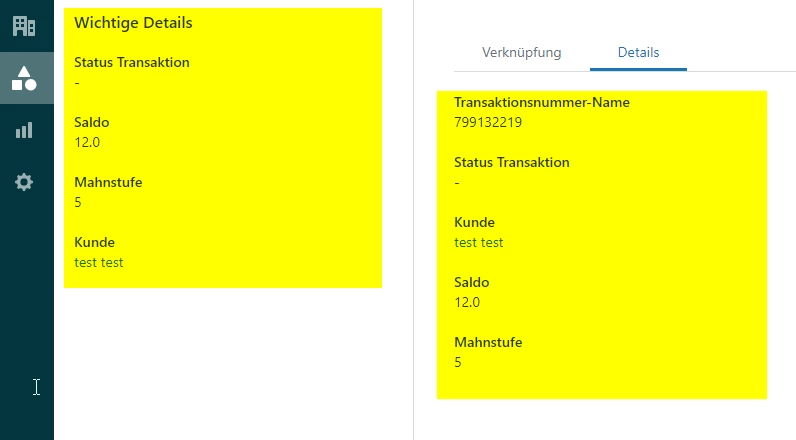
I might not have fully understood difference between the current details and the full details tab.. Are you taking about the Key details (Left panel) = current details and the Details Tab = full details tab.

You can use this API to reorder your fields in the Custom objects details page..  


  • Author
  • April 17, 2023

@ashwin11 Thank you for the reply.

Glad to hear the related tabs ordering is planned.

Regarding your question:

The left panel (key details: left) does not equal the right panel (full details) for me.
I can reorder the custom object fields, but the reordering will not apply to the full details page. (right)


Unless the reordering customer objects API is different from the UI provided for reordering custom objects in the admin center, I believe this might be a bug perhaps? 


Ashwin11
  • April 17, 2023

The Reordering API is different from the UI version.. 
Let's imagine a custom object which has 20 fields.. The left panel helps you decide on the top 5 or top 10 fields that needs to be displayed on the left panel..

The Details tab shows all the 20 fields.. The Reordering API will help you reorder the details panel.


Ashwin11
  • May 1, 2023

Hi @shayan11 - However, in the related tab which links to the custom object, there are only the first 6 properties of a custom object displayed, and in alphabetical order (excluding the object name which is always displayed first). - We have fixed this issue.. Check it out and let me know if you see it on your side.


  • Author
  • May 2, 2023

@ashwin11 Hello there,

Yes I have tested it, and it seems to work - now the order of attributes is equal to the one given in the important details tab.

Thank you for the quick fix.