Not able to count the right amount of incoming, open tickets | Community
Skip to main content

Not able to count the right amount of incoming, open tickets

  • August 26, 2019
  • 8 replies
  • 0 views

Hi Zendesk Community,

We are currently using a Plecto Dashboard to show how many incoming Open tickets we have hour for hour. 

To do this, I have created two different views in Zendesk (two views because we are experiencing trouble counting this, and therefore trying different solutions). 

1st view: Open tickets v1
Conditions:

Ticket: Status Is Open
Ticket: Tags Contains none of the following: [Customer Service employees]
Ticket: Group Is (current user's groups)

2nd view: Open tickets v2
Tickets: Status Is Open


To count the amount of incoming open tickets hour for hour I have linked Zendesk with Google Sheets via Zapier. The connection in Zapier is made with the trigger event "New Ticket", which means that data will be transferred to Google Sheets every time a ticket is added to a view in Zendesk.

Now the problem comes. For some reason, not all incoming open tickets are counted as a "New Ticket" in the view for open tickets. I tried with both 1st view and 2nd view

Example:
In the 1st view for open tickets, I manually count 20 open tickets that are received (updated) today - meaning that the ticket requester last sent a reply today. However, in my Google Sheet there is only added 7 rows today, meaning that the system (via Zapier) only counts 7 "New Ticket"'s in the view for open tickets today. 

I have been controlling the tickets it does count in, and I can't seem to find any difference to the tickets it doesn't count in. 

I think the problem is that some open tickets are not removed from the view once one of our Customer Service employees has responded (and thereby solved) the ticket. 

Does anybody have a solution for this issue? Is there a way to create a view, where tickets are added to every time the ticket gets opened or reopened by the reqeuster? 

Thank You,

Jakob Bisgaard

8 replies

Brett13
  • Community Manager
  • August 26, 2019

Hey Jakob,

Since this is a 3rd party integration created by Zapier, your best option would be to reach out to them directly to see why these numbers don't match up.

I'll leave this post open in case other users have used the Google Sheets integration by Zapier and have run into a similar issue.

Cheers!


  • Author
  • August 27, 2019

Hi Brett,

Thanks for your comment!

I will definitely reach out to Zapier.

However, I am still interested in knowing if the Zendesk views I have created is eligible to count the number of incoming, open tickets pr. day. 

Thank you!,

Jakob


Jacob20
  • August 27, 2019

Hi Jakob,

I'm wondering if you are wanting to count tickets in the "New" state as well as those in "Open"?

If that is the case, you could use the condition "less than pending" for your view:

Also, instead of manually counting tickets, you could use an Insights report as a reference for the true state of things:

https://support.zendesk.com/hc/en-us/articles/212724337-Insights-Tickets-by-time-of-day-created

Hope that helps you out.


  • Author
  • August 27, 2019

Hi Jacob, 

Thank you for your reply!

In this case we only want to count the tickets in the "Open" state. 

I might be wrong, but I am not sure that the guide you linked to is relevant since the launch of Zendesk Explore? Is there a way to look up the amount of reopened tickets each day in the "Requests"-tab in Zendesk Explore? Then I will be able to use that as a reference for the true state of things.

Thank you!


Jacob20
  • August 27, 2019

Not all accounts have transitioned to Explore just yet, but there is a recipe here you could modify for this purpose.


  • Author
  • August 28, 2019

I'm not exactly sure how to count the number incoming "Open" tickets for each day in Explore using this recipe.

The "Time - ticket created" is unfortunately not relevant in this case, since we are interested in counting the amount incoming "Open"-state tickets pr. day. A ticket could be created at the 24th of August but reopened by the requester at the 28th of August. Then the number of incoming "Open"-state tickets for the 24 August should be 0 and for 28 August it should be 1, since the ticket was reopened on the 28th. 


What I seem to miss in Explore is "Time - ticket reopened".

Is there any other way to count the number of incoming "Open"-state tickets pr. day? In other words, how do I count the number of reopened tickets pr. day? 

Thank you,

Jakob


Jessica73
  • August 29, 2019

Hi Jakob,

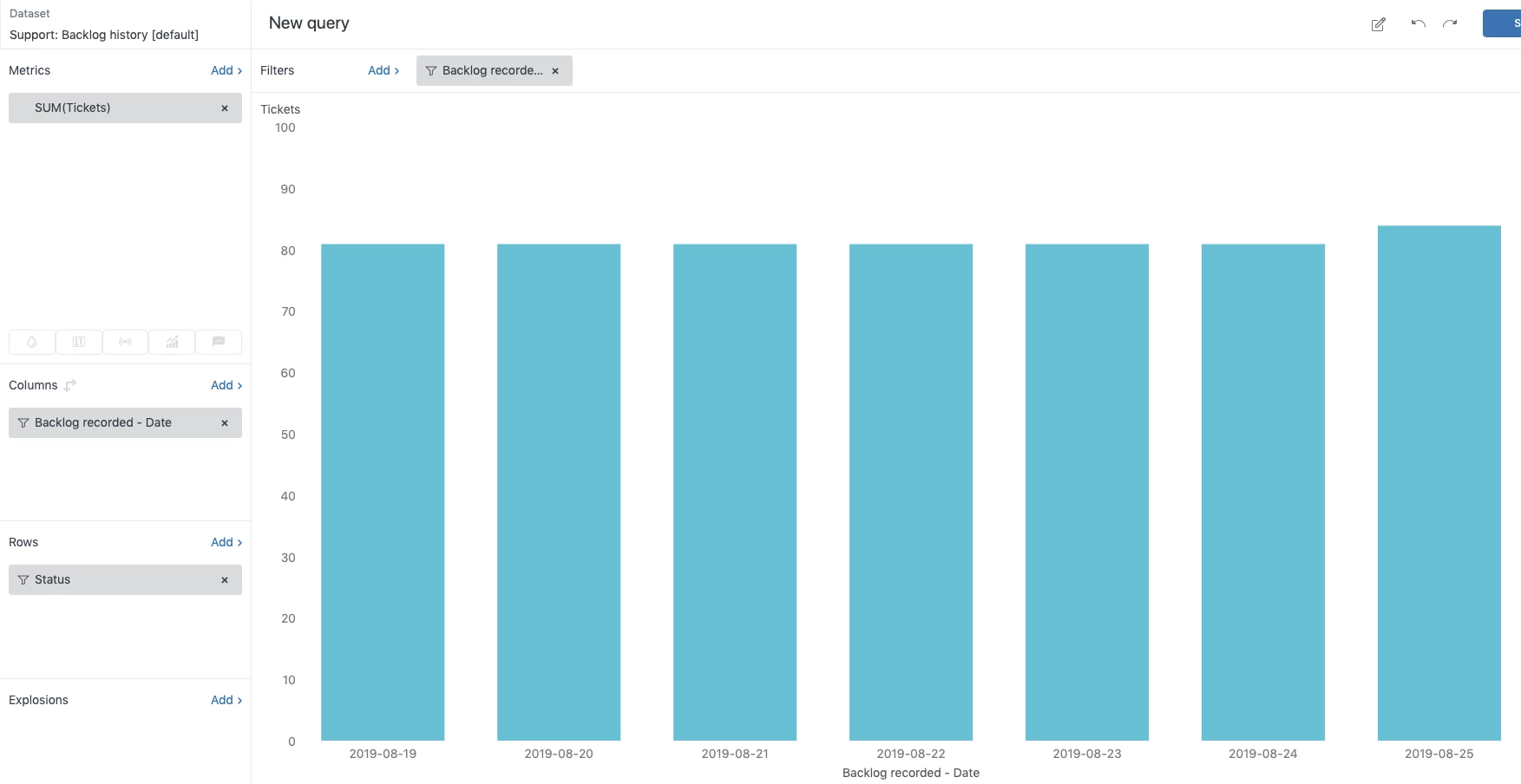
You might find it easier to get the information you are after in the Backlog history [default] dataset. This dataset will show you the number of unsolved tickets at any given date. Check out Metrics and attributes for Zendesk Support which contains the full list of backlog dataset metrics. 

You can then apply a filter to sort by tickets that have a current status of Open. Check out the example below:


  • Author
  • August 29, 2019

Hi Jessica,

Thank you for your reply!

I have tried using the above metrics in the Backlog history. 

However, this does not help me. When showing the number of "Open" tickets pr. day, I still don't know how many "Reopened" tickets we receive each day. The above example shows how many "Open"-state tickets we have each day, but it does not count in the amount of solved "Open"-state tickets pr. day. Example:

"Open"-state tickets on 28 August: 50
"Open"-state tickets on 29 August: 60

According to these statistics, we received 10 "Reopened" tickets on 29 August. However, this might not be true, since our Customer Support might have solved 20 "Reopened" tickets on 28 August. This gives the following equation for the number of incoming "Open"-state tickets on 29 August:

60 - (50-20) = 30

Thus, incoming "Open"-state tickets on 29 August is 30 and not 10

Therefore, I am still looking for a way to count the number of "Reopened" tickets pr. day or in other word the number of incoming "Open"-state tickets pr. day.

Thank you!