New Feature: Chat APIs | Community
Skip to main content

New Feature: Chat APIs

  • October 16, 2018
  • 12 replies
  • 0 views

Daniel100

We now support a broad range of Chat JavaScript APIs in the Web Widget with the integrated Chat experience EAP, giving you advanced customization of the Chat experience and agent routing.

The naming of these APIs follows a new syntax as part of a broader Web Widget JavaScript APIs refresh, designed to scale more effectively as we grow our cross-product integrations. Some benefits of the new API syntax include simplicity, ease of maintenance, and future-proofing your code.

We have aliased the vast majority of the legacy $zopim.livechat APIs, so it will continue to work without the need to update any code.  To see which APIs are planned or currently in-progress, please refer to our Web Widget developer API reference.

Please note, there are some cases where the mapping may result in subtle differences in how the APIs behave in the Web Widget compared to using $zopim.livechat previously. For example, we don’t have any separation between our launcher and window, so if you call `hide` or `setOffset` we apply it to the entire widget instead of just the launcher or window. Refer to the notes in Web Widget developer API reference for more detail.

If you intend to continue using the $zopim.livechat syntax for some time before migrating to the new zE syntax, please refer to this article to understand how to correctly wrap $zopim.livechat API calls when using zE.  

If you previously signed up for the EAP, but indicated a need to wait for the APIs to be available, you should now receive an email to notify you that the EAP is enabled for your account.

To find a detailed description for each API refer to the Web Widget developer documentation.

12 replies

Tomasz20
  • November 27, 2018

Morning Daniel, 


I got problem with that, I have tried both methods, and i still get the choose department field visible..


Because i'm not literate with JS - would you be able to help me with some example code how to hide choose department option?


Cheers


  • November 27, 2018

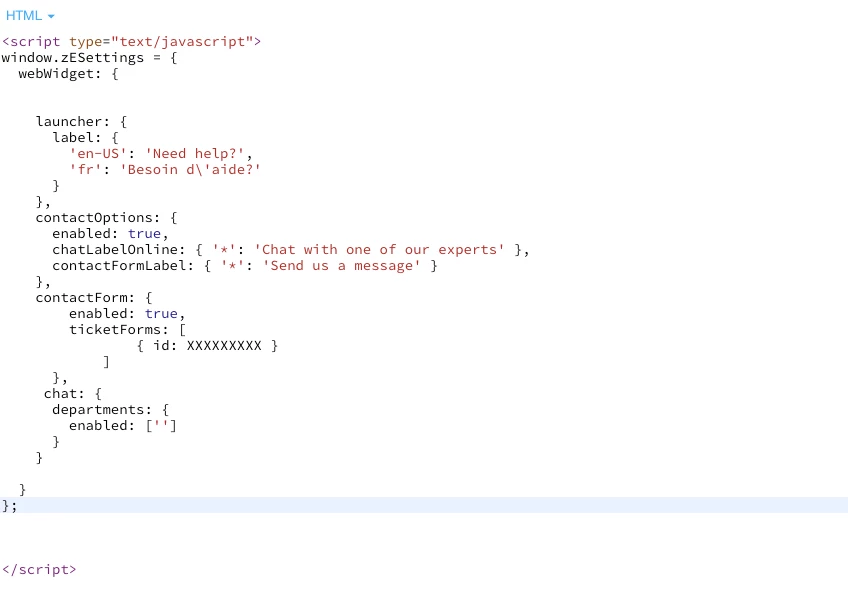
You will need to use the following: https://jsbin.com/qufixid/edit?html,output

-Ramin


Tomasz20
  • November 27, 2018

Hey Ramin .!


Great , that did actually work and have hidden the list,  but it have set customer with "no department " is there a way to set the default department? 


I can see this :


zESettings.webWidget.chat.departments.select


but not sure how to use it in new API system.


I got this:


  • November 27, 2018

You can look at the code example in the docs to see how you can use both the enabled/selected option: https://developer.zendesk.com/embeddables/docs/widget/settings#departments

If you still need assistance, please email chat@zendesk.com and our advocates will help you with the code.


Hi everyone!

I have a problem with the new widget: the function $zopim.livechat.clearAll(); it’s not supported.

Have you some idea?


  • November 29, 2018

Hi Gabriele,

For the new experience, you should be using:

zE('webWidget', 'logout')

This is listed in the migration guide here: https://developer.zendesk.com/embeddables/docs/widget/chat_api_migration

-Ramin


i'm sorry Ramin, but i don't have the same experience with "logout": the method $zopim.livechat.clearAll() clear the session, remove tag, endchat.

Logout function only in logged chat and it's not my case...


  • December 7, 2018

Hi Gabriele,

There is a defect with the logout API and the team in Melbourne are working on resolving it now. Will update you when the fix has been released. If you need to use the API right now, would recommend opting out of the new experience until the issue is resolved.

Thanks,

Ramin


  • January 30, 2019

Hi,

We previously used $zopim.livechat.window.show(); to show the chat window on button click if chat is available, but now it triggers the main help search window and we dont want that - it confuses our customers.

can someone point me to how to trigger the chat window where users would initiate the live chat? i want it to open immediately instead of having to click "Help" > "Contact Us" (at the bottom where our users would miss it) > "Live Chat". I want it to expose "Live Chat" on button click.

I hope that's clear! :) 


  • January 31, 2019

Hi Kristin,

Thanks for posting your question. You will want to use the suppress API to filter the Web Widget to just Chat and then use the activate API to open the widget on button click.

You can learn more about the suppress API here: https://developer.zendesk.com/embeddables/docs/widget/settings#suppress

-Ramin


  • March 4, 2019

Hi Gabriele,

I have responded to your email, the problem should be resolved now. If you are still experiencing the problem, please let us know in the existing email thread.

Thanks,

Ramin