The Announcements page, together with What's new in Zendesk, Developer updates, Release notes and Service notifications (all part of Zendesk updates) allow you to stay up-to-date with important Zendesk announcements and notifications - which can be Followed to receive them via email as well.
But they can also be a very good source of tickets, especially if Advanced AI demo capabilities are required - to be able to show from the Intent / Language / Sentiment or Summarise capabilities to Similar or Merging tickets or even Redaction!
And all you have to do is to create an updates@[your_subdomain].zendesk.com email in your sponsored instance and Sign in to Zendesk Support with the new address to receive notifications, which will create tickets which can be used with your chosen Intent model and other Advanced AI capabilities!
Here is an example for Agent Copilot (one of the recent AI Summit announcements), using Retail intent; this also shows the new agent copilot experience which includes Merge Suggestions - please note Similar tickets are now located in the search bar in Agent Workspace (Intelligence panel no longer exists, Intent is also located in the ticket header). Zendesk AI Summit Deep Dive is also available with a lot of Q&A info and great Event Resources (like demos) as well.
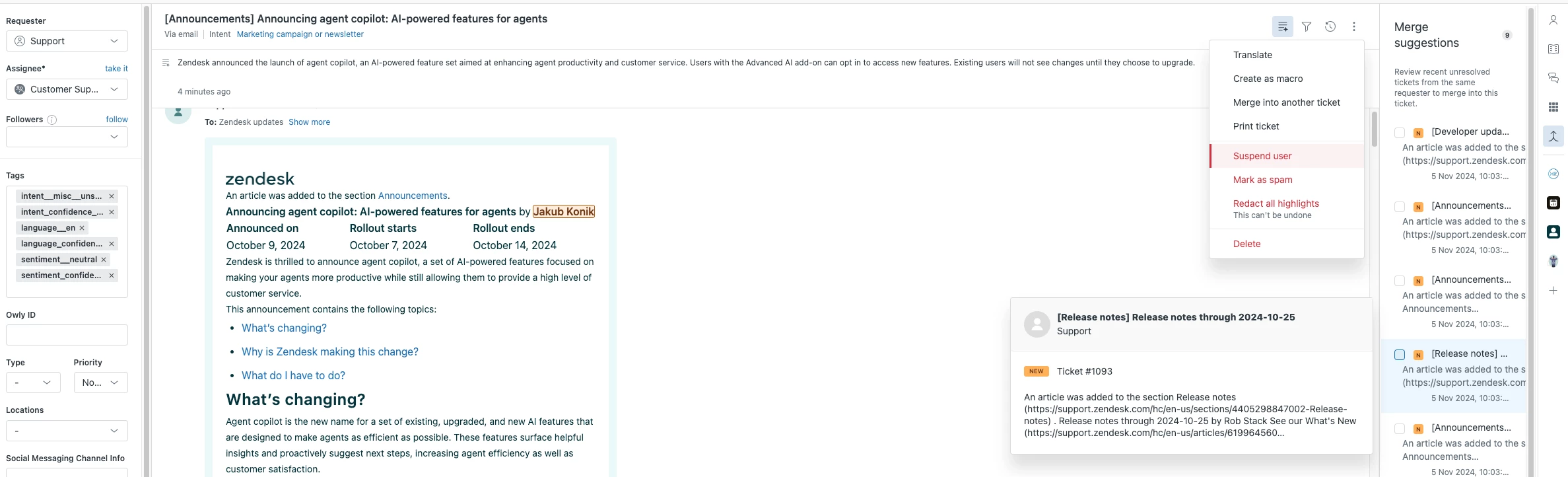
If you can't see the tickets immediately after the setup - just have a look in the Suspended tickets, as they might be there (and might need this done from time to time).
On a similar approach - status.zendesk.com provides instance (subdomain) status notification subscription for the products or services you would like to be notified - so you can create a status@[your_subdomain].zendesk.com email in your sponsored instance and use it to subscribe for status notification subscription - which would generate a lot of tickets for your Advanced AI demos as well.
Of course this can be enhanced further with Intelligent triage and so on!
Some of the functionality like Similar tickets requires Intent confidence to be High for some previously solved tickets, so you can go and set this to High before solving the tickets.
And if you don't have all the Gen AI functionality enabled in your instance - you can sign-up to the new form for Zendesk AI Early Access Programs.
Redaction suggestions is now GA, so this would require ADPP add-on moving forward.
You may also want to create a script to generate tickets for more immediate use. You can follow these instructions, however, do so with caution and follow all steps and recommendations.
And of course the Requester can be changed to the customer persona, so the Interaction history can display all the records relevant for that demo.