How to Disable Submit a Request? | Community
Skip to main content

How to Disable Submit a Request?

  • March 26, 2015
  • 17 replies
  • 0 views

How can I remove / disable the "Submit a Request" form that an End-User sees in the Help Center? We are using a separate application (Form Crafts) to handle this.

Many thanks in advance for your suggestions!

This topic has been closed for replies.

17 replies

  • March 26, 2015

Hi there!

To remove the "Submit a Request" link in your Help Center, you would need to remove that component from the Help Center code. However, the ability to customize the Help Center code is only available on certain plan types; if you're on the lowest-level plan you won't be able to remove that link from your Help Center.

Please let me know if you have any other questions!


  • Author
  • March 27, 2015

Jessie, thanks much for that information!

I do have one further question, perhaps you can help --

When tickets are generated from the Submit Request link in our Help Center, the customer name is NOT being imported. So, in Zendesk dashboard, it is saying 'No Name' under the 'Requester' heading. Any ideas how we can fix this?

Again, many thanks!! 


  • March 27, 2015

Just to clarify, is that using the Submit a Request form provided through Zendesk? Or are you using the form you created with FormCraft, as mentioned in a different post?


  • May 8, 2015

Hi Jessie,

I had the same question. I am on Enterprise plan and am having a difficult time figuring it out.


ModeratorWes

To remove the Submit a Request link navigate to your Help Center and select "Customize Design" then select "Edit Theme".  Navigate to the "Header" page which should look like this.

Just remove the {{submit_a_request}} placeholder and that will remove the link from your Help Center.


Rafael23
  • September 9, 2016

Hi, 


i'm trying to hide the submit_a_request option depending of certaing tags of the user (not organizations).

I know where I have to do it, but I don't know which class/function I have to use in the script to read the current user's tags,

Thanks!


  • September 13, 2016

Hey Rafael!

We have a Support Tip on this very subject! You can find it here: Hide and show My Activities and Submit a Request (Help Center).


Rafael23
  • September 14, 2016

Thanks for your help, Jessie. I've got it!


  • April 10, 2018

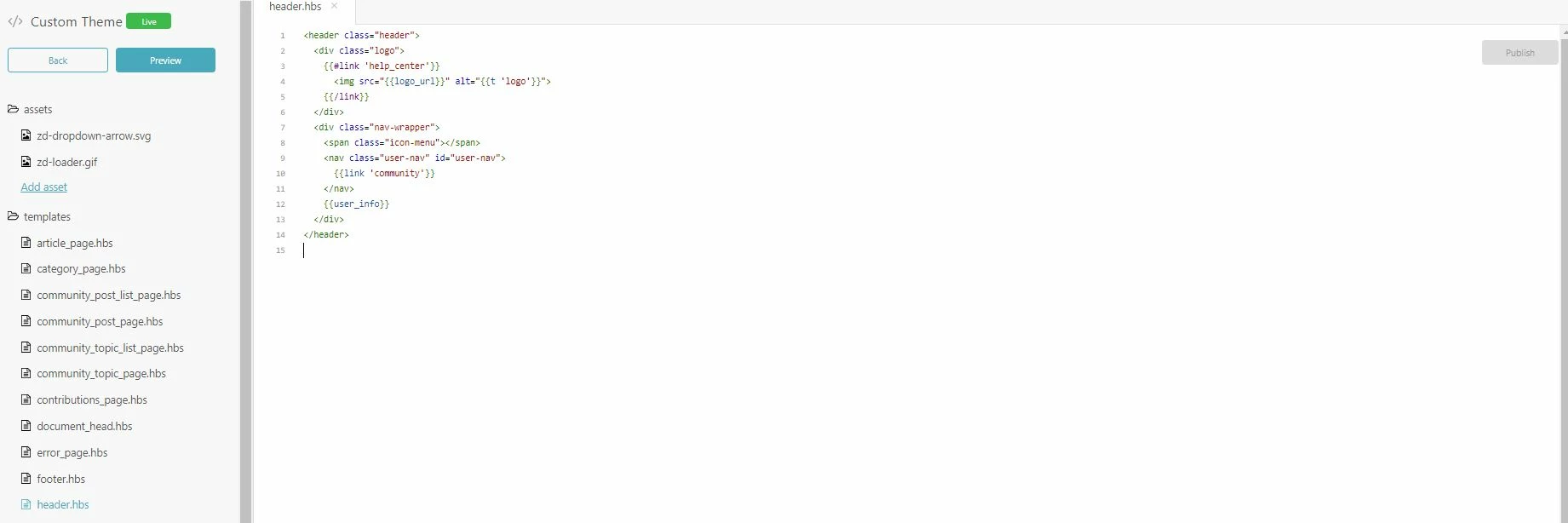
Hi there, could it be that this has changed a bit since the screenshot posted by Wes Drury?


I am unsure where to remove the submit a request button. This is what I see:


I've searched the templates but cannot find the line "submit a request".

Thanks for any help!


Trapta
  • April 10, 2018

Hi @David Zimmermann,

It is available in header.hbs template. Please select the template from the sidebar.

Thanks

Team Diziana


  • April 10, 2018

Hey Trapta,

thank you, but this is all I see under header.hbs:


Which sidebar?


Trapta
  • April 10, 2018

@David,

I see (from the image you have shared) that you do not the submit-a-request component in your header template. Are you still seeing submit-a-request link in the header of your HC?

Thanks

Team Diziana


  • April 10, 2018

No, I don't believe there ever was one there or maybe I removed it in the past. People are sumbitting their requests below the posts, example here:

https://sellics.zendesk.com/hc/en-us/articles/115003714494

I have searched pretty much all of those templates for "submit a request" using CTRL+ F without success so far.


Trapta
  • April 10, 2018

@David,

Please open article_page.hbs, search for the component {{request_callout}} and remove it.

Let me know if you face any issue.

Thanks

Team Diziana


  • April 10, 2018

Awesome, thank you very much! Found it and have removed the  {{request_callout}} from line 96
(noting it more for myself ;) ).

For any other future readers, the preview (also anonymous view) did not seem to show the change, but after publishing it, the button was indeed removed :)


Trapta
  • April 10, 2018

@David,

Glad to hear that. Enjoy! :)

Team Diziana


  • August 23, 2018

Thanks for this info, everyone. It was on line 103 in my article_page.hbs, but removing it from header.hbs is what worked.