Hi Zendesk Foks,
I'm doing a PoC for my company in order to migrate our support platform from Jira to Zendesk.
Let's assume the following scenario:
- We have product A (e.g. Shoes)
- We have another product B (e.g. Jeans)
Now we have different Customers for the product A and B (Shoes & Jeans). Each product will have it's own SLAs, ticket form and independent workflow.
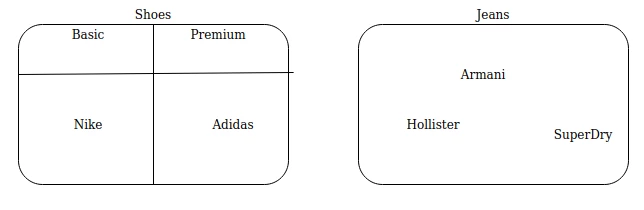
In the diagram that I've attached here, you can see what I mean. Now the way we are handling it in Jira is that each product (shoes or Jeans) is a Project. Inside the project we have the customers (e.g. Nike, Adidas, Armani...) And each project has it's own SLAs, ticket form, labels and so on. Furthermore in Shoes Product we have 2 subscription "Basic" and "Premium" and each subscription has it's own SLAs.
Now how can I achieve similar thing with Zendesk?