How should Recent Activity work on the Home Page? | Community
Skip to main content

How should Recent Activity work on the Home Page?

  • July 15, 2016
  • 12 replies
  • 0 views

Based on this post: https://support.zendesk.com/hc/en-us/community/posts/208086567-What-is-recent-activity-, the answer is, "Recent Activity should be pulling in recent activity, I believe it is set to pull in data from the Community by default". The documentation indicates that the widget template has an optional parameter to specify scope to be one of community (default), category, or section.

We are using the template on the Home Page, but we do not specify the scope parameter. The confusion is around how the widget should work on the HomePage since some articles and article comments are showing in the results but not across all categories and sections. Based on the documentation, it's not clear how this should work on the Home Page. I would expect that the Home Page would work like an activity stream across the site, and the behaviour would change as you navigate into different categories and sections.

We need some clarification on how this advanced helper works on the Home Page so we can understand how to control the content displayed to our users.

This topic has been closed for replies.

12 replies

  • July 19, 2016

Good question! On the home page the only scopes that return results are community or none. When set to "community" the 5 most recently updated community topics visible to that user are displayed. When set to none it will show the 5 most recently updated articles or topics visible to the user. You set the scope to none by removing the scope parameter from the placeholder. So just a bare {{recent_activity}} placeholder.

There is no time limit for recent activity. If your most recent update or comment was from a year ago it will still appear at the top of the list.

The "category" and "section" scopes display the most recently updated visible content for the category or section currently open in the browser. The home page isn't inside a category or section so noting will be displayed for those scopes.

If you want the recent activities displayed within each sections or category you'll want to add the placeholder to your section and category templates with the appropriate scope set.

We are currently investigating an issue where articles created as a draft are not properly displayed in recent activities after publication. I saw you have a ticket open related to the issue. When it gets resolved you'll receive a notification.


  • Author
  • July 19, 2016

Great explanation. Thank Brian.

It wouldbe nice to have that added to the Template component reference: https://developer.zendesk.com/apps/docs/help-center-templates/advanced_helpers#recent_activity-helper


  • July 21, 2016

Great suggestion, Craig! I've pinged our Documentation team to see if we can add that information.


  • August 16, 2016

  • July 4, 2017

Hi, i have a question related to this. 

We're using the {{recent_activity}} helper on the home page of our help center without specifying any scopes, and it renders both knowledge base & community activities. We're trying to have it be limited to the knowledge base content as i understood it would from the documentation unless you pass the community scope. Any help would be highly appreciated.


Thanks.


  • July 11, 2017

Hey Carl!  Yeah, that can be done, but takes some custom work to get it done.  If you have a web developer  on hand here's the article you'd need to better limit what's shown in Recent Activities:

https://developer.zendesk.com/apps/docs/help-center-templates/advanced_helpers#recent_activity-helper


  • July 18, 2017

Thanks Keith,

The only scopes available to pass that i find in the help article are community, category, or section. And when we don’t pass any scope at all, we still get activity from the Help center as well as the Community. What we want is all activity on the Knowledge base (not restricted to section or category), any ideas?


  • October 3, 2019

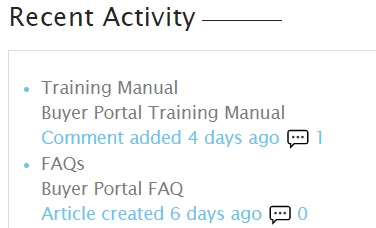
The {{recent_activity}} helper display is not particularly understandable for users. When used on the home page, it displays the number of comments without specifying what the number is. Looking at the below, I don't see how a user could understand what the meaning is of the numbers 1 and 0.


Trapta
  • October 4, 2019

Hi @Karen D Snyder,

Looks like the comment icon is missing in your UI. Can you share the URL of your HelpCenter so that I can share the piece of code with you for showing the comment icon?

Thanks


  • October 4, 2019

Hi Trapta, the URL of the HelpCenter is https://nesportals.zendesk.com/hc/en-us/requests, but it isn't activated yet, and it requires users to be signed in.


Trapta
  • October 5, 2019

367254856428 looks like you have SSO enabled for your help center which is preventing me from signing up. Try putting the below code at the bottom of your style.css file and let me know how it goes for you.

.recent-activity-item-comment span::before {
color: #e1253b;
content: "\1F4AC";
display: inline-block;
font-size: 15px;
padding-right: 3px;
vertical-align: middle;
}

  • October 7, 2019

Hi Trapta, I added the CSS and now the comment icon appears! Thank you so much for your help!