
How do I see callers waiting in the phone queue by using support views? - Rollout Complete | Community
Skip to main content

How do I see callers waiting in the phone queue by using support views? - Rollout Complete

  • June 1, 2022
  • 2 replies
  • 0 views

UPDATED (20 Feb, 2023)The functionality is GA. Talk calls will be routed by the omnichannel routing engine for the Customers who opt-in to omnichannel routing. Here are more details.  

For overview information about Talk in omnichannel routing, see this article.

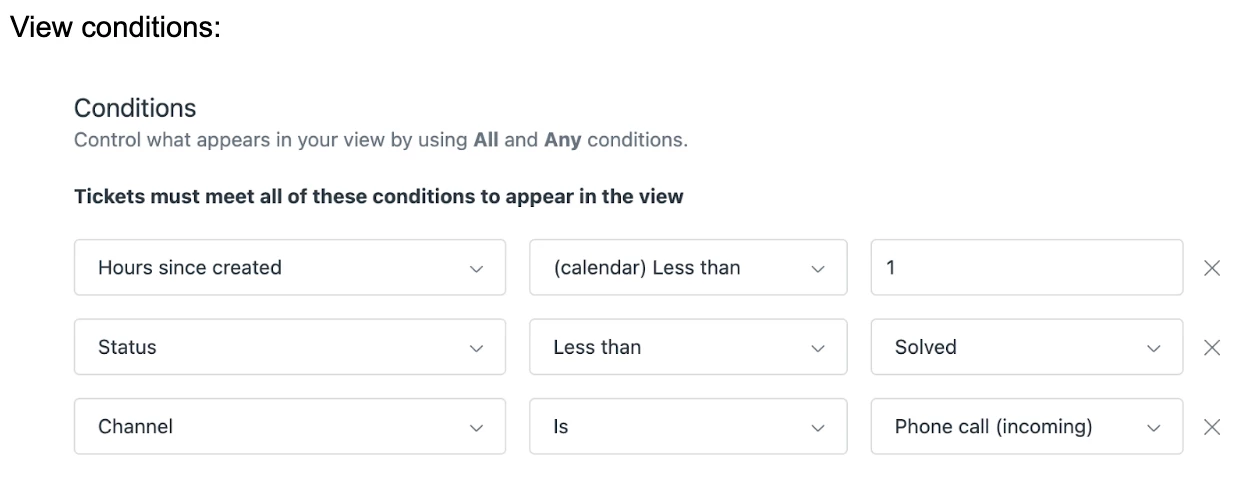
As the ticket will be created earlier in the flow of call routing (as soon the call enters the queue), you will be able to see the tickets getting created from callers still waiting in the queue inside a support view. Here is an example of view conditions that can help you see the call tickets that were created in the past hour. This will also contain the calls that are still in the queue to be answered. 
2 replies

Douglas18
  • June 3, 2022

Thank for letting me in


Rohan11
  • February 20, 2023

Hi Everyone,

As the functionality is GA and completely rolled out. We will soon be archiving and closing this post comments. 

Talk calls will be routed by the omnichannel routing engine for the Customers who opt-in to omnichannel routing. Please refer to the help centre article below:

Using omnichannel routing to route calls.

Thanks

Rohan