How do I provide feedback for the Lookup Relationship Fields EAP? | Community
Skip to main content

How do I provide feedback for the Lookup Relationship Fields EAP?

  • May 16, 2022
  • 13 replies
  • 0 views

Ashwin11

Feedback during the early access program is very important for us. Since this EAP is limited to a subset of customers, it is also a requirement to participate and give feedback so we can create the best unified status experience for you and your agents.   

Use this community forum

We'd like to keep feedback as social and collaborative as possible, so we invite you to follow this community forum too.

If we see that there is a topic of general interest, then we'll post about it here and invite everyone to provide their feedback. Likewise, you're welcome to ask questions or provide feedback at any time through this user community. 

Suggested guidelines for giving feedback

We value your feedback, no matter what it is. We encourage you to tell us what you like, dislike, and where you could see improvements. We'd like to see a healthy forum for discussion, but we can't do that without just a little bit of effort from everyone. 

Here are a couple of pointers that will really help us understand your feedback and work with you to make the ticket forms beta even better:

  • When you see something you dislike or see something you'd like improved, write it down and think about it for a little while
  • Try to be as clear as possible in your feedback; explain why you like/dislike something, and how it could be improved. If you can do screenshots easily, we'd love to see them
  • Be patient when waiting for responses from Zendesk
  • Don't use sarcasm, be rude to other customers or staff, and don't use strong language. We will moderate forum posts where we think reasonable

Ultimately, we want the feedback forums to be a place where any customer can come and give feedback.

13 replies

Jimmy11
  • May 24, 2022

I just enabled this and would love to see any use case of how it is enabled in action (i.e demo video?).  I was actually hoping to use this to add a ticket field to perform a lookup over my existing list of organizations, and have that organization name be a value in the ticket field, but am unsure how to proceed here.

Sometimes we have users who are part of Organization A, that are putting in tickets on behalf of Organization B, and I was hoping to use the lookup field to represent that in a ticket.


Ashwin11
  • Author
  • May 24, 2022

Hi @jimmy11. This page has a walkthrough of how to setup Lookup fields. If it helps, I can also create a demo video and share it in sometime.

The use case that you are looking to achieve seems like a perfect fit for Lookup fields. 


  • May 24, 2022

So if I was  creating a Look-up field for all orgs with a certain tag I could select from "Select a related object" : Organization?

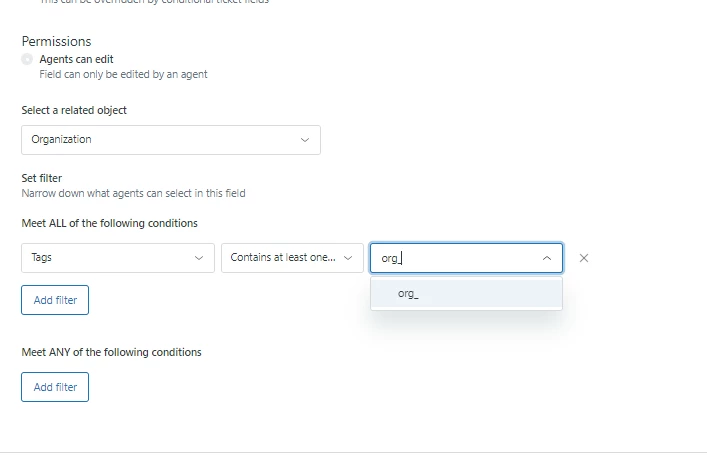
If so, I noticed when entering a particular tag to restrict on it doesnt appear to do a dynamic lookup for tags that match what your entering in the field.  Is that the intended functionality or is there something wrong on my side?

I added the field to a ticket form.  I was hoping if you clicked on the drop down it would list all possible orgs matching the criteria instead of having to start typing in a name and getting results but I'm assuming that may be for performance?


Ashwin11
  • Author
  • May 25, 2022

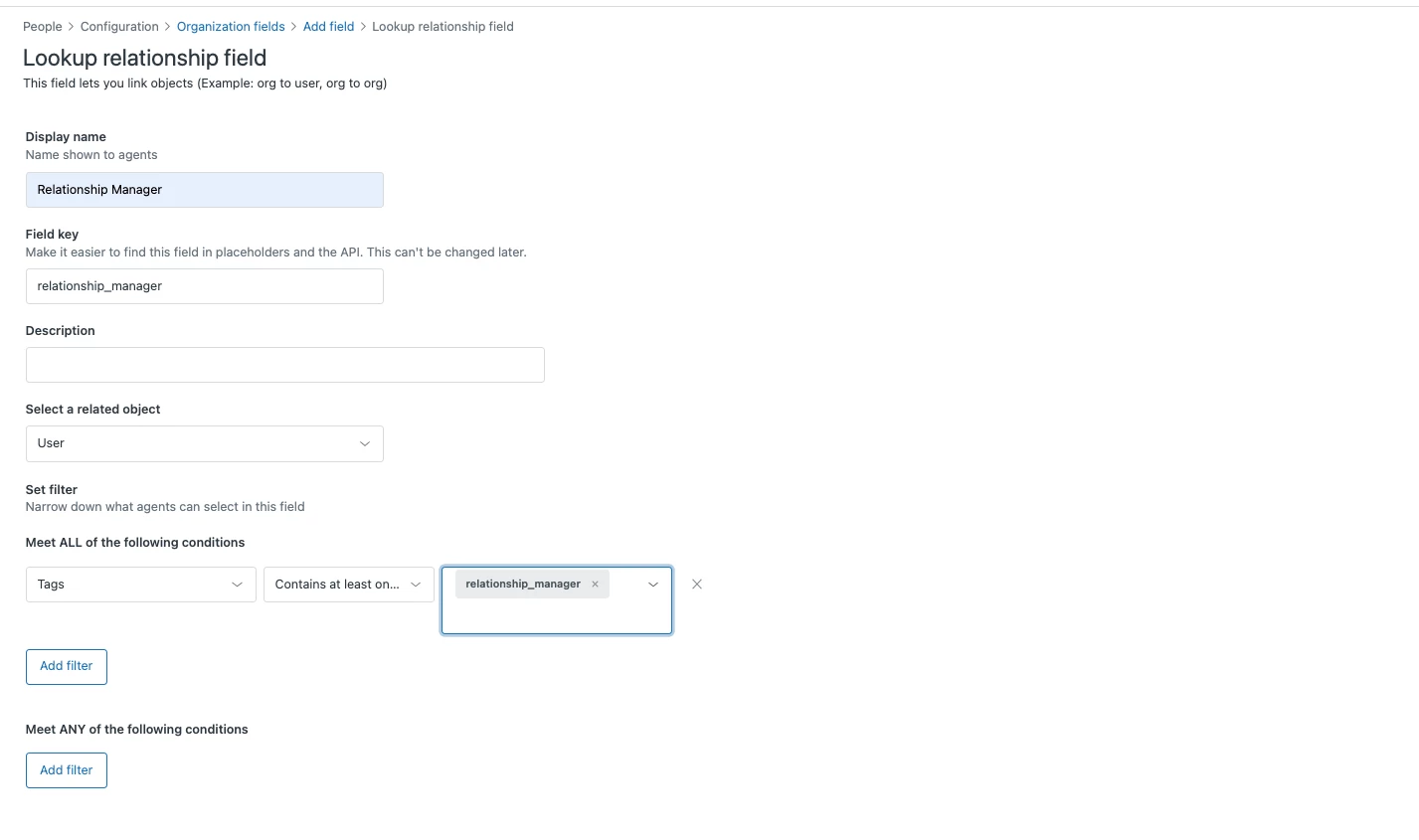
Hi Bill.. Select a Related Object is what you want the Lookup field value to point to. For eg: Let's say you want to create a Relationship Manager for each Organization. You go to Organization fields, create a Lookup field and "Select a related object" as User (because a Relationship manager is a user object).
If a User can be assigned as a Relationship Manager (User) to an Organization only if they always have a tag `relationship_manager`, you can update the Lookup field to add this as a Filter where tag contains `relationship_manager`.  Attached is a screenshot..
I see your point on - "I dont know what the organization starts with". Valid feedback.. But you are right. Having a large dropdown pop up with all organizations may affect performance. But let me noodle with my design team on your feedback and see if there is a better way to improve the experience.


  • May 26, 2022

Ashwin.. Thanks for the response. To be honest the issue with the lack of a look-up on existing tags when creating the conditions of the the field is more concerning.  We use tags quite a bit and it doesn't appear there is any look-up associated to the field which means the person creating the condition would have to know the exact name of the tag.  Here is an example; (we have a large number of tags used for org fields that start with "org_")


Sam15
  • May 26, 2022

+1 to @bill12's comment. I spent a few minutes having to troubleshoot a test field we created because it does not actually populate the dropdown list until you provide a value, which can be a bit confusing.

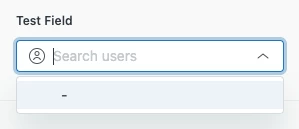
When you first encounter the field, it'll appear like this:

The above makes it seem like the conditions are not working properly for the field or there are no matching records.

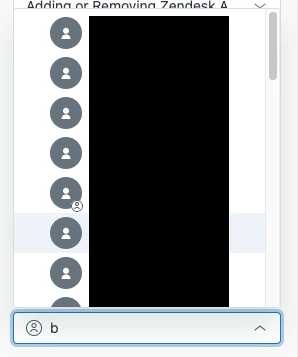
Once you type a value, it'll then return some results:

Like Bill mentioned, this is probably expected from a performance perspective. But it isn't quite intuitive, especially if you don't know who or what to look for.

We would love to at least have a partial list shown, and perhaps an option to "search for all matching" or similar, if there is a path to showing any list at all. At a minimum, perhaps a "Type to Search" default text could be helpful than just "-"


Ashwin11
  • Author
  • May 27, 2022

@bill12 - That is a valid point. We will working towards fixing the tag issue.. And make it similar to the experience that we see in Views Admin page.


Ashwin11
  • Author
  • May 27, 2022

@sam15, @bill12 - This is awesome feedback.. We will be improving this experience pretty soon and make it similar to the experience of adding a follower to start with..The confusion arises because there is this '-' coming up when I click on the field.. 
We are also exploring the option of showing up the top 10 or the most recently used.. But that would need some additional technical considerations.. 
Really appreciate the feedback.. 


Zach38
  • June 2, 2022

These lookup fields beg a question. If you relate an organization to another organization - those two objects probably don't represent the same real world entity. For example one might represent a client account, and another a business partner.

Now these two entities wouldn't require the same data stored on each. That is to say, if I added a custom field to one, I wouldn't necessarily want it on the other (for instance an account may warrant a "subscription level" field, but a business partner may not)

That said, are there any plans to introduce conditional organization and user fields, similar to conditional ticket fields? It would be ideal to be able to define what type of entity an organization represents, and then show or hide other fields based on what type they are.


Ashwin11
  • Author
  • June 8, 2022

@zach38- This is good feedback. I have shared your feedback with the team managing the organization page.. And are looking into it.


Jimmy11
  • June 8, 2022

So I've started using the lookup fields for two functions that were painful in the past.

1.  Org tagging when internal user submits on behalf of a client

- One thing my organization has is dedicated consultants that occasionally submit tickets on behalf of our clients.  Due to that workflow, the organization would show up as my own organization name when reporting on "Ticket by organization" instead of the actual client's organization.  This lookup field allows me to set a secondary "organization" field in the ticket itself, for eventual tracking of internal requests that are associated with clients.

2.  Linking Zendesk ticket to other Zendesk tickets

- Up until now, there has been no real/effective way to establish a direct relationship between Ticket A and Ticket B.  Other applications like JIRA allow you to maintain said relationship like "Relates to", "Duplicates", "Is blocked by", etc., but Zendesk only allows you to put a # in front of a ticket ID in a comment as a means to link.  I used the lookup field based on the ticket data set and called it "Related support ticket (Lookup)".  This means if a support analyst wants to link Ticket A to Ticket B, they can do so indirectly.  Now, there is no two way linkage with this setup, you can't link multiple tickets in one field, and you can't establish the type of relationship the two tickets have, but its something that we didn't really have before.  Perhaps PM can use some of the components of this feature to build a full fledged "linking" feature in the future.


  • June 8, 2022

@jimmy11   for item 2  have you thought about using the Problem/Incident linking between tickets?


Jimmy11
  • June 8, 2022

@bill12, I believe I tried to use that early on, but I believe that only assumed it was a "blocking" scenario, and I really only need visibility into the linked ticket for direct linking/pivot.  We had been using the "Linkets" app, but I'd rather have a fully baked solution.