How can I provide feedback for the Estimated wait time via Messaging Triggers EAP? | Community
Skip to main content

How can I provide feedback for the Estimated wait time via Messaging Triggers EAP?

  • June 26, 2024
  • 20 replies
  • 0 views

Feedback during this stage is very important for us. 


This community is best place to share feedback.


You can provide feedback by creating a new post or commenting on an existing post. We'd like to try and keep feedback as social and collaborative as possible. It's where we can answer the most amount of questions or comments so that everyone can see and benefit from it.


Reporting bugs

As these updates are in early access program, the best way to report a bug is to do so here in this forum, rather than contacting us. This is especially helpful if you're reporting a minor bug or a bug that is not directly impacting your customers. That being said, we do realize that during beta more urgent issues can crop up.  As this is a beta, the response times may be longer than they typically would be going through the normal support channels. 
20 replies

  • July 23, 2024

We are a multilingual organisation and we need to be able to send the wait time message to customers in their relevant language. Can you help us understand how this can be achieved with the messaging triggers mentioned?

  • Can you use the triggers with a third-party messaging bot?
  • Can you use dynamic content in messaging triggers?
  • If dynamic content, can't be used, how can we send the message to the customer in the relevant language of the customer?

In legacy chat, you used to be able to stipulate the locale of the website or Guide to manage the language message sent. This is no longer an option.
 

We use skills in our account for language identification, but these aren't an available option.


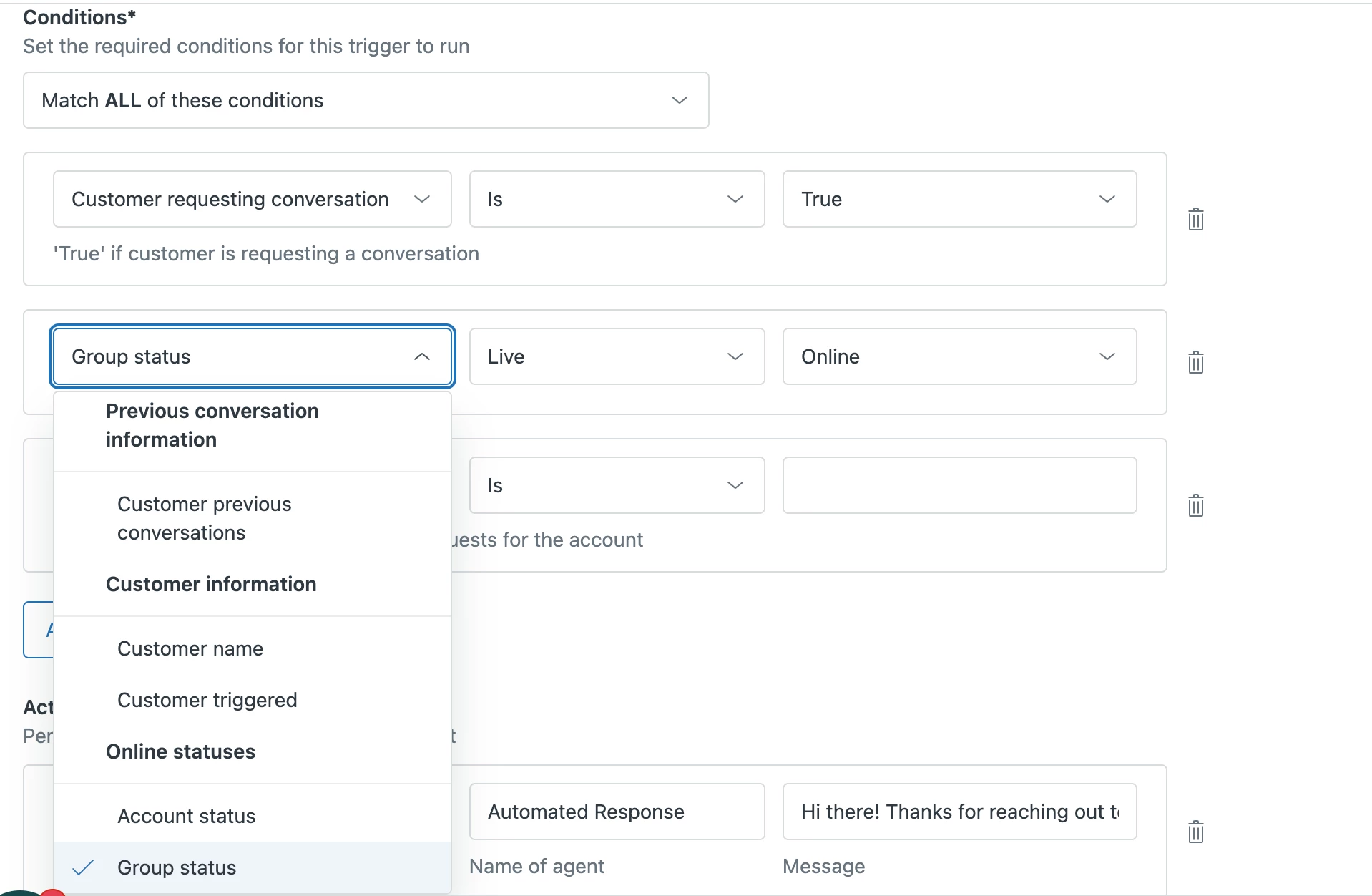
As you can see the options available to choose from are limited:


Viachaslau11

First observations:
1. sometimes the expected waiting time differs dramatically in chats created within one minute (e.g., in one chat will be 2-3 minutes, in the other 7-10 minutes).
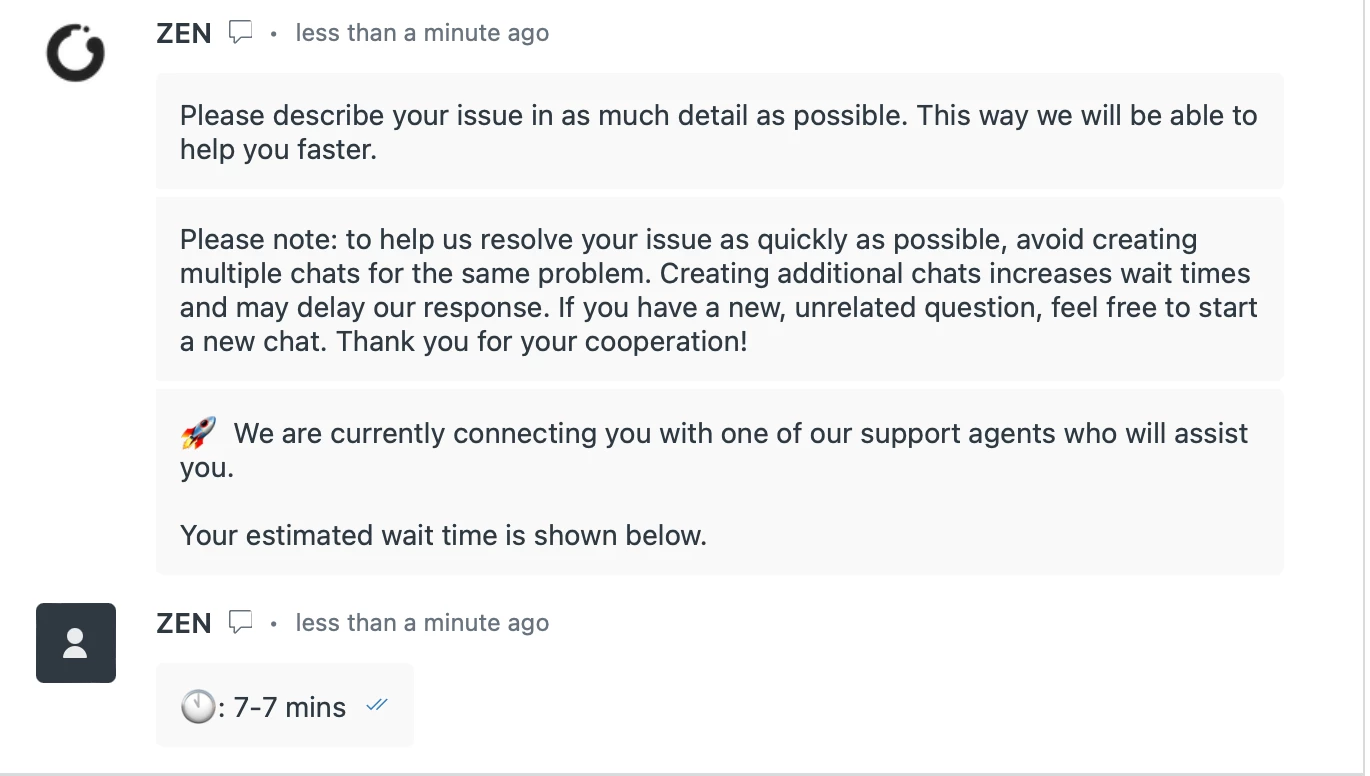
2. sometimes the expected time is not quite expected, for example "3-10 minutes". 3 or 10 - completely different expectations of a client
3. can it be just 7 minutes, not 7-7 minutes? 😊


  • August 9, 2024

wait time display is not working for me. 


  • Author
  • August 13, 2024

Hi Kerry, 


Apologies for the late response. 


Can you use the triggers with a third-party messaging bot?

These triggers execute after the control is handed over from the third party messaging bot and a ticket is created. You can use these with a third party messaging bot. 


Can you use dynamic content in messaging triggers?

This is not supported. 


If dynamic content, can't be used, how can we send the message to the customer in the relevant language of the customer?

This is not supported. Are there other indicators that can be used to describe where the end user is coming from - such as Group? That can be used to create trigger instances for each language. 


- Prakruti


  • Author
  • August 13, 2024

Hi Slava,


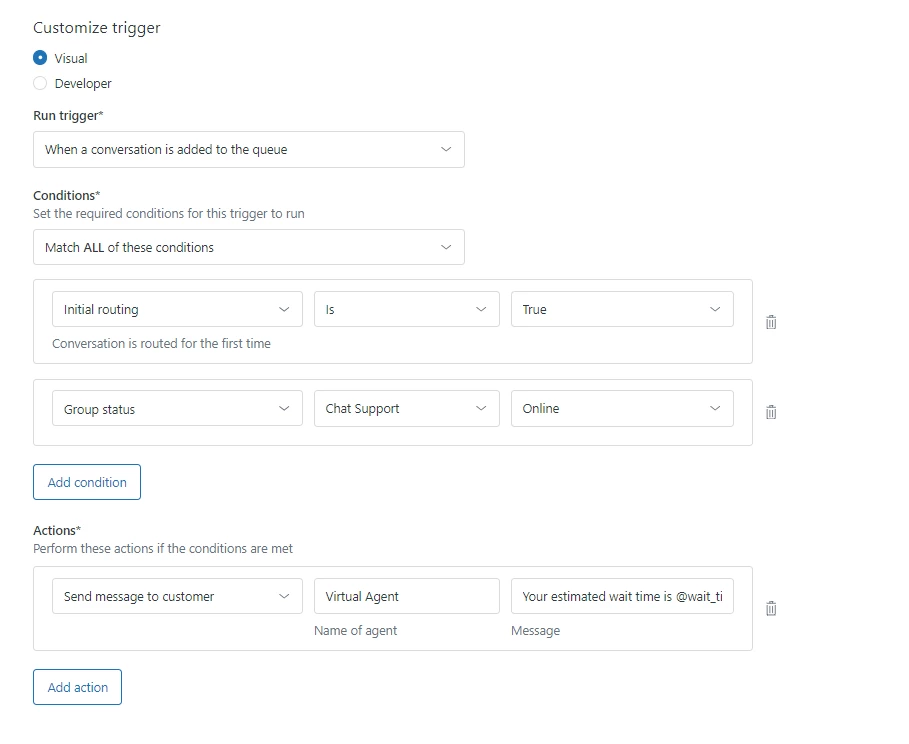
Thanks for the feedback. You can choose to use the placeholders in any combination - @wait_time_min and @wait_time_max, including using just using the @wait_time_max. 


e.g., in one chat will be 2-3 minutes, in the other 7-10 minutes).

Are you seeing this same group or different group? 


- Prakruti


  • Author
  • August 13, 2024

Hi Julio,


Thank you for your patience. We have received a lot of interest for the EAP and been gradually onboarding accounts to the EAP.  The EAP also requires the account being on the new messaging backend. We are planning the activation after the migration is complete. There is no action required from your side to move your account to the new messaging backend. 


- Prakruti


Viachaslau11

@prakruti  Thanks, yes, we decided to use only @wait_time_max placeholder at the moment

Are you seeing this same group or different group? 

The same group. I have checked once again several times. When we had a queue of three chats, 3 minutes was indicated everywhere. When we had a queue of 12 chats, the difference was between 4 and 7 minutes. That's OK. When we first enabled the feature as I mentioned above, the difference could be significant.


  • Author
  • August 13, 2024

Hi Ankit,


Can you tell more about the feature not working? Maybe you can respond on the activation email I had sent for us to understand better.


- Prakruti


Admin24
  • August 14, 2024

Is there a way to use these placeholders with other social channels? Like WhatsApp, Facebook Messenger, Instagram direct, etc.


Allie11
  • August 15, 2024

Hi there!

Just a few feedback items for the Zendesk product team!

  • My Messaging queues in Zendesk are setup to serve to one group if they are available but overflow to another group if unavailable. “Group Status” being a condition of the trigger seems to be hit-or-miss. 
    • If I create two triggers for each group, users receive duplicate notifications when entering the queue. 
    • To avoid duplicate messages, I currently have the trigger looking at both groups “online” availability but there is no way to make it an “OR” statement so it doesn't fail when one group isn't available. That would be a cool feature to add, especially since it would make Messaging Triggers more like Triggers with conditions.
  • I love having the ability to have an estimated timeframe! It would be great if this timeframe was based on current queue size that way its more accurate.
  • I would love to see an additional option of queue placement (i.e. “You are now 2nd in the queue”) in future iterations of this feature. 

Thank you again for making this available!


Best,

Allie


  • Author
  • August 22, 2024

Is there a way to use these placeholders with other social channels? Like WhatsApp, Facebook Messenger, Instagram direct, etc.
 

We do not support this feature for social messaging channels. However, it is on the roadmap, planned for early next year. 


  • Author
  • August 22, 2024

Hi Allie,


Thanks for the feedback. We are glad to hear you like the feature. 


For your case where the messaging ticket moves from one queue to another, 

  • initial routing will be TRUE when the ticket is placed in Queue 1
  • initial routing will be FALSE when the ticket moves from Queue 1  to Queue 2

Using this condition will help you to identify when to send the notification.  The estimations are actually based on average wait time for queue position behind the scenes. We do plan to support frequent updates to queue position in the SDKs in the future. 


For now, we felt estimated wait time would be more useful in communicating wait time than queue position. 


  • August 22, 2024

Do you have any plans to introduce "skills" to the conditions of the messaging triggers? As we do not use groups to identify language, we use language skills.


Maggie17
  • August 28, 2024

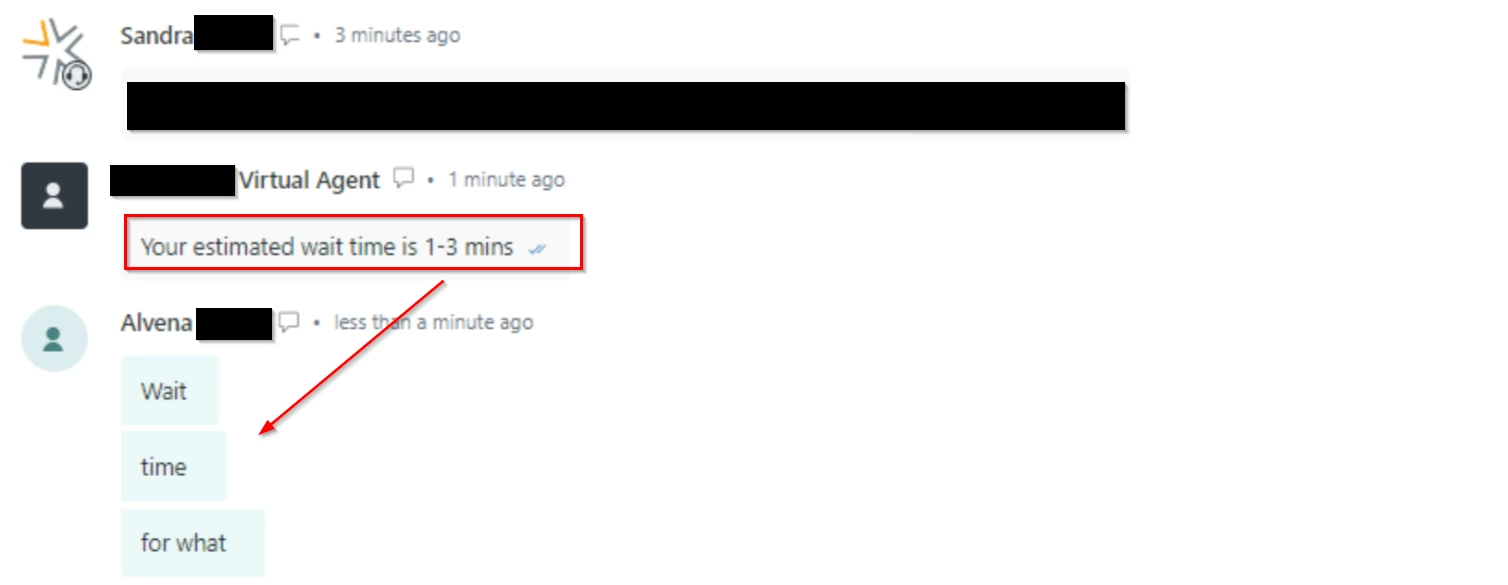
We are experiencing instances in which the wait time shared with the member is drastically incorrect.  The time that should have been shared in these instances is ~1-3 minutes. This is occurring on a small set of tickets, with no clear similarities between them (such as ticket group). 


Maggie17
  • August 28, 2024

More examples: 

“Thanks for your patience. The estimated wait time for a live agent is 288 - 920 minutes.”

“Thanks for your patience. The estimated wait time for a live agent is 1302 - 1693 minutes.”


  • Author
  • August 30, 2024

Do you have any plans to introduce "skills" to the conditions of the messaging triggers? As we do not use groups to identify language, we use language skills.

Fair feedback. We are planning to support language as a trigger condition in the future. The language would be the language used by the customer. 


  • Author
  • August 30, 2024

We are experiencing instances in which the wait time shared with the member is drastically incorrect.  The time that should have been shared in these instances is ~1-3 minutes. This is occurring on a small set of tickets, with no clear similarities between them (such as ticket group). 

Hi Maggie, 


Thank you for sharing. Are you using sandbox for testing? And is it occurring infrequently ? Is there a pattern in time - possibly during peak or non-peak hours?


Maggie17
  • August 30, 2024

Thank you for sharing. Are you using sandbox for testing? And is it occurring infrequently ? Is there a pattern in time - possibly during peak or non-peak hours?

@prakruti 

We tested in our sandbox prior to our production implementation and did not experience this issue. We are experiencing this issue in production only. It occurs on about 2% of our messaging tickets. There isn't a pattern in time. It happens randomly and we haven't been able to determine any other sort of pattern across the tickets that it occurs on. 


  • September 11, 2024

Hello!


Our wait time trigger is firing after the interaction has been accepted by an agent.


  • Author
  • September 13, 2024

Hi Charles,


Thanks for reporting it. We are looking into it. 


Hi Maggie 


I see you have raised a ticket. You will hear from us on the ticket.