
How can I provide feedback for the EAP to view AI agent conversations as tickets? | Community
Skip to main content

How can I provide feedback for the EAP to view AI agent conversations as tickets?

  • February 12, 2025
  • 27 replies
  • 0 views

We're excited to launch this EAP and your feedback is crucial is making this feature a success! 


We have started to rollout access, if you’ve signed up, we’ll notify you as soon as your account is ready.


Our goal is to keep feedback collaborative and interactive. Your voice directly shapes how Zendesk works for everyone. 


How to share feedback

  • Reply to this topic: 
    • Share your feedback, questions or suggestions by replying directly to this thread. We encourage open discussion and collaboration right here. 
  • Start a new post: 
    • If you have detailed experience to share, specific enhancement ideas or want to start a focused conversation, feel free to create a new post in this community forum. Give your post a clear title and details to help others join in and share their perspectives. 
  • Submit your feedback privately: 
    • If you would like to provide your feedback directly to our product team, you can use this Google form to do so. Our product team reads every response and may reach out for additional details or to follow up on your feedback. 

Your input, weather simple or detailed helps us shape the future of AI agent tickets. We're listening!


Key feedback areas

We're especially interested in your experiences and opinions on: 

  1. Default Search behaviour - Should the default search return both AI agent and human agent tickets or just human agent tickets? 
  2. Default Views - When configuring your views, if you don't specify the support type - do you want the default configuration to show both AI agent and human tickets or only human tickets? 
  3. Future actions - What would you like to do with these tickets in the future? Any edit capabilities or otherwise that you'd like to see us introduce?
  4. Reporting - What type of reporting for AI agent tickets would you like/need? 

Tips for great feedback

We value your feedback, no matter what it is. We encourage you to tell us what you like or dislike and where you could see improvements. We'd like to see a healthy forum for discussion, but we can't do that without just a little effort from everyone. 


Here are a couple of pointers that will help us understand your feedback and work with you to make this EAP even better:

  • Be as clear as possible in your feedback; explain why you like or dislike something, and how it could be improved. 
  • Be patient when waiting for responses from Zendesk.
  • Please keep the conversation respectful and constructive, no sarcasm, strong language or negativity toward others. 

We look forward to learning from you and working together to build the best experience possible. Thank you for being part of this EAP.

 

This topic has been closed for replies.

27 replies

  • August 8, 2025

Received access yesterday. I followed the instructions to enable in Messaging settings, but no AI Agent tickets are being generated. 


  • August 11, 2025

We're noticing that intents aren't coming through on messaging tickets since we've enabled AI agent tickets. We're getting error code H_ypgr_34099016136471-1. It seems to be related to this EAP. We need this fixed ASAP because we use intent-based routing heavily.


James60
  • August 13, 2025

We noticed that although the Assignee says AI Agent, this is not an options as a condition in a trigger even though other assignees are there.  Is that and expected behavior?


  • August 13, 2025

Our workflow includes triggers that tag tickets to categorize, view, assign, and account for them. When AI conversations open tickets, our creation-based triggers stop working. There's no system solution that treats these tickets as if they were newly created, and there are no settings that allow, e.g. the transition from Agent AI to normal tickets to be considered an event. Thus, in our use case, all escalated tickets wouldn't reach agents, and given the big issue I had to disable the feature.


  • August 14, 2025

Hello there,

Sharing my first thoughts since turning on today.

Similar issue with error on ticket - ! Event couldn't be loaded for help, contact Customer Support and provide this error code: H_rzke_38091830386321-1.
So far not noticed any issues, but not ideal.

Also dislike that you cannot seemingly create a trigger to have these tickets route to a group. Unless I'm missing a step. To counter this I removed the visibility in our “tickets without a group” notification view.

Also Also, despite coming through to an agent and ticket being accessible and the details matching an existing end-user, the name on the ticket remains as Web User XXXXXXXXXXXXXX(numbers). This should change to the End User's details… and look visually more appealing. 


  • August 15, 2025

Hi Team,


1. Based on the article (https://support.zendesk.com/hc/en-us/articles/9204149016346-Understanding-and-viewing-AI-agent-tickets-for-AI-agent-only-conversations-EAP#:~:text=While%20an%20AI,business%20rules.)


Which said the Triggers and automations do not currently work on AI Agent tickets. Does it also contain Messaging Trigger as well?

Because the AI Ticket triggered our Messaging Trigger setting and added the tags, it subsequently caused the AI Agent ticket to be routed to the incorrect Support View. Is this normal?


2. Some of the AI Agent Tickets did not display Full conversation history, only “Bad” shows.

This makes us unable to deal with the case for those unsatisfied clients directly. We cannot see the history of the client inquiry with AI bot.


This seriously affects our service quality. Please confirm it as soon as possible. Thank you.


  • August 19, 2025

Interested to know the logic behind leaving these tickets at OPEN status.

Given they are non editable and the issue(s) will be considered resolved then SOLVED seems more of an obvious choice


  • Author
  • August 25, 2025

Hi folks, 


Thank you for all your valuable feedback so far. I have responded or raised a ticket on behalf of some of your comments and believe most of these queries are in hand. 


@James Molina - yes, this is expected for our first iteration of this feature but we will be looking to introduce triggers in the future and to have another way of denoting an AI Agent on a ticket instead of using the Assignee field. 


@ian16 - this is a temporary measure and we will be introducing more updates in September to streamline this. 


Thanks and please keep the feedback coming!


Will and the AI agent tickets team.


  • August 27, 2025

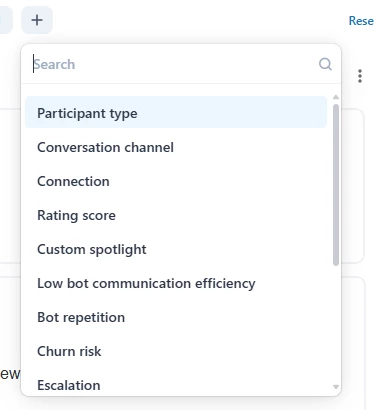
Hi! When I went through the auto-reviewed conversations I noticed that all of them are conversations where customer has spoken only with the AI agent, so they have not reached a human at all. When I filter the participant type to “user” there are no reviewed conversations. How can I avoid this from happening, since I am interested only in the conversations where a human has written something, not the bot?


  • August 27, 2025

Hello, 


I would like to add a use case for being able to edit fields and/or add tags. As I am manually reviewing the AI agent tickets, I would like the ability to flag tickets as something like good-response / bad-response, so that I can a) understand the split, and b) report or filter on just the ‘bad’ ones separately, so that I can then go back and look for ways of improving the AI responses for specific questions / scenarios. 


Loving the ability to even just see these though, this is really beneficial and fills what was definitely a blind spot! 


Thanks, 

Steven. 


  • August 27, 2025

I just noticed that conversations between our AI agent and customers that aren't escalated are NO MORE created as READ-ONLY tickets available in Agent Workspace. They are as ‘open’ ticket and our agents can seltect them. 


  • Author
  • August 28, 2025

Hi Nina - you can use the support type filter to filter for human only tickets. 


Hi Steven - thanks for the feedback, this is really good feedback and aligns with what we're hearing from others. We're planning on investigating the best way to provide these types of capabilities. Happy to include you in some research conversations/interviews - I'll reach out in due course to arrange.


Hi Carole - I've raised a ticket on your behalf so our teams can investigate further. 


  • September 1, 2025

Good morning,


I see that that since switching on this feature, we can no longer view who the ticket is from. The name just states Web User instead of the name from the data base. I expect this from new users but not when there is already a user with the same details in our database. 


Can you fix this issue please?


Also,  I think we would prefer to have the AI bot tickets go to solved after 24 hours, otherwise it clogs up our view . We really only want to see tickets from a human in the front page.  


Many thanks 


Alistair


  • Author
  • September 2, 2025

Hi Alistair, 


Thank you for your feedback. 


Noted regarding the 24 hour solved request - we're working on making this configurable in an upcoming version. 


As for ‘Web User’ names, it will depend on your flow, if you have authentication turned on, the conversations should reflect their actual names you have. Or if they are anonymous, normally, we would only capture users names at the point of escalation to a human agent when they are presented with a form. 


I've raised a ticket on your behalf and will reach out there so that I can check your specifics. 


Thanks!


Will


  • September 3, 2025

Hi! 

you can use the support type filter to filter for human only tickets.


In the filters, there isn't this kind of filter, maybe it is the “Participant type” or I am at the wrong place?


If I choose “bot” there, there are no auto-reviewed conversations at all. It has reviewed only bot conversations.


  • Author
  • September 5, 2025

Hi Nina, when you got to configure your views, you should be able to add a support type column. 


After you have added this, you should be able to filter. 


Please let us know if you're still having issues.


Thanks,


Will 


  • September 5, 2025

REQUEST: 


Having the ability to see (filter, trigger, etc.) an automated resolution “status” would be a high value add. Even without the parameter being in Analytics, this would alleviate most of our issues with reporting on automated resolutions. 


  • Author
  • September 9, 2025

Thank you for the feedback Jacob, this is already on our radar and we're working internally with the automated resolutions team to make this available. Once we have it ready, we'll update here accordingly. 


Thanks,


Will 


Laci
  • September 9, 2025

Those that are listed as Agent roles are unable to see the AI Agent tickets in the View we've created or by doing a search. Are only Admin roles able to view these tickets? If both Admin and Agent roles are able to view these tickets, would it be something in our company's configuration that would need to be changed for everyone to see these tickets?


  • Author
  • September 17, 2025

Hi Laci, those with Agent roles should be able to view these once they have sufficient access to the views configured with AI Agent tickets. 


Please reach out if you're still experiencing issues.


Thanks! 


Will


  • September 22, 2025

Hello! At the beginning, the ticket field ‘Support Type’ was visible in the tickets. Why is this no longer the case?


  • Author
  • September 23, 2025

Hi Veronica, 


Yes, based on feedback and inputs from our internal teams, we decided to remove the support type from the ticket properties. The rationale behind this is that we already have 3 locations where we illustrate that these are AI Agent tickets: 


1. In the tab, we show the bot icon.

2. Underneath the heading, we show the purple AI Agent label.

3. On the bottom of the screen, we hide the composer and show a link out to our help centre explaining these types of tickets. 


Hope this clarifies. 


Thanks,


Will 


Laci
  • September 23, 2025

Hi Will, 


How would we configure a view so that those with Agent roles can view the AI Agent tickets? We've tried multiple times but cannot seem to confirm a view that allows them to see these tickets.


Rendra
  • September 24, 2025

Hello, I would like to share some feedback regarding the Zendesk chatbot.
 

Our company is currently using the WhatsApp channel integrated with Zendesk. Unfortunately, only chats that follow the Transfer to Agent flow generate a ticket, allowing us to identify the user’s WhatsApp number.
 

For chats that are not transferred to an agent, no ticket is created, making it impossible for us to track the conversation or identify the users. We would greatly appreciate it if these non-transferred chats could also be tracked in the same way as transferred ones, including capturing the user’s identity, even if no ticket is assigned to an agent.
 

Thank you for your attention and support.


  • Author
  • September 24, 2025

Hi Laci, to configure the views, you can take a look at this article which explains the process.


If you've any issues, please let me know and we can explore further.


Thanks,


Will
