Explore PDF Export Cut Off Issue | Community
Skip to main content

Explore PDF Export Cut Off Issue

  • October 18, 2019
  • 16 replies
  • 0 views

Hi,

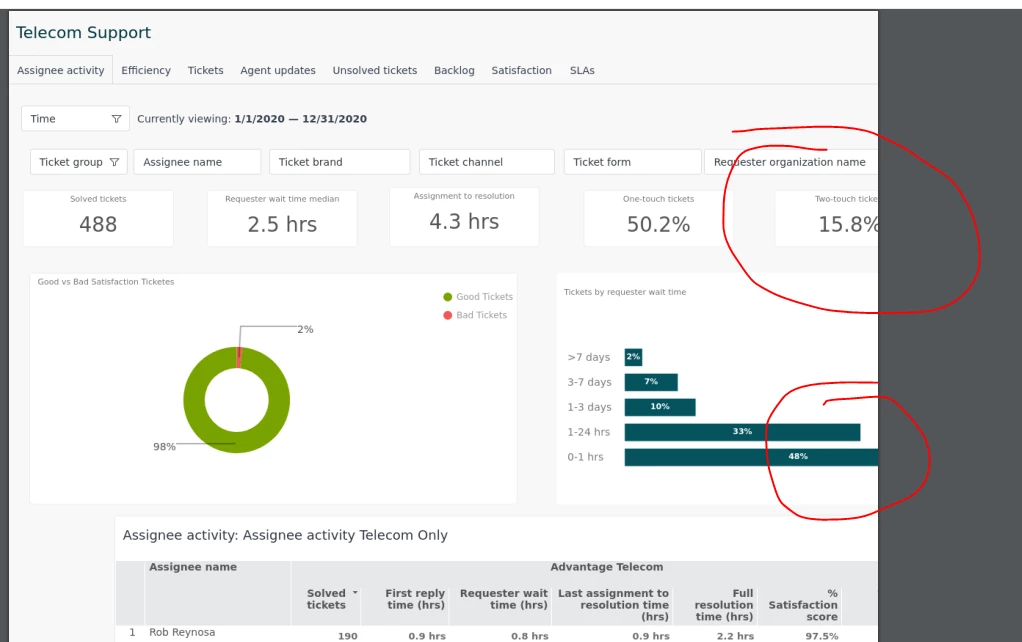
The Explore export function does not include all tables when exporting to a PDF or image.

I'm missing two additional tables in my export.

Can you investigate please.

Cheers,

Aaron

This topic has been closed for replies.

16 replies

Brett13
  • Community Manager
  • October 23, 2019

Hi Aaron,

I'm going to bring this into a ticket so our Customer Advocacy team can look into this. We weren't able to replicate this on our end so there may be something else at play here.

You'll receive an email shortly stating your ticket has been created.

Cheers!


Craig13
  • February 11, 2020

Explore Export doesn't export to PDF more than one page. We have a report with 102 rows. I can't get this to export in anything other than Excel or CVS to view the full report. I'd like a PDF of these reports, but they're currently unusable in this state.

And as I just found out this is if you choose the A4 Landscape option. It seems it's only targeted to a single page. (awkward)


  • February 17, 2020

Why doesn't Export to PDF work Properly on Explore? I cannot switch away form Insights until this is fixed.


Devan
  • February 17, 2020

Hello @Chris Braley & @Craig Bailey,

I've opened a ticket for you both so our advocacy team can look into this issue deeper for you. You'll receive an email shortly stating your ticket has been created.

Best regards. 


Gabriel26
  • February 28, 2020

Has there been any update on this? Our reports are getting cut off as well. 


Nicole17
  • March 3, 2020

Hi Gabriel - 

It looks like they're still trying to sort out what's going on, but we'll share here as soon as we have a solution! 


Jon46
  • March 10, 2020

For any future viewers of this conversation, this article is a good place to start:

Why are my queries cut off or missing at the bottom of my exported or scheduled dashboard PDF's and images?

Many times, the reason a dashboard is cut off is because the tab is not big enough to contain all the queries it contains.

That said, if adjusting the tab size doesn't help, please reach out, we would love to troubleshoot this with you directly!


b8ta
  • March 12, 2020

I also am having an issue with the PDF cutting off the report. is there a fix yet? My tab sizes are fairly small


Brett13
  • Community Manager
  • March 12, 2020

Hey Janiece,

I'm going to create a ticket on your behalf so we can look into this with you. You'll receive an email shortly stating your ticket has been created.

Cheers!


  • May 14, 2020

Hi Any updates on the PDF export cut off issue? We send daily email updates with PDF on our stats, without this being fixed in Explore,  Insights should not be retired.


Devan
  • May 14, 2020

Hello @Jacquie,

We have no new updates to announce on this feature request at this time. I would recommend posting in our product feedback forums so our developers can consider this for future updates. 

Best regards. 


  • June 15, 2020

Is there an update to this? If a dashboard is more than 1 PDF page, then it should just add another page in the PDF, according to my logic... It makes no sense that it gets cut off.

Adjusting the tab size doesn't help.


  • June 24, 2020

Agree with all people in topic.
Another issue which is not resolved in 8 months. Great work, ZD!


  • November 23, 2020

Has anyone solved this problem? 


Chad16
  • January 20, 2021

Hello all

For my issue (exported PDF was cutting off reports) - the article - Why are my queries cut off or missing at the bottom of my exported or scheduled dashboard PDF's and images? shared by Jon Daniels fixed my issue (Thanks Jon).

I needed to adjust the size of the tab (the little vertical and horizontal ruler icon) and make the tab size adjust to where my reports were.

I hope this might help others :)


  • October 4, 2021

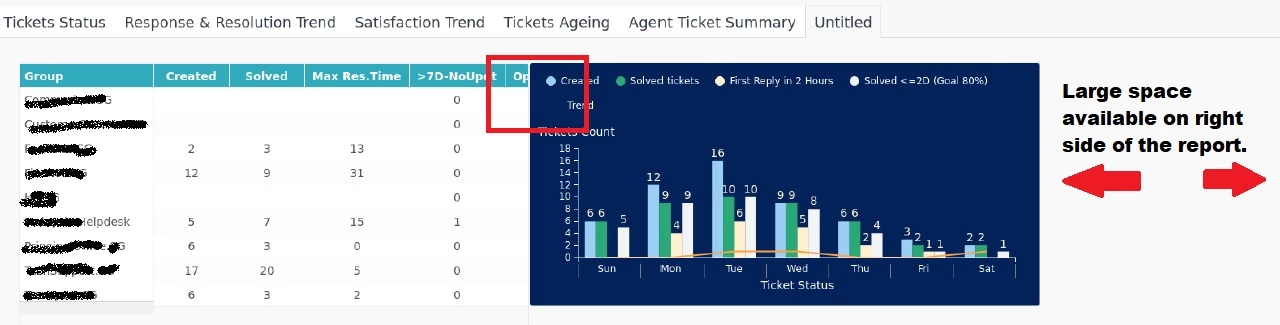
Issue faced by us is the cutting-off of the tables or graphs in the downloaded PDF or Image. They cut either at the right end of the report or where two adjacent widgets are placed. In case one has to add multiple tabs in a dashboard, it becomes impossible to reach a standard width that fits all.

In the attached screenshot of a downloaded PDF file, one can see large space available on right side of the report, yet two widgets (table and graph) are merging and graph overlaying.

Reaching out to Zendesk support does not benefit as they are also bound by the limitations of the product. Posting it here, in case someone has struck a logic that works as a standard for equating right dimensions.