Editing Company Info | Community
Skip to main content

Editing Company Info

  • October 1, 2021
  • 4 replies
  • 0 views

Ricardo12

Hi,

I'm trying to edit the company info in the footer of my company's Zendesk Guide platform. When looking at the theme's code 'footer.hbs' file, I noticed that this is not hardcoded in HTML, but it is generated from some other field.

<div class="f-14 f-sm-11 footer-company-info m-r-30">
<p>{{dc 'hc-footer-company_info_text'}}</p>
<div>{{dc 'hc-footer-copyright_text'}}</div>

However, I am having a hard time finding where I can edit this info on Zendesk settings. I also can't find any solution in your Help Center when I search 'edit Company info on Zendesk'.

So my question is, where can I edit the 'company info'?

4 replies

Ifra
  • October 1, 2021

@Ricardo Pereira, the code you shared, it's DCs identifiers, you can edit the company's info via DCs under Support.


To edit the company's name follow the below steps:

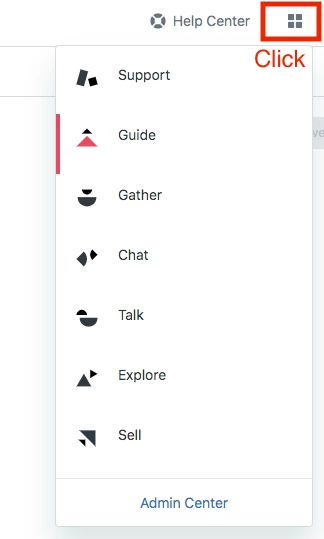
1). See the top right corner, there is an icon click on that.


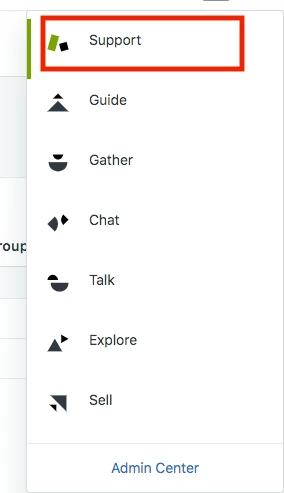
2). Select Support from the list.


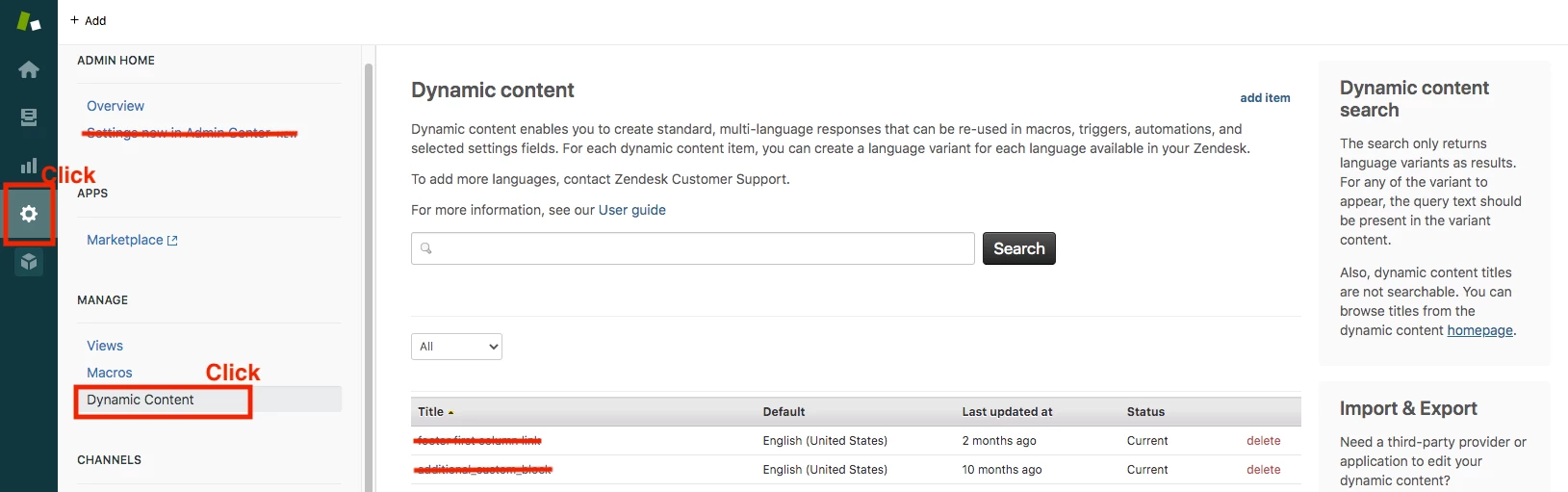
3). Now, click the gear icon left sidebar see in the below screenshot, then select Dynamic Content see in the below screenshot.


4). Find this 

hc-footer-company_info_text

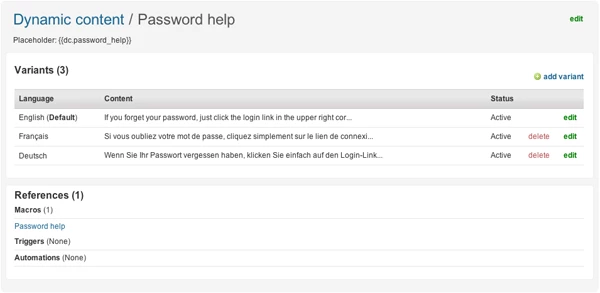
after finding it, click on this and you will get the view as in the below screenshot.


5). Click on edit lighted with the green color and then you can change the translation because you would reach at your point.

6). When you have done the first one again find for the copyright info

hc-footer-copyright_text

 and click on it then edit it.


If any confusion, do let me know.

Also, you should take a look at this article for better understanding: https://support.zendesk.com/hc/en-us/articles/203663356-Providing-multiple-language-support-with-dynamic-content

Thanks

Team


Ricardo12
  • Author
  • October 1, 2021

Thank you - that solves my question.
FYI, in our setup, I found the variables with the following names

HC::Footer::Company

and

HC::Footer::Copyright Text


Much appreciated!

Ricardo


Nicole17
  • October 6, 2021

Thanks for sharing that answer, Ifra!


Ifra
  • October 6, 2021

:)