
Edit footer links that are set as strings? | Community
Skip to main content

Edit footer links that are set as strings?

  • July 16, 2021
  • 2 replies
  • 0 views

Hi there,

I am trying to edit the links in my footer as some of them are outdated or redirecting. 

When I go to my footer.hbs file to edit them, the destination URL doesn't appear, instead they are set as strings.
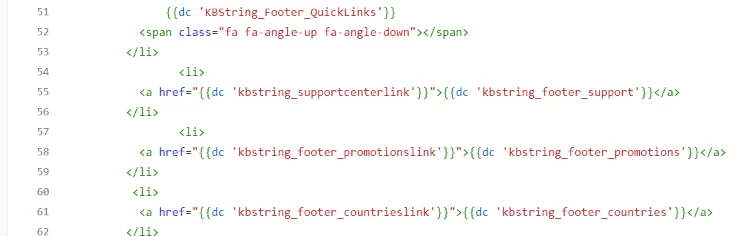
How do I change these string values? Or can I just change these so I just need to enter the URL?

For example instead of saying 'kbstring_supportcenterlink' just put 'support.domain.com/hc/en-us'

Thanks, Jack

2 replies

Peter11
  • July 16, 2021

Hi Jack

The "dc" in front of the strings stands for "dynamic content".

You will find the strings defined as dynamic content in your help center, so you can change the URLs without even touching the source files.

I have never used the feature, but I suppose that the dynamic content is located in your support admin page, MANAGE, dynamic content at the very bottom of the manage entries.


Yours truly

Peter


  • Author
  • July 16, 2021

Hi Peter,

Thanks for your help, I can confirm it's under Admin > Manage > Dynamic Content.

From here I just do a search for the related string and then change text that appears and the URL. 

Thanks for such a quick response. 

Cheers, Jack