


The Community Roundtable is a group of Zendesk customers who share their expertise on a specific topic. You don't have to be on the panel to participate!
How to participate:
- Read the advice from the panel.
- Add a comment to ask a question or share your ideas.
The topic this time is how to decrease agent touches and ticket volume with automations and triggers.
Meet the panel and read their advice!
- Lucas Bruch, Network Manager, Samaritan's Purse
- Risa Ward, VP Operations & Customer Experience, DonorsChoose.org
- Graeme Carmichael, NHS Greater Glasgow & Clyde
- Dan Rivera, Manager of Technical Services, Make a Wish Foundation
Lucas Bruch, Network Manager, Samaritan's Purse
I manage an IT Infrastructure team of 13 staff that manages Infrastructure and client support for 2000 users in 32 locations spread across 16 different countries. Our primary Help Desk has 5 staff and we handle about 1200 tickets a month.
Our volume has grown tremendously over the past few years, but like so many of you, my staff has not. So I set out to figure out how to solve this issue of supporting a growing user base and maintaining a high level of support and customer satisfaction with minimal staff.
My conclusion was that I needed to decrease agent touches and also empower users to find solutions without contacting support, thereby decreasing agent touches.
I want to focus specifically on triggers in this topic, but one of the musts for any lean support team is to have a great Help Center built out. Empower your users to find their own answers!
How are we using triggers?
Right now we have 38 triggers in place, and will be adding more all the time. These triggers take an action on a ticket. Some of our examples are:
- Tickets that come into a specific support email inbox get automatically assigned to an agent group and have the appropriate status and tags set
- Tickets from certain users get assigned to certain technicians (if you have techs that are solely responsible for an area)
- Tickets from VIPs get higher priority and status set
- Tickets with VIPs automatically CC support manager
- Tickets about certain content automatically get assigned to the correct group of technicians that can deal with it
There are others, but you get the idea. All of this decreases agent touches and the amount of time that is needed to manage the work load.
And without getting into too much detail, we have a slew of triggers that are responsible for assigning work orders to the correct teams that come in from our work flow for account creations/modifications.
When a new user starts, there is work to be done by the telecom team, ERP team, network team, HR, etc. So our automated workflow that gets sent around for approvals when account changes or creations are needed has its results dumped into Zendesk. Standard methodology would be that it would create one ticket for user creation that has to be worked on sequentially and reassigned to each team that needs to complete a task. This takes a lot more time and a lot more agent touches. Instead, we use triggers to turn the data Zendesk receives into specific tickets for each team. Then all the work can be done simultaneously. A single technology work order (our internal workflow for account changes) can generate over 10 tickets in the system.
All that being said, keep one thing in mind: It is easy to over automate a system so that it loses its human element and personal touch. So be sure that the system you build still provided excellent customer service!
Risa Ward, VP Operations & Customer Experience, DonorsChoose.org
At DonorsChoose.org, most of our 40 agents & managers are subject-area experts who support a particular customer group or topic. So one agent might be a pro at helping donors with tricky payment issues, while another guides teachers through creating and sharing adorable thank-you notes .
The great thing about this structure is that we can provide highly customized support and adapt easily to change. We’ve also found agents can work more efficiently through a queue of similar tickets, rather than having to constantly switch mindsets. But the downside of specialization is that it has the potential to slow things down.
Before we switched to Zendesk, we noticed a lot of emails bouncing around to different people until they found the right match. Using Zendesk, we’re able to guide tickets to the correct agent right away.
First, we created a custom field we call “Issue Area,” which designates the customer type and general topic of a ticket. This gives us more flexibility than using groups, because each agent can work from views with their own mix of specialities.
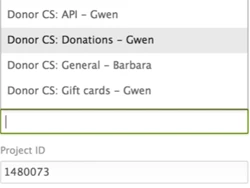
The real magic happens with triggers.
First, our triggers assign each ticket to an issue area based on a selection the customer makes on our contact form . That’s a good start, but we don’t want to ask customers to choose from a huge number of options. Instead, we use triggers based off keywords to further sort tickets to the correct issue areas.
One of my favorite examples: When we have a promo code available, we know that some donors will accidentally complete their donations without entering the code. This is a pretty quick fix for us, but it’s easier to do a big batch all at once. So we have triggers searching for tickets that mention the current promo code, and assigning all those to a single issue area that an agent can work through a couple times a day.
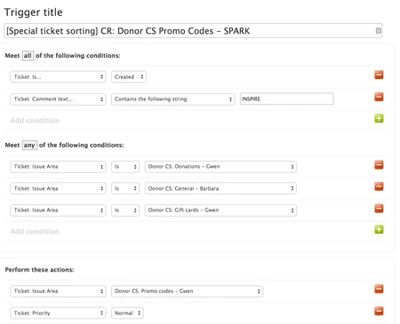
The best part of outsourcing all the sorting work to triggers is that it lets our agents focus on the fun part… helping people!
Graeme Carmichael, NHS Greater Glasgow & Clyde
Rule 2: keep non help desk activity out of the help desk.
We have several automated emails confirming successful interfaces that may end up creating a lot of tickets in our zendesk. This skews ticket volumes, performance and SLAs as there is no real work associated with the ticket. It is best to redirect these to a non help desk address.
But if you can't do that, use a trigger to tag and solve the ticket. Base the trigger on:
- source email address
- destination email address
- ticket content text including the title
Make the actions solve the ticket and set any custom fields to show that it is not support related. Also set any tags to suppress the normal notification to customers and agent and any satisfaction related business rules.
Dan Rivera, Manager of Technical Services, Make a Wish Foundation
We had a special project where my first level support agent was scheduling upgrades for our CRM software. We needed to route tickets away from our CRM team, and to our first level support agent so we used a key phrase trigger to route the tickets. This was a huge time saver, and kept the CRM team from having to manually reassign tickets.
Here was the method we used:
I created a trigger named “CRM - AD HOC - Custom Routing.” Currently it looks for a phrase in the comment of all newly created tickets “Schedule NOAH Upgrade” that come in through either the CRM form or email address. Then it adds a “it_crm_upgrade_request” tag to the ticket and assigns it to 1st level support.

Hi Andrei! I'm glad you found the information useful!
This Roundtable has been around a bit so I'm not sure that Risa will be around to respond, but I'll try to help if I can. I'm not sure that I understand your question, though...can you be more specific about what you'd like to know?