Date Field | Community
Skip to main content

Date Field

  • April 28, 2021
  • 6 replies
  • 0 views

Alex54

I have a trigger that fires when a certain checkbox is checked. When it is checked the action is to fill out a date field as "Set number of days from now" to 0. The intention here is that it enters the date the checkbox was checked in the date field. (I also include a nullifying condition in my trigger so this doesn't continue to fire.) This almost works, but there's is a slight wrinkle. In the Events Tab, it shows the correct date in the date field. However, in the date field itself it shows the next day. See the image below. Can anyone explain why this is happening? 

6 replies

  • April 28, 2021

I get this next day issue even in the default date Fields.
I just set it to the day before and it automatically moves to the correct date.


  • April 28, 2021

I was figuring it was a time zone glitch as we are in +12 or +13


Dave12
  • April 29, 2021

Hi Alex,

Interesting! I'm turning your post into a ticket so our team can check it out. Thanks for the heads-up!


  • November 17, 2021

Hi there, I get a similar issue when I retrieve the date value via API and display it in a sidebar app.

Here is the date field displayed in the ticket:

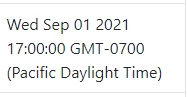
And here is the same date field displayed after retrieving it via API:

@dave12, is there any update on the ticket you created?


Eric27
  • November 18, 2021
Hey Jessica,

We actually pushed out a fix for this late last week. Are you still experiencing the issue?

  • November 18, 2021

Hey @eric27, yes we're still having the issue in at least one of our instances. I haven't checked others yet.