Community discussion: How do you assign tickets? | Community
Skip to main content

Community discussion: How do you assign tickets?

  • April 25, 2017
  • 33 replies
  • 0 views

Show first post

33 replies

  • April 29, 2017

Our channel distribution at the conclusion of 2016 was 32% email, 32% web form. We triage tickets by category into tiers (Red, Yellow, Green), with relevance to urgency to handle. Since we're an online retailer, tickets that come in with categories like "Change/Cancel Order" and "Where's My Order?" are collected together in the "Red Tier" to stress urgency in handling by the team. 

With that, the team works on the red tier first to knock out those issues, then proceed down the other tiers until the inbox is clear. 

Sadly, there's still no solution to efficiently distribute tickets evenly amongst agents available unless you pay extra to utilize guided mode. 


  • April 30, 2017

We use a few combinations of methods.

1. Support Email Addresses

We have people who scan items in on a MFP that need to be updated, like a customer's address for example. A piece of mail may come back to us because the address is wrong. So the mail gets scanned in a forwarded to the Support staff. 

I added a "scan" email address to the MFP and to Zendesk. So if it comes in to the address, it gets assigned to a Group and priority is set to Low


2. Help Center

Based on the category, we have rules that assign to certain groups or individual users


3. Organization

If a request comes in from specific Organizations we set priority and assignee. Depending on the Org it comes from, we will assign to a group or a  specific user.


We tried to assign based on key words, but that never took off. In one case the rule was updated because the key word was misspelled. After 3 different misspellings, we abandoned the method.


Jennifer16
  • Author
  • May 1, 2017

Thanks for all the amazing contributions to our community discussion! It's so interesting to see the different approaches to assigning tickets to agents.

Congrats to the five participants who were randomly selected to receive a Zendesk t-shirt!

And if you haven't commented yet, you still can! We've completed the swag giveaway, but we'd still love to hear from anyone who wants to share and keep the discussion going.


Peter11
  • May 4, 2017

We're just starting, however, we do have 4 different brands with different support requirements:

  1. Standard Software Product Support: Licensed users pay maintenance which includes support and error corrections. Product change requests (enhancements, extensions etc.) are also entered in this channel.
    No SLA.

  2. Premium Support: Support for individual solutions implemented using above product. Require a paid SLA, and receive their own support mail address, since several of our customers use 3rd parties to run their IT systems.
    Mostly, those third parties are the ones opening tickets with us - the number of 3rd parties is less than the number of customers.

  3. Product Support for a Web Application which targets the bookkeeping and HR tasks of SMEs up to 20 employees.
    The service is free to use, the support is done mostly via Chat. We have a few agents who specialize on this product.
    No SLA.

  4. General and Internal Support: Everything that does not fall into the categories above ;-) - lots of IT support, including coping with DMARC reports, backup reports etc.
    No SLA.

We use a strict organization - group matching, so for each client organization, there is a corresponding support group. This is a n:1 match; several client org's may be assigned to the same group.

We're heading towards a "First Level checks all" policy, i.e. first level support gets all customer interactions first, do the obvious things like check for completeness, request missing information etc., then involve various second and third level organisations. All output of those organizations is again screened by first level to avoid unclear statements, unfriendliness, ..., and then sent out to the clients.

We achieve this by assigning the 2nd and 3rd level agents as Light Agents. This holds for all four brands.

Where feasible, we assign the tickets to the correct groups automatically using triggers. This is easy in premium support, because the client sends the tickets to "his" support mail address, or registered users create tickets on their Guide/Help Center.

In general support, we automatically process backup reports - successful ones are closed immediately, while unsuccessful ones are assigned to IT support. The same holds for DMARC reports which we get from all over the world.

Since at this time, only one brand uses chat, its tickets are also automatically assigned.

For all other cases, we have to assign the tickets manually.


  • May 4, 2017

We have 2 helpdesk systems - 1 EU and 1 "Global" (aka USA). I wrote our assignment system which uses the Zendesk API via Google Sheets and their automation tools to allocate tickets based on

  • Group that the ticket is assigned to (specific market segments)
  • Skills required for the ticket (something we call Call Type) and is broadbrush breakdown of the technology / product that the issue is about
  • Agent availability - i.e. are they working, (or on vacation or public holiday for their site)
  • Agents can  have "primary" responsibilities and "other" responsibilities allowing them to pickup tickets from other queues if not fully busy.

An agent has an allocated "maximum ticket load" and all helpdesk environments are read and consolidated such that we know how many open tickets every agent has.

We then determine who gets the ticket by assigning it to the least busy person who is available for work.(People on vacation or public holiday are unavailable for work). All this is calculated using the timezone the resolver lives in (from USA to Japan). We also try to ensure that Agents don't get assigned tickets immediately before holidays, i.e. we allow them time to respond / resolve or redirect the ticket before the end of their day.

The great thing about this is that all this is addition to the power of triggers and automations available within Zendesk, and doesn't require the deployment of any additional hardware  systems. You do Google sheets automations simply by scheduling your function to run at specific intervals. Really cool!


  • September 23, 2019

It's been a couple years since the OP, does Zendesk have an inherent way to automatically assign tickets to agents based on attributes/criteria?


Brett13
  • Community Manager
  • September 25, 2019

Hey Joran,

You'll most likely want to take a look at our Trigger Recipes articles which provides a list of useful trigger recipes and how to create them.

If you're looking for some additional assistance, can you provide more information on the attributes/criteria you're looking at?

Thanks!


Au24
  • October 2, 2019

So great to see all of the different methods being used to assign tickets here.

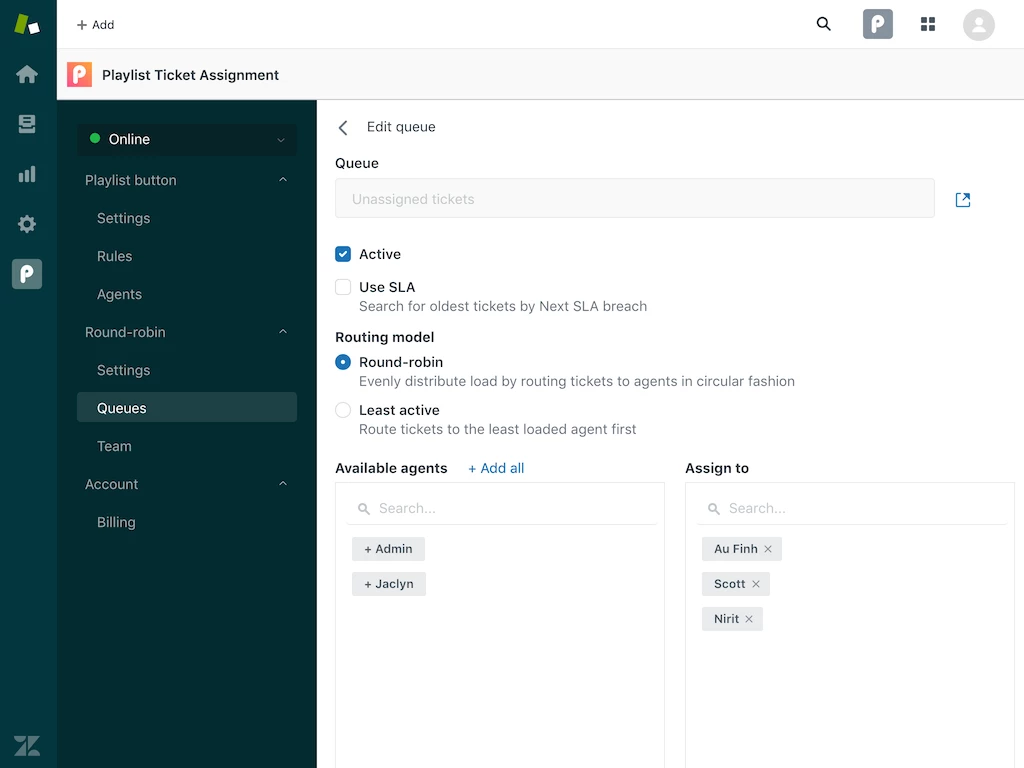
We also have the Playlist Ticket Assignment app, which has been on the Zendesk Marketplace for a little over a year now. We just recently introduced a round-robin option.

Check out the demo

Features:

  • Runs every 2 minutes
  • Use a classic, round-robin model or route tickets to least loaded agents first
  • Use existing views to set up queues
  • Drag and drop to change priority of queues
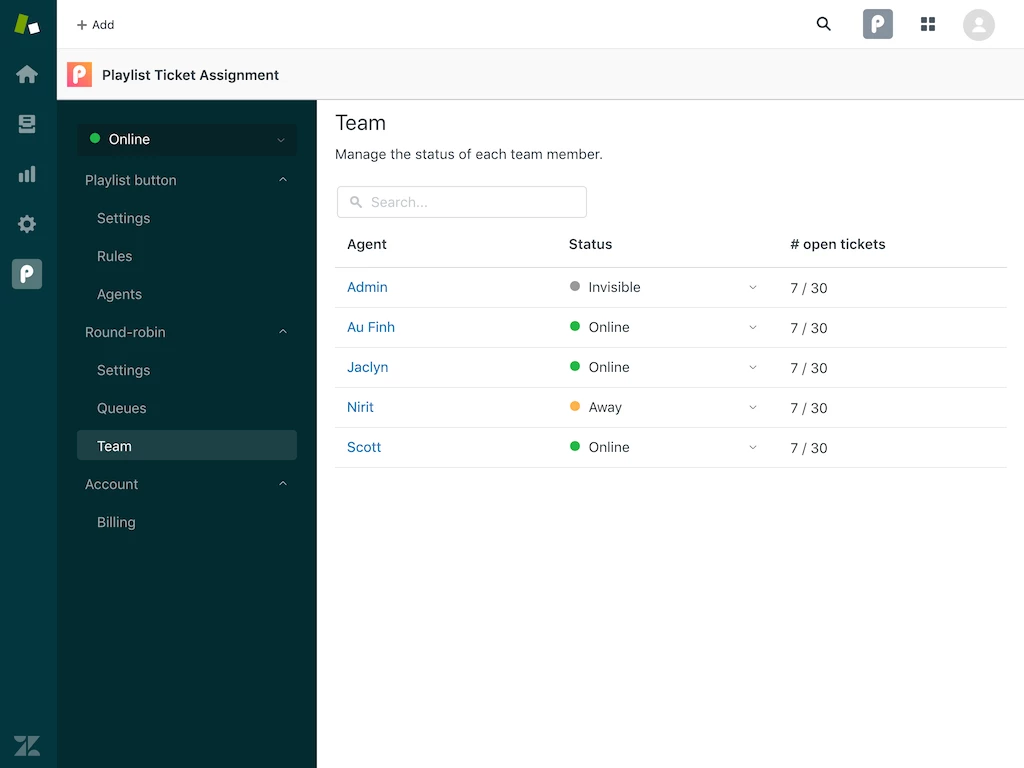
  • Agents can set their status to Online, Away, or Invisible
  • Managers can manage statuses under the Team tab
  • Set an inbox limit to control how many tickets agents can work on at a time

We'll also be adding support for Skills-based routing soon.