Can't view tickets older than 1 week | Community
Skip to main content

Can't view tickets older than 1 week

  • May 3, 2021
  • 9 replies
  • 0 views

Ian21

Why can't I access tickets older than 1 week?  Are they archived that quickly?  I can find no knowledgebase article and nothing in these forums on how to expand the date range to view historical tickets.

9 replies

  • May 3, 2021

Are you exporting data from Explore or Insights? 


Ian21
  • Author
  • May 4, 2021

I am simply on the "View" option. None of the views show anything older than a week, no matter how they are customized.


Kyle25
  • May 4, 2021

Hi Ian,

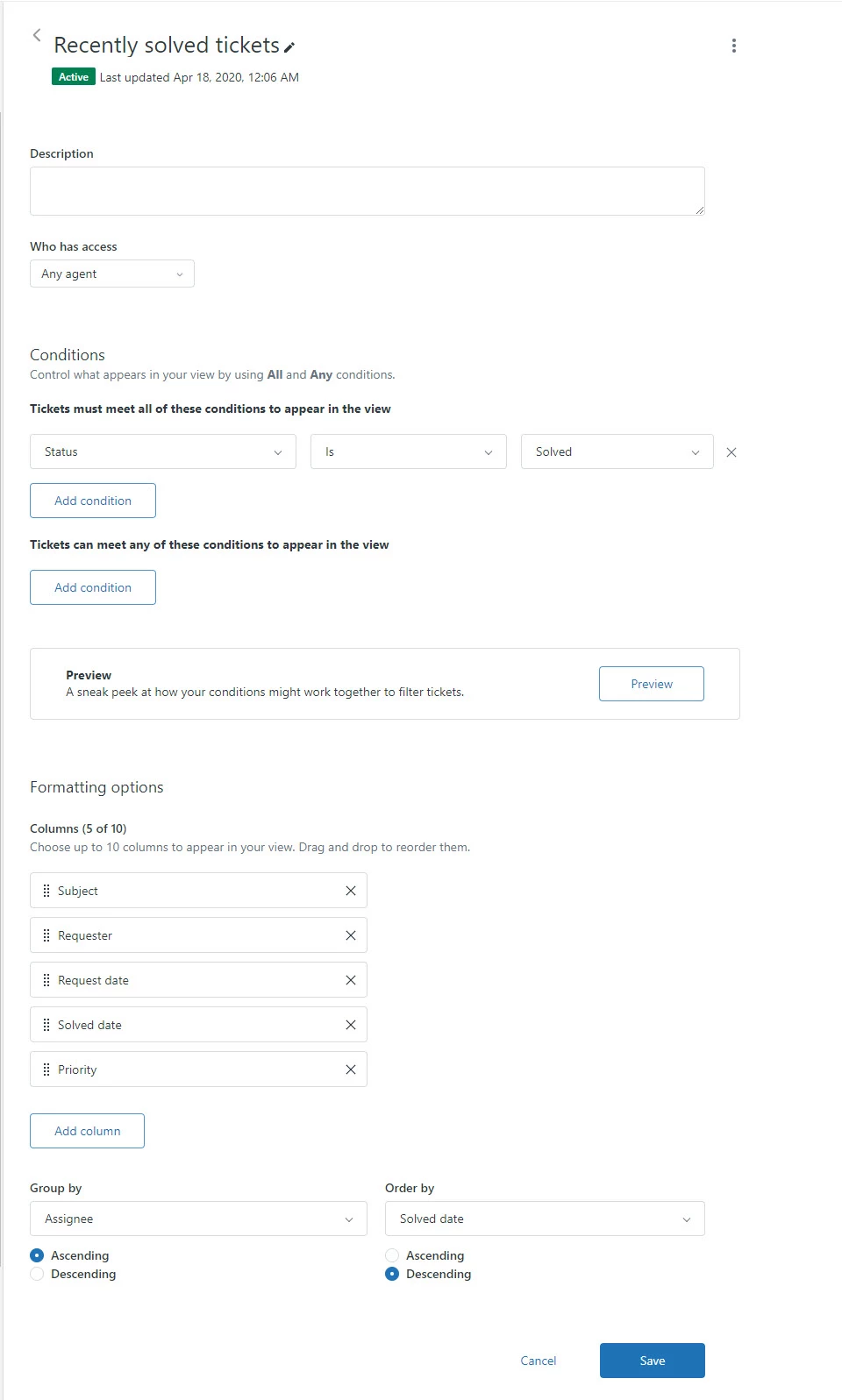
The first place I would like to look would be how the Views are built. Can you post either a screenshot or manually type how you have a view configured? There might be something in the Conditions section that is causing this. With this information, we'll have a better idea of what we can change to correct this. 

Thanks,
Kyle


Ian21
  • Author
  • May 4, 2021

OK, here's the default view for recently solved.  There's no area in which to configure the dates or even include more tickets.  How can I view tickets older than a week, I can find no option even in custom views to show me the older tickets.  Where are they?


  • May 4, 2021

Hi Ian, might as well change the condition of the view instead of "Ticket is Solved" make it "Ticket less than Closed"

Hope this help! 


  • May 5, 2021

Hello @Ian Herrick,

As Jahn pointed out, most probably that you can not view the tickets in that view is that the tickets were closed.

Default automation is closing tickets after 4 days of inactivity.

As Jahn suggested, you may change the condition to 'Ticket less than Closed', then more tickets should appear in that view.

You can additionally create a view specifically for closed tickets.

For more info:

About the Support default automations

Creating views to manage ticket workflow

Hope that helps!


Ian21
  • Author
  • May 6, 2021

Thanks for the suggestions!  I cloned the view and set the "tickets less than closed" and can still only see back less than a week.  The views were practically identical, expect it now includes open tickets.  I'd like to see the tickets that are older than a week.


  • May 7, 2021

Hello @Ian Herrick,

Tickets should be archived only after 120 days, as covered About ticket archiving.

But I want to look at your account directly to see what is going on and to see if we can fix it somehow.

I will open a ticket and respond to you.


  • March 28, 2022

Hello @jahn12 @kyle25,

I am encountered the same whereby not being able to see all closed tickets older than 120 days. Had tried a few suggestions below suggested by other community members.

a) View - customized the "view" with the following options, but no luck.

     > Status less than closed

     > Hours since closed less than 17520 (2 years)

b) View - not able to find the option Archive under the status option

c) Went to Explore and found out not able to customize own filters and dashboard panels. We have customer tickets added with tag upon received at Zendesk. So, we are planning to filter by specific customer tag to export the ticket details logged during a specific time frame such as 1-year time frame. Is there a way to customize the filters and dashboard panels in Explore?

Thanks & regards,

Steven Yeoh