Bookmark component for the new dashboard builder - Gathering interest | Community
Skip to main content

Bookmark component for the new dashboard builder - Gathering interest

  • March 9, 2022
  • 57 replies
  • 0 views

Show first post
This topic has been closed for replies.

57 replies

Robert17
  • July 26, 2023

Hi @walter11,

Is there any update on the availability of Bookmarks and Hidden Filters on the new Dashboard builder?

Given the recent announcement that the new Dashboard Builder will be GA in the near future and the classic builder deprecated, I would like to understand if a decision has been made on these features.


Almog11
  • July 26, 2023
  • Why is the bookmark component important to you? What is the use case where this feature is most needed? How frequently do you use it?
    I am using it for freezing filters such as assignee agents, time, etc. 
  • On a scale from 1 to 5, how impactful would it be if the bookmark component wasn’t available in the new dashboard builder?
    5

  • July 26, 2023

The loss of bookmarks would be a big deal for us - we use them to quickly allow us to jump between common "states" (combinations of various data filters that limit what we see to specific varieties of tickets) when viewing dashboards - e.g. "All Team X tickets", "All Team Y Tickets categorised in Z way in the Ticket Fields", "All Tickets for teams X and Y from Z Customer Type" etc. 

Loss of this would be a 5/5 impact for us. 


  • July 26, 2023

I use bookmarks in every dashboard I build to allow filter presets. It's easier and less confusing for someone to click a bookmark than reset multiple filters. I find it hard to believe you aren't already working on including this feature. I rate it a 5 for us. We also use hidden filters.

If you can't provide feature parity, the deprecation of the classic environment should be indefinitely delayed. This would be the second time in five years we were forced to move to a new environment that lacked features of the predecessor. 


Damien11
  • July 31, 2023

I use bookmarks and hidden filters in every dashboard I create mostly to preselect the time.

The main purpose is to reduce the loading time which is a nightmare on Explore and to make it easier for the user to see the most recent data as this is usually the case.

I would rate it 4 out of 5 as the users can still update the filter manually but the experience will be highly degraded.


  • August 2, 2023
  • Why is the bookmark component important to you? What is the use case where this feature is most needed? How frequently do you use it?

 We use bookmarks on almost every single dashboard we create, so there is always a "default" to start with. We typically reuse reports as the metric being captured is the same across all groups but use bookmark on each dashboard to customize the reports so they are specific to each individual group. Most of our groups do not overlap, so keeping the data separate is important to them.

  • On a scale from 1 to 5, how impactful would it be if the bookmark component wasn’t available in the new dashboard builder?

I would say a 4 to a 5. its not a show stopper, as there is a workaround, but it would be a HUGE impact. If there isn't a way for us to have bookmarks or something similar, this would be extremely impactful, as we would need to customize about 200 reports approximately 120 times!


Ryen
  • August 3, 2023

Usage - Every dashboard. 

  • Ticket groups - Attributes don't allow us to group one ticket group in multiple buckets so we use bookmarks to get around this. 
  • Date filters - When a dashboard loads, our bookmarks allow us to only load one week at a time so it doesn't take forever to load at first. Then if the managers need more dates they can adjust as needed. 
  • I could go on and on. 

Impact - Level 5 (more like 10) MAJOR


Vanessa12
  • August 8, 2023
  • Why is the bookmark component important to you? What is the use case where this feature is most needed? How frequently do you use it?
    I am using it to freeze filters such as data filters, Time filters and also exclude certain data metrics from the entire dashboard instead of doing it 1 report at a time. 
  • On a scale from 1 to 5, how impactful would it be if the bookmark component wasn’t available in the new dashboard builder?
    5

  • August 8, 2023
  • Why is the bookmark component important to you? What is the use case where this feature is most needed? How frequently do you use it?

Bookmarks are essential for creating easy-to-use dashboards without maintaining dozens of cloned reports with different filters. I use them to pre-fill dashboard filters that have been abstracted out of the individual reports (a practice recommended by Zendesk, I believe) as well as to give readers a simple way to filter data that is most relevant for them, such as viewing one team's contribution to the metrics of their group, or tickets related to a certain set of organizations. Without bookmarks, we'd have to create and maintain dozens of duplicate dashboards (and all the reports underlying them, since I suppose we couldn't set default dash filters without bookmarks either) in order to avoid trusting users to reliably set a bunch of filters every time they open the dash. Bookmarks also allow you to hide numerous data filters from view without compromising your ability to use them, which is essential for professional and approachable dash designs. Hiding filters behind bookmarks also prevents users from unintentionally spoiling their dash data by changing a filter that doesn't mean what they think it does.

  • On a scale from 1 to 5, how impactful would it be if the bookmark component wasn’t available in the new dashboard builder?

5. It is currently holding us back from adopting the new builder, along with the baffling inability to create a new report. That's absolutely maddening to remember whenever I'm trying to use the new builder, but I'd still only rank it a 3 against bookmarks' 5, for context. The admin overhead without bookmarks would be a nightmare and change our entire process for Zendesk reporting.


  • August 10, 2023

@walter11

Seeing the feedback on the post, with every single response rating it a 4 or 5 in terms of impact if the bookmark feature is removed, will we actually see Zendesk listening to it's users this time, or is the bookmark feature still being removed?

It's been more than a year gathering feedback, so this cannot possibly be a matter of needing more time to evaluate.


Theo16
  • August 16, 2023
  • Why is the bookmark component important to you? What is the use case where this feature is most needed? How frequently do you use it?

I have multiple dashboards that I run throughout the week. I need to get snapshots for last week, this week, last month and this month. Bookmarks allow me to do this quickly and easily. 

It's also important for controlling the number of reports & dashboards. Instead of having a whole dashboard and associated reports for 'Last Week', 'This Week', 'Last Month', 'This Month'... I have 1 dashboard built with reports which don't have time filters and I adjust the filters using bookmarks for a quick and easy change.

  • On a scale from 1 to 5, how impactful would it be if the bookmark component wasn’t available in the new dashboard builder?

This is a 5 from me. My first play around with the BETA Dashboard, and it seemed OK, but when I couldn't set the bookmark filters at a dashboard level. I stopped there and immediately switched back because the beta wasn't going to meet my needs.


Tina11
  • August 16, 2023

I use bookmarks on almost all of my dashboards, it's a 5 for me.  Its hard to understand why a feature pushed by Zendesk in the past would be a miss on the new dashboard.  I fail to see the benefit of this, why not explain to paying accounts why this is a benefit instead of us telling you why it is needed?


Adam12
  • August 17, 2023
  • Why is the bookmark component important to you? What is the use case where this feature is most needed? How frequently do you use it?

I use it for every dashboard I have built, across several datasets. Filters for times, agent assignment, and many more based on the various departments and teams that utilize the dashboards.

  • On a scale from 1 to 5, how impactful would it be if the bookmark component wasn’t available in the new dashboard builder?

4.5. While users can still update the filter manually, most cases are too complex for users to remember all the filters to apply on every dashboard. This causes non-technical users to spend more time on learning the data attributes rather than focusing on business insights and action planning based on insights.


  • August 30, 2023

Really appreciate if Zendesk can keep the bookmark feature and bring it onto the new Dashboard building experience


  • September 7, 2023

Why is the bookmark component important to you? What is the use case where this feature is most needed? How frequently do you use it?

  • This a key feature for us. All of our dashboards use this feature as a hidden bookmark to default filters the report. Without this the reports would be cumbersome and not readable

On a scale from 1 to 5, how impactful would it be if the bookmark component wasn’t available in the new dashboard builder?

  • 5, we would be looking at alternative suppliers

  • Pourquoi le composant signet est-il important pour vous ? Quel est le cas d’utilisation dans lequel cette fonctionnalité est la plus nécessaire ? À quelle fréquence l’utilisez-vous ?

il est important car il permet de faciliter la lecture des données. Il facilite également le filtrage de données. IL me permet de créer différents aperçus des données destinés à différentes cibles.


  • Sur une échelle de 1 à 5, quel serait l'impact si le composant de signet n'était pas disponible dans le nouveau générateur de tableau de bord ?

5 !  car cela m'obligerait à dupliquer les rapports et les onglets
la compréhension et l'analyse des données seraient très compliquées


  • September 15, 2023
  • Why is the bookmark component important to you? What is the use case where this feature is most needed? How frequently do you use it?

Bookmarks allow to chose between different scenarios on a dashboard page - e.g. timeframes or products or languages. Essentially: Explore would be useless to daily business, it would reduce the use of Explore to deliver raw data and add the need to buy (and maintain) a full BI system to run needed reporting. 

Usage: daily


  • On a scale from 1 to 5, how impactful would it be if the bookmark component wasn’t available in the new dashboard builder?

5 - no bookmarks will make Explore useless. 


The current implementation is already not helpful: 
Every user should be able to easily set their own bookmarks on a dashboard. Without editing the dashboard.
Means: When someone has "View" rights on a dashboard, this user should be able to save their own bookmarks (in their view only). 
This will allow better distinction of user roles (editor vs viewer) and reduce the number of edits of a dasboard (when only a new bookmark is needed) 


  • September 20, 2023

Please consider to include the bookmark feature on beta builder allows us to save and quickly revisit essential reports without the need to repeatedly select time filters. We focus on the data and insights that matter most. 


  • September 21, 2023
  • Why is the bookmark component important to you? What is the use case where this feature is most needed? How frequently do you use it?
  • We use the bookmark function to freeze varieties of filters. as an example for each team/certain timeline/certain group/certain product. in this case, we will have a clean view for the dashboard user and obviously, for the report builder, it means saving a lot of time instead of cloning each query. Every dashboard is necessary to use this function.  
  • On a scale from 1 to 5, how impactful would it be if the bookmark component wasn’t available in the new dashboard builder?
  • 5 indeed. without bookmarks, the user experience is much degraded, and from the report builder's point, it means increased dozens of manual work which is really not efficient.

  • September 22, 2023
  • Why is the bookmark component important to you? What is the use case where this feature is most needed? How frequently do you use it?
  • The bookmark feature is highly important to us because it streamlines the process. Instead of toggling and selecting filters, we can access the data we need in a single view, saving us time. Therefore, please include the bookmark feature in the beta builder
  • On a scale from 1 to 5, how impactful would it be if the bookmark component wasn’t available in the new dashboard builder? - 5


Walter11
  • Author
  • October 19, 2023

Dear customers,
Thank you for your feedback and patience as we delved into this matter. Your comments have significantly helped us understand your usage of the bookmark feature, thereby allowing us to plan our next steps more effectively.

Firstly, I'd like to assure you that we will either rebuild the bookmark feature or provide functionalities that support the same use cases.

At the same time, we want to limit some of the side effects bookmarks today have. Having multiple bookmarks can lead to some inconsistencies when applied across different tabs. One bookmark could potentially override another one, causing the exposure of unnecessary data.
We are committed to preventing such behavior in the beta builder.

As of now, there are several needs you've flagged that can be addressed with the beta builder. I'd like to share how you can overcome some of these challenges and shed light on the remaining ones we aim to resolve in the future.

Served needs

  1. Need: Sync filters across datasets -> Solution: Link filters
    We understand the importance of maintaining consistency when filtering data across different datasets. Similarly to the classic builder, “Link filters” will allow centralized filtering across different datasets. We plan to ship this feature before the GA of the beta builder.
  1. Need: Adapt reports to different audiences -> Solution: Dashboard Restrictions
    Many of you reported how you combine bookmarks and hidden filters to filter data based on the audience while preventing them from seeing unnecessary data. As a result, if you want a dashboard to adapt to different audiences, you have to clone and maintain different dashboards.
    Dashboard restrictions allow dynamically adapting data to the viewer while maintaining a single dashboard that adapts to different audiences.
  1. Need: Speed up the initial load of the dashboard -> Solution: Default time filters
    We understand you currently use bookmarks to preset a shorter time period to speed up the initial load of the dashboard.
    In the beta builder, any dashboard created with a time filter will load “Last 30 days” data by default. You can learn more here.
  1. Need: Schedule a filtered version of the dashboard -> Solution: Schedule dashboard restrictions
    When scheduling a filtered dashboard version via email, you currently use bookmarks to set the default values for filters.
    With schedules, currently planned before the GA, you will be able to schedule a dashboard restriction, allowing you to control what data is exposed to your recipients.
    Please note that dynamic restrictions (e.g., the possibility to adapt data based on the viewer) won't be initially supported for end users.

Unserved needs

  1. Need: Quickly set and reload a set of values within filters
    Bookmarks are currently used to store a set of values within filters and quickly access them.

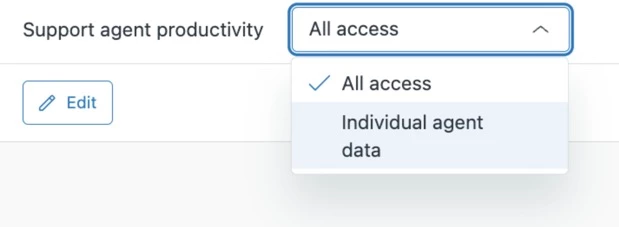
    While this capability is already available to editors with dashboard restrictions (Editors having full access to the dashboard will be able to access all the underlying restrictions from the access dropdown), we will extend the same behavior to viewers.


  1. Set the default filtered version
    One of the capabilities of bookmarks is to set a default view when the dashboard is initially loaded.
    While it is not currently possible, in the future, you will be able to set a default restriction when the dashboard is initially loaded.
  1. Set custom time filter values
    We know dashboards are meaningful when just the right amount of information is exposed. You currently use bookmarks to pre-set a specific time range to look at.
    While by default, time filters are set with a value of “Last 30 days”, you will be able to customize this value in the future.

I want to reiterate how much I appreciate your valuable feedback.
I will keep you updated on the progress of these unresolved issues in this post.


Regards,
Walter


Ola11
  • October 20, 2023

This latest update causes more problems for us than it solves.

Firstly, dashboard restrictions don't meet every use case for bookmarks. They can't be set up for different filter combinations to allow someone to quickly switch between them.

Secondly, allowing viewers the option to switch to an 'all access' view would be a horrible change for us. The entire benefit of dashboard restrictions for us has been the ability to only show someone their own data (because Explore has never had the formula function for this). If the agent can switch to a view that's not filtered for them it becomes pointless.


Walter11
  • Author
  • October 20, 2023

Hi @ola11,
thanks for your feedback about bookmarks.

We recognize that dashboard restrictions currently do not serve all the use cases from bookmarks, and that's why "Quickly set and reload a set of values within filters" has been marked as an unserved need we will work on.

As for viewer access, we do not plan to give "All access" unless the editor explicitly wants to share all data.

As for switching between different filter combinations, once a viewer or an editor is given access to multiple dashboard restrictions they will be able to switch between them from the access dropdown quickly.

Thanks for your comment.
Walter


Devan
  • November 17, 2023
Thanks to everyone who attended our PM Roundtable on Explore Dashboard Builder Transition, where the product team connected with community members to hear and address feedback. After hearing from you on what changes would be best, the product team drafted this response on key points raised during our roundtable. We’ve included below our summary, resources from the event, and a complete recording of our roundtable.

Walter11
  • Author
  • March 12, 2024

Dear customers,
we are working on building the bookmark experience in the new dashboard builder and really value your perspective on how these improvements will work out for you.
Your feedback will be crucial as we strive to make it smoother and more efficient for everyone.

That’s why we want to invite you to participate in our study:

The interview session will take about 1 hour and to thank you we're offering a participation incentive of $100 USD or country equivalent via your choice. This token of appreciation can be claimed through a wide selection of digital gift cards. 

By participating in this study, you understand and acknowledge that your personal data will be processed in accordance with the Zendesk Privacy Notice. California residents: Please see our notice of financial incentive here

If you're interested in taking part in our study, please click the link below to sign up!

Sign up to participate

Technical and device requirements: Desktop/laptop computer, we might ask you to share your live Zendesk instance. An interview will take place over Zoom.

Due to the limited number of available time slots, not everyone who signs up may be selected to participate.

I look forward to hearing from you.

Regards,
Walter