Article multiplacement and retrieval | Community
Skip to main content

Article multiplacement and retrieval

  • September 11, 2024
  • 23 replies
  • 0 views

Orsolya

All article placements have their unique article ID and as a result of this, retrieval services (e.g. help center search, messaging bots etc) will return all article placements in the results visible to end users. In some cases, end users can see multiple results appearing in the search page and article suggestions which have the same title and body, and the breadcrumbs indicating their placement is the way to differentiate between them. While this behaviour is not inaccurate by the retrieval services, we understand you want to prevent your visitors to be confused by the duplicate results.

We are inviting you to share your experience and tell us your pain points with regard to multiple placements and retrieval, so we can design and implement the best solution for you.


Thank you for your contribution!

23 replies

  • October 3, 2024

Hello,

I just tried to add an article to 2 sections. While it works, it seems the attachment is not working anymore. The file attachment doesn't display at the end of the article. At first, the attachment was displayed in the article's original section only. So I removed the attachment and saved. I then added the attachment again. To do so, I had to add the article in another section because it would not let me save the attachment without adding a new section. Afterwards, I went to see, and the attachment wasn't there anymore. How can I make sure the attachment file will display at the end of the article in each of the article placement?


  • October 18, 2024

Just wanted to let you know I ended up in a situation where multiple articles are now in “Unknown Section”.  See below:


Clicking any of the buttons shown there results in this error:


I did a strange sequence of actions so I'm not entirely sure which specific part did it but here's what I can recall:


* Group of articles were publicly visible in a section.

* I deleted the parent section. This archived the articles.

* In the admin, I group selected all the articles and clicked “Restore”.

* I was asked where I wanted to put them and I chose a new location.

* I couldn't see the articles when using the Guide (so this could be where the problem started) so I tried changing the review status of them, but this didn't make any difference.


Any help appreciated! 


Zach16
  • October 22, 2024

I feel the article should only come up once. We are using this feature to duplicate articles across multiple product user guides that may have the same feature set. We want the guide in multiple places, but don't want to manage multiple articles and have the article found in search multiple times.


Jesse12
  • October 29, 2024

The first thing a user would see is the Article Title on the search results page which is all they care about.

The article should only appear once on the search results page. Displaying multiple results will just confuse end users and agents. Even though the breadcrumb is visible to indicate where the article is placed, most people don't care for it or even notice it. 


  • November 1, 2024

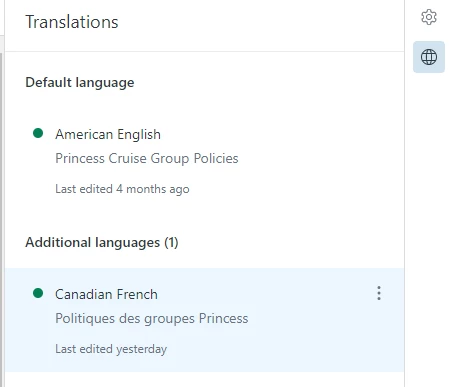
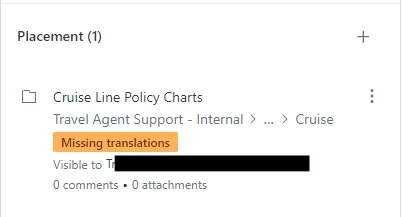
We have an issue where even when we have created translated pages in our HC for articles, the Placement section still displays “Missing translations”.  And when trying to view the page in the HC and switching the language from EN to FR, we get a “Oops…. page missing” message.


Mattias11
  • December 9, 2024

Absolutely fix the “should only appear once”. It steals away from other relevant articles to have it appear several times. Makes no sense at all and should be an easy thing to take care of. 


  • December 16, 2024

Since “Article Placement” is an optional column in an article list, it makes sense that you would want to list all placements. But if we aren't using that column, there is no reason to list an article multiple times since the multiple listings look otherwise identical. Perhaps the problem can be solved by showing all the placements only in a list using the “Article Placement” column, and conversely if a list isn't using that column collapse the multiple listings to one.


Orsolya
  • Author
  • January 10, 2025

@jesse12 @zach16 @mattias11 I understand your concerns. Can you tell me how would you pick which article placement should be one showing up in search? To give you more context, if we “hide” most placements to ensure there is only one returned in search, you will face the dilemma which one to choose, and how the rest will be findable. 
As I said, I understand your problem and we are trying to find the best solution. I'm curious what do you consider the best solution. Cheers!


Mattias11
  • January 10, 2025

Hello @orsolya 

I would personally say that it's not a huge issue to have to select one or the other. It's the title of the article that is important, not that it's placed in one place or another. 

This double article presentation is extra irritating in the “Submit a ticket” section where the real estate is very important to deflect cases. See example from our site below: 


  • January 10, 2025

In Search results when there is multiple placement for an article, isn't it possible to show the result only one time but with several breadcrumps?


Zach16
  • January 10, 2025

@orsolya I've thought about this a lot more, and I actually think you would want two things. By default, they show up in search, but you have the option per placement to not be indexed by search. In many cases, I now think it makes more sense for it to show up in search for multiple locations as an end user could be looking for something on a specific product and maybe they find the duplicated article on another product in your KB, even though the info is correct, they may not understand that the information pertains to their product too. But I could see the need for the ability to not have it show. This could be as simple as a check box in the multi-placement process that says “Allow search to index this article” or something.


TLDR:

Default Search Visibility: Articles should be visible in search results by default.

  • Opt-Out Search Indexing: Provide an option to exclude specific article placements from search results.
  • Rationale for Search Visibility: Duplicated articles on different products can be beneficial for users seeking specific product information.

Lyle12
  • January 10, 2025

Our use case is that we've got two separate Zendesk installations covering two customer bases. One base has strict data residency requirements, but the supported products are the same.


Supporting the same products in two places means that we want to leverage article suggestion and other features in ZD, so have the content duplicated across instances.


The result, however, is that indeed there's duplicate content showing up in search engines - and we also think it's affecting our page rank.


It would be nice to be able to specify a canonical URL in each page so that we can at least avoid downranking.


My dream state would be to have both customers use the same KB and not lose any of the opportunities for self-service exposed by having the KB hosted within Zendesk.


  • January 15, 2025

Hi! We have several brands with similar article content—but not identical—so we were very excited about this feature. However, we noticed that if we publish an article for, for example, four brands at the same time and then go back to change some links (because each brand has its own links/websites), the changes will apply to all the articles that were bulk-published. As a result, we can only use this feature for a small number of articles that don’t have any brand-specific links. Hopefully, this will be improved soon.


Tyler42
  • January 15, 2025

I agree with Nina. The ability to utilize placeholders, or simple IF THEN logic to return brand specific text or links would be immensely helpful. 


Jesse12
  • January 21, 2025

@orsolya 


I was thinking along the lines of making it as simple as possible for customers i.e. the top viewed article to only appear in the search results page.

What Zack Gilbert has mentioned above makes sense, it means the customer can "click" on the option to filter duplicates out if they don't want to see it in multiple places.


  • January 28, 2025

I've noticed that when I place articles in multiple sections/ help sites the content copies across correctly but some of the custom html (specifically accordion lists) does not. Is this a known issue and is there a workaround/ improvement coming to address this? 


Orsolya
  • Author
  • February 5, 2025

@james32 can you share a screenshot about this issue?


  • February 5, 2025

Hi @orsolya here are some screenshots, so you can see the acordions are displaying in the Sinch MessageMedia placement but not in the Sinch Engage one. 


  • April 29, 2025

Hi, Is it possible to add placements between brands using the API we have 100+ articles we'd like to include in multiple help centers that we currently just in one. 


  • April 29, 2025

Hi is it possible to add article placements using the api? 


  • May 20, 2025

Would be great to have the following:

- Ability to copy over labels from the initial brand where the article was placed (in the use case where you already have the article in one brand and are now adding it to additional brands)
- would be good if the articles that were posted in additional brands maintained the same author as the original article - currently it assigns whoever is copying the article as the new author


  • June 27, 2025

Hello,


we have the following use case:
Three Help Centres with different default languages: 1x English, 1x Swedish and 1x Polish
We would now like to create a uniform article in English that should only be displayed in English in all three brands. This is not a problem in the English brand, but we cannot publish the article via multi-placement due to the missing languages in Sweden and Poland. Instead, we have to create a new article as before and specify that the language is Polish and Swedish, even though it is English.
Adding English as a language for the Sweden and Poland brands is not an option for us.


It would be great if there were a solution for this in the future so that articles can be published via multi-placement regardless of language.


  • July 1, 2025

Is there any plan to increase the 10 Brand Maximum?  We have well over 10 and growing, but all use the same core KB Article information that we'd like to keep current from one central location.  Having the customizable Brand and other such merge fields would also be a game changer along with the ability to have some other Brand specific sections added.