[ARCHIVED] Tip: How to add cool agent badges in Communities (Gather) | Community
Skip to main content

[ARCHIVED] Tip: How to add cool agent badges in Communities (Gather)

  • September 7, 2015
  • 58 replies
  • 0 views

Show first post

58 replies

Vladan
  • May 23, 2017

Hi Morgan, It's really hard to catch where is the bug from this point. The code seems fine.
Any chance to get url to your community? Thanks


  • May 24, 2017

Vladan
  • May 24, 2017

Hi Morgan, please try to put this code at the end of your footer (tested on this page):

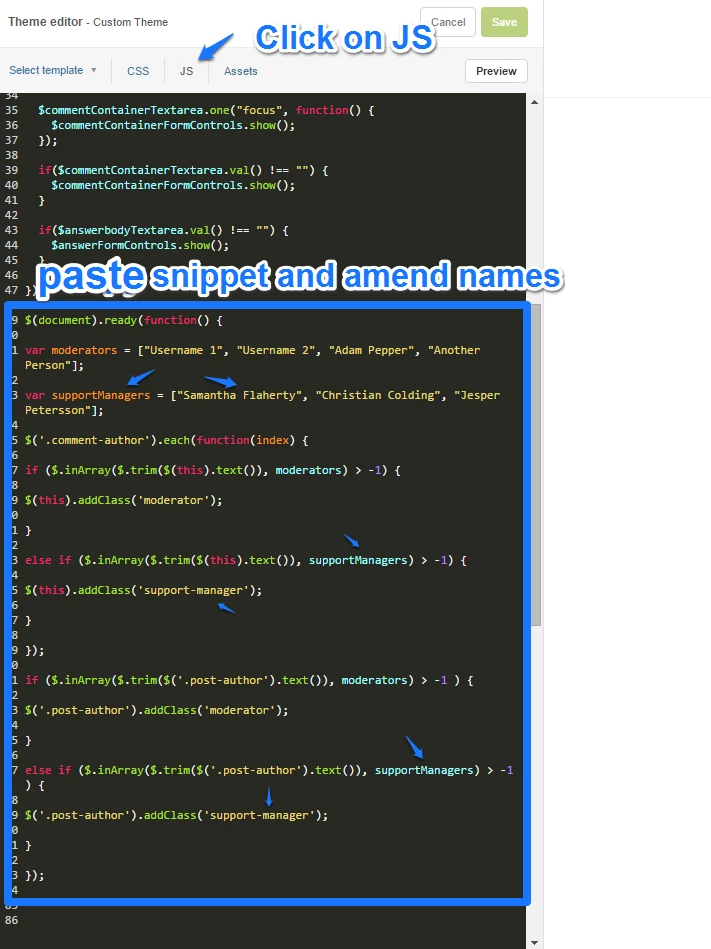
<script>

$(document).ready(function() {

var moderators = ["Melanie Benzel", "Katrina Lewison", "Amy Frank", "Ryan Strait", "Jessica LaFever-Smith", "Robin Genschorck", "Don Torrez", "Morgan King"];

$('.add-badge').each(function(index) {

if ($.inArray($.trim($(this).attr('title')), moderators) > -1) {

$(this).addClass('moderator');

}


});

if ($.inArray($.trim($('.post-author').text()), moderators) > -1 ) {

$('.post-author').addClass('moderator');

}

});

</script>

  • May 24, 2017

This works!!! Thank you!


Vladan
  • May 24, 2017

Glad that it works now! You are welcome!


  • June 8, 2017

Any plans on adding this as part of the Community code? seems like a pretty reasonable feature to want in a forum. 


  • June 12, 2017

Hey Joanna!

This isn't currently on the roadmap for our Community product, but it's a great suggestion! I did some poking around in our Product Feedback and found several threads with suggestions for Community product improvements, but nothing specific to just badges.

If you're willing, I'd encourage to you head over there and share your idea and detailed use case!


Mary12
  • October 27, 2017

I would love the ability to add an actual badge image (jpg).  Can that be done using what is shown above in CSS?  How could we accomplish this?


Mary P


  • November 30, 2017

I've tried following these steps and can't get it to work. I feel like everything is in the right place. I changed some of the class names but it should still work. I also tried testing without changing the class names at one point but that didn't work either. Would someone be able to check out my support site and advise what I'm missing?

https://support.ioninteractive.com/hc/en-us

Thanks!


  • November 30, 2017

Please disregard my last comment. I figured it out.

Thanks


Mary12
  • November 30, 2017

Has anyone found a way to include a Jpg badge in a profile?


  • December 7, 2017

Hi everyone! 

Is it possible to substitute email address for name in the code snippets? Has anyone tried any had some success? Let me know!


  • December 12, 2017

@Dave, any chance you can share how did you fix the issue? 


  • February 21, 2018

Instead of advising people to modify strings of text that match Moderator names, why not create the javascript trigger based off the ID of moderators?  Something along the lines of this:

$('a[href*="22805752907"]').addClass ( "FancyNewModeratorClass" );

Basically, what this code will do is look for the ID number of a person in the link to that person's profile (replacing "22805752907" in the example above with the ID of the moderator).  Since profile ID numbers are unique to the person and are baked into the URL of each person, this should work.  This way, you wouldn't get the "John Smith" problem as outlined in the article.  I would not want to allow for the possibility of mis-labeling a user as a moderator, if I were maintaining a community.

We have decided to move away from Zendesk Community in favor of a more feature-rich community option, otherwise I would flesh this concept out completely: adding all moderator ID's to an array and then filtering the links that the script triggers off of.  Hope this helps, though.


  • February 21, 2018

@Mary Paez,

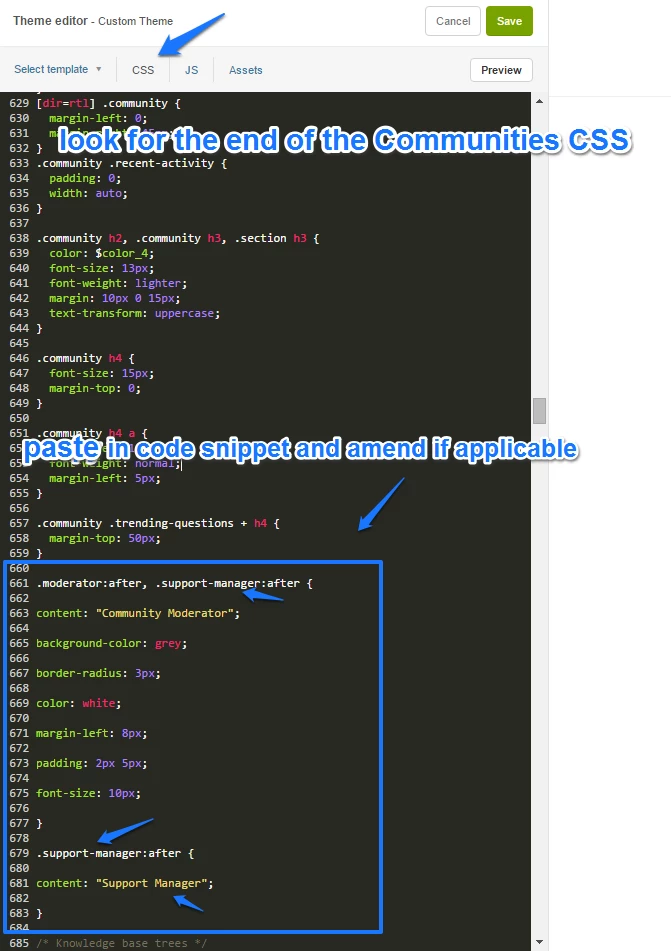
Did you figure out a way to solve your problem?  It's not difficult to modify the CSS to change the image that appears for agents.  An example of how I did that in our instance is below, injecting our company logo into each agent's profile:

.avatar .icon-agent::before {
position: absolute;
right: -2px;
bottom: -4px;
content: url($assets-logo-shield-15x22-png);
}

You would need to mess with that code based on your own image's dimensions.

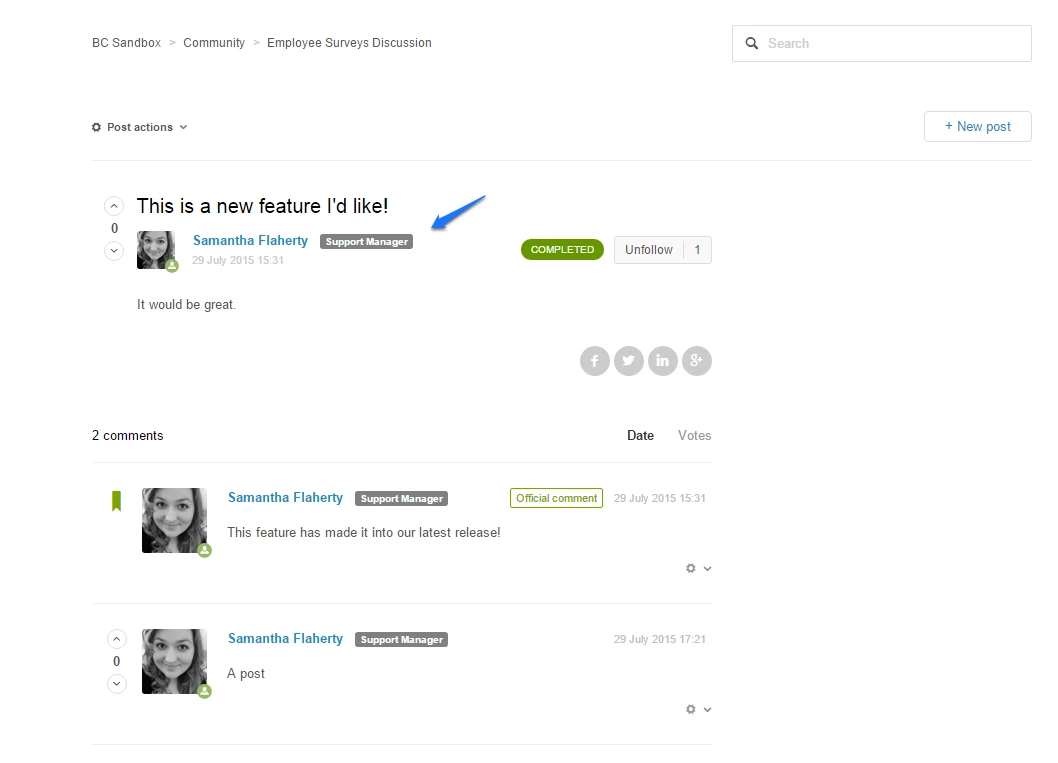
You could have the image appear after the name, similar to how this article is injecting the "Community Moderator" by just modifying the CSS as outlined in the article to reference an image (like I did in the sample code above).  You could theoretically stack up additional badges by adding more complicated Javascript arrays and loops and adding more classes...but it will be very difficult to manage if you're trying to offer badges to many quantities of people, or if they change often.  


Jennifer16
  • February 21, 2018

Thanks for helping out with solution ideas, Luke! So helpful.


Mary12
  • February 21, 2018

This is really helpful, Luke.  If it is possible, maybe Zendesk can incorporate the abiltyy to easily add an image to do this?to various profiles.  The problem with us coding is every time we need to make a change, we have to hire someone to do that.  It takes testing & TIME!.  A simple coding change in the product would be easier for many customers.  Thank you for that.  I will pose to our team and see if they might be interested.  I think they would rather have ZD build it into the profile.


Don22
  • September 6, 2018

Are there any plans to expose more user information about the authors than the "agent" parameter? It would be nice to be able to have different badges for moderators, support staff, or SMEs based on user tags or segments rather than having to continuously maintain lists of names.


  • September 12, 2018

What do I need to modify in the .js  if I want to have more then 2 moderator classes?


  • January 24, 2019

Thanks @Samantha Flaherty 

Have you ever tried adding an icon?

Best,

Toby


  • February 4, 2019

HI Zendesk,


This is a great addition to the community area and I have tried implementing this with a few changes, however in the new layout of the config I cant seem to get this working. My config is below, can you see anywhere I may have made an error please?


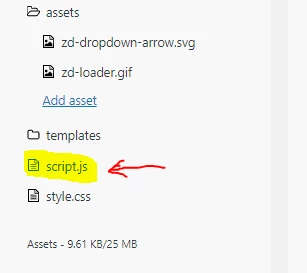
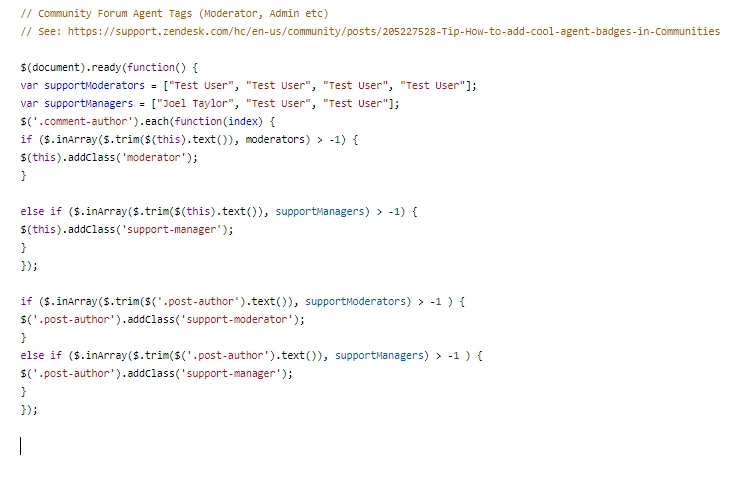
1. In the 'Script.js' ...


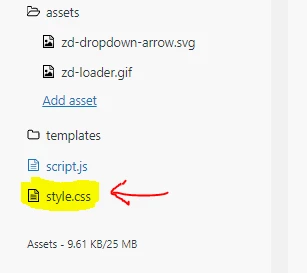
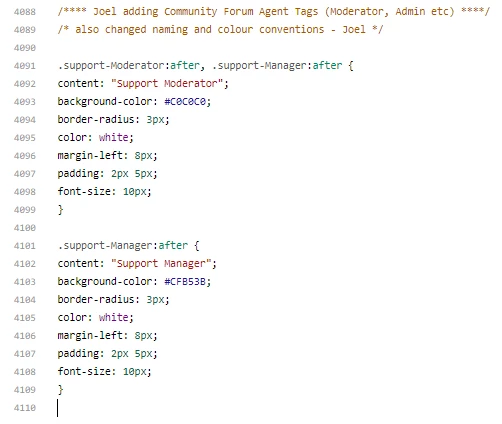
2. In the 'Style.css' ...

From what i have seen (although changing a few naming areas) I think I have added all sections correctly?

However the result is still:

Any help would be amazing!


Kind regards,

Joel


Vladan
  • February 4, 2019

Hey Joel, from this perspective for me it seems that you need to make a change in your CSS file (to lowercase),

.support-Moderator -> .support-moderator

the same for .support-Manager 

If this doesn't help, can you share your HC link so I can check directly?


  • February 4, 2019

HI Vladan,

Thank you for the very quick reply! I have tried this and it didn't seem to resolve this issue, although great spot on the caps, I can't believe I missed that (sorry).

Is it the URL to the help centre you would need?

Kind regards,

Joel


Vladan
  • February 4, 2019

Hey Joel, Yes.

Also, please edit:

https://cl.ly/63a7fe5a81d1

red arrow -> should be supportModerators

blue arrow -> support-moderator


  • February 4, 2019

Hi Vladan,

I have tried that also and unfortunately no change to the community forum.

The URL to our Help Centre is below:

https://gladstonesoftware.zendesk.com/hc/en-gb

Thanks again for the help on this!

Kind regards,

Joel