[ARCHIVED] Help Center - Collapsible headers in articles (accordions) | Community
Skip to main content

[ARCHIVED] Help Center - Collapsible headers in articles (accordions)

  • September 24, 2013
  • 102 replies
  • 0 views

Show first post

102 replies

  • August 28, 2015

Hey Wes,

Thanks for this article.

How can we make the entire header clickable without any text?  

I am using a background image and don't want text but can't seem to get the header clickable using this:


<div id="accordion" class="panel-group">
<div class="panel panel-default">
<a href="#collapseOne" data-toggle="collapse" data-parent="#accordion2">
<div class="panel-heading">
<h4 class="panel-title">test</h4></a>
</div><!-- End panel-heading -->
</div><!-- End panel-default -->

Only the text is clickable and not the div

Thanks!


ModeratorWes

@Rebecca - I believe you will need to wrap that with an <a> tag.


  • August 28, 2015

Thanks Wes - I figured it out by adding padding to the a tag so it took up the same space..


Follow up question - - how can I put spacing between head panel-heading ?


I tried adding a margin-bottom to panel-heading but doesn't seem to work :(


ModeratorWes

@Rebecca - Its hard to troubleshoot without seeing your code as I have no idea what modifications you have done.  Can you post the URL or send it to me via email - support@wesdrury.zendesk.com


  • December 30, 2016

Great stuff @Wes thank you for this!


Hey @Wes
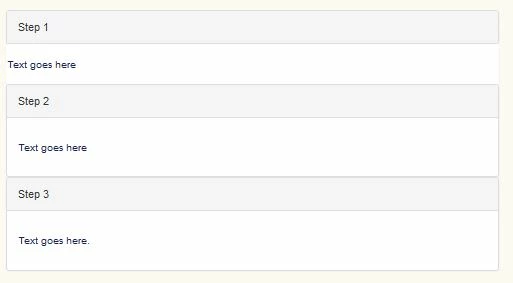
I was able to add this in, however my first panel doesn't show correctly. The panel size, border and indent don't seem to be applying correctly like the other panels do.

Here's what it's looking like


  • April 25, 2017

Awesome guide, Wes, thank you for sharing!

I tried working on this, and it seems to be mostly functioning as it needs.

However, you'll notice the top box has a lighter border than the bottom one.

I'd like all the borders to mimic the top box. Any suggestions on where to look?


ModeratorWes

@Scott - Is your help center open or can you post the link to the article so I can inspect the code via browser and take a look.


  • April 25, 2017

https://fieldedge.zendesk.com/hc/en-us/articles/115006163887

I'll keep this open for a bit while you take a look, but do maintain a locked down help center. It's not live yet though.

Updated: Link should work for a bit. Let me know!


ModeratorWes

@Scott - To mimic the top box border please remove the following from your CSS tab.

.panel-default {
    border-color: #ddd;

  • April 25, 2017

Didn't seem to have an effect. I removed that entire entry from the CSS tab and published.

https://fieldedge.zendesk.com/hc/en-us/articles/115006163887


ModeratorWes

@Scott - It inherited it from another class add this into your CSS file.

.panel-default {
     border-color: transparent !important;

  • April 25, 2017

I think that did it! Take a look. 

Conversely, if I wanted to go with the solid border such as the second image, would I change the border-color to Solid?

I'll want to do some AB testing with the team.


ModeratorWes

@Scott - Yes you can play around with that CSS selector, however, there may be a few more in there that would need tweaking.  Since I don't have this in my test account I'm having to depend on your article posting.


  • April 25, 2017

Thanks Wes, I appreciate the help! That's the only article so far, so just using that to do all the testing.


  • September 1, 2017

Hi, this is a great solution. Question...it works in the webwidget also?


Thanks,


  • December 28, 2017

Is there any modification needed if we just want to make our ToC collapsible, not the article content itself? And can this be applied on a per article basis? We have some articles with a short ToC that do not need collapsing. Thanks!


  • January 22, 2018

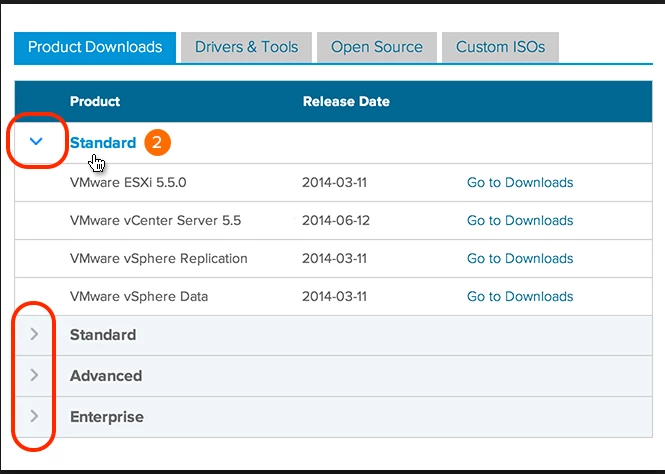
I'm not sure if this was brought up before but is there a possibility of adding non-static, clickable arrows to the accordions, like this one below, without messing it up:


ModeratorWes

Sure take a look at this code, it should get you going.


  • February 7, 2018

Whoops I forgot to write back!!! That worked perfectly! thanks so much Wes :-) 


ModeratorWes

@marlliam - Glad to hear :-)


  • March 5, 2018

Hi Wes, Quick question! For the accordion, I would like it so that if our users clicked on anywhere on the heading that it would open up the accordion. However, I haven't found a way to make it work yet. Do you have any suggestions? Thank you!


ModeratorWes

@Richard - Not sure what code you are using but you could turn the header div into an a tag.  If not post the code you are using so I can take a look.


  • March 5, 2018

@Wes - The code that I am using in each article to create a container is:

<div id="accordion" class="panel-group">

<div class="panel panel-default">
<div class="panel-heading">
<h4 class="panel-title"><a class="accordion-toggle" href="#collapseOne" data-toggle="collapse" data-parent="#accordion2"> Type Title Here </a></h4>
</div>
<div id="collapseOne" class="panel-collapse collapse">
<div class="panel-body">
<p>Type text here</p>
</div>
</div>
</div>

Other than this, the code for CSS is identical to the one from this article.


  • March 6, 2018

@Wes - Just an update. I have made the panel-heading clickable by adding this to the CSS:

.panel-heading a {
display: block;
text-decoration: none;
}

However, I found that the area clickable is only up to the size of the title. Is there anyway to make the entire box clickable instead?

Also, I found that when trying to adjust the size of the title through the article, it seems to "revert" itself back into a hyperlink by changing the title color back to that of blue. Is there anyway to prevent this from happening as well?