[ARCHIVE] Zendesk adds random line breaks in email template | Community
Skip to main content

[ARCHIVE] Zendesk adds random line breaks in email template

  • May 23, 2017
  • 9 replies
  • 0 views

Hi,


I'm putting the HTML signature of our agents in the trigger's email body. Since I want the agent's picture, his details, and our company logo, the layout is quite complex but works perfectly from Outlook.

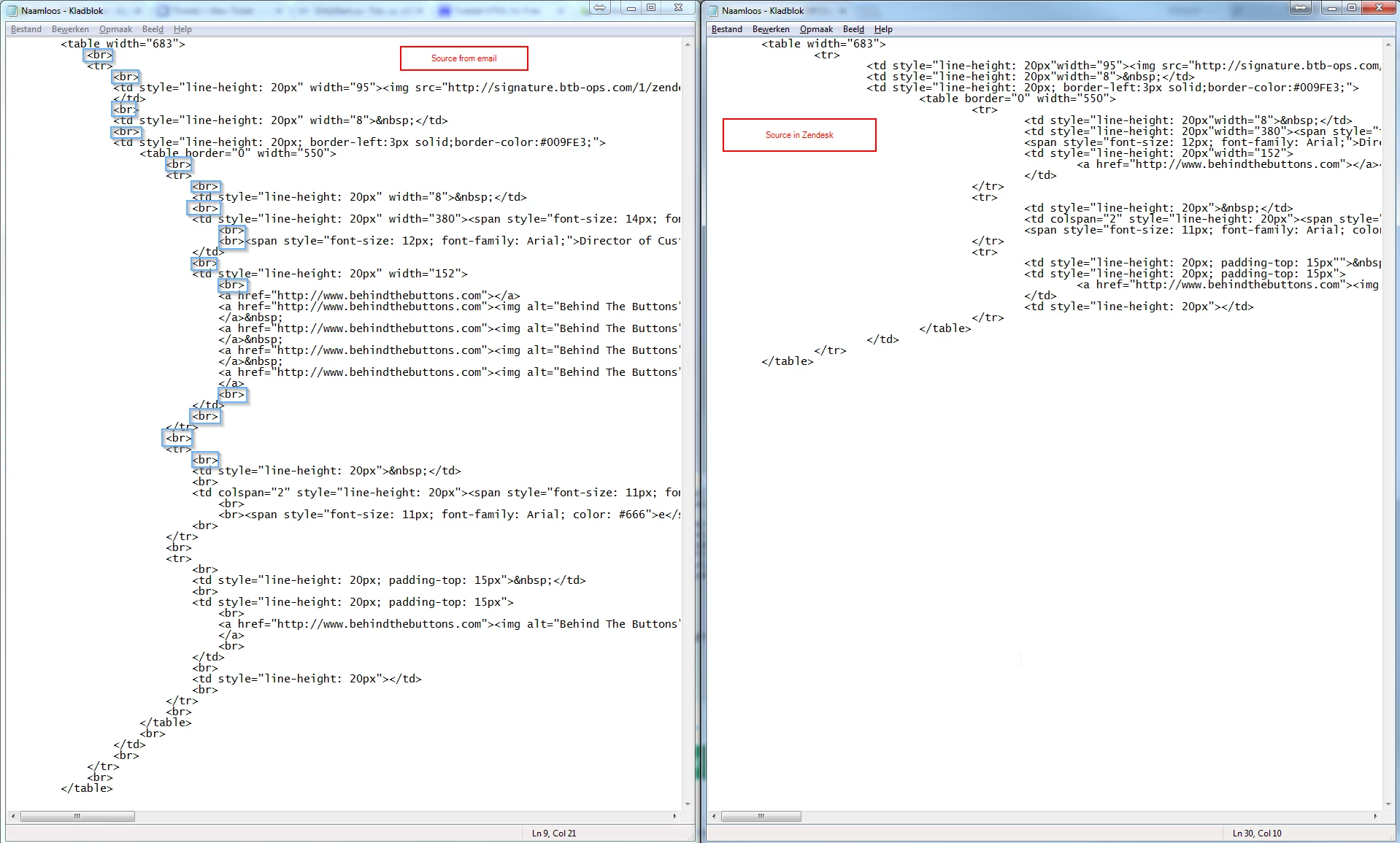
When using the same HTML code in Zendesk though, the emails arrive with a vertically stretched footer. When looking at the source code of the email that arrives through Zendesk, a lot of random line breaks were added. Anybody got a clue why and how to solve it?

Code:


But source of email arriving through Zendesk:


This topic has been closed for replies.

9 replies

  • May 24, 2017

Hi Thomas,

My guess is that you probably have some non-printable characters after your 3rd td tag and after the  .

Try editing this text with Notepad++ or similar editor, and make sure you turn on "view all characters" -


  • Author
  • May 24, 2017

Hi Tal


Thanks for your comment!

Unfortunately, I don't think it will be the solution to the problem: I don't see any weird chars...


  • May 24, 2017

Thanks.

The Notepad++ screenshot actually looks different from your 1st image - there is no extra line and   after the 3rd td before the table tag.

Try to copy and paste from notepad as it is now and see if the email is still weird.


  • Author
  • May 24, 2017

Hi Tal


Sorry for not claryifing that - indeed I have cleaned up a little in the Notepad, but already copy pasted that back into Zendesk with the same result (unnecessary <br />'s) :)


  • May 24, 2017

actually, the table html is not well formatted - for example I see only one table tag but two /table closing tagss


  • Author
  • May 24, 2017

Hi Tal,


It is there :) Just not indented really well - since I was trying if it mattered if I had absolutely no line break between the two tables.


  • Author
  • May 24, 2017

As I investigated this further... there is a bug in the online tool I use to make the source code of the email a little more readable.

Now did the check manually... Apparently it's not adding that much line breaks, just a lot spread all over the code:

Any way to disable these automatic line breaks? Would it work if I put the whole code on one line, so Zendesk doesn't interpret a CR/LF as something to replace with a <br>?


  • Author
  • May 24, 2017

FYI - I was able to fix it like that.

Lesson learned: when using HTML code in a trigger email set-up, make sure you remove all line breaks (e.g. using http://www.textfixer.com/tools/remove-line-breaks.php) so all HTML code is in one block, or Zendesk will replace all new lines from your HTML with <br>'s.

Thanks a lot for your help Tal!


  • May 25, 2017

Hey Tal, long time no see! Welcome back!