Admin Center - Out of Memory... | Community
Skip to main content

Admin Center - Out of Memory...

  • March 4, 2022
  • 5 replies
  • 0 views

Peter11

I already said it in multiple posts, and I voiced my concerns in meetings with product management for the all new Admin Center: This piece of software is not ready for prime time.

That being said once more, I just experienced the first time a Out of Memory condition in Google Chrome with the admin center. My personal laptop has 32GB of RAM and there's enough free memory at this time, so I can't quite fathom what would cause this condition.

So, I once more ask you, Zendesk Support Development, to please eat your own dog food first yourself, and not to let us paying customers have the privilege to endure your problems and errors.

Yours truly

Peter

This topic has been closed for replies.

5 replies

Nicole17
  • March 4, 2022

Hi Peter, 

I've been following your comments regarding Admin Center, and they've been passed along to the product managers for this area. While I am not a product expert myself and cannot speak to the exact issues you're experiencing, I just wanted you to know that your concerns have been heard, and that Admin Center is continuing to be worked on and improved upon. 

I'm engaging some folks internally to see if anyone can help us understand what is going on with the Out of Memory condition you shared here. 

Thanks as always for providing your feedback and being such an active member of our community. 


Parag11
  • March 4, 2022

Hi Peter,

I sincerely regret that you have experienced this issue.  In order to get it resolved, can you please share:

  1. Exact steps you had taken in Admin Center when this error occurred
  2. Chrome version
  3. Laptop type (e.g. Windows 10, Macbook OS Monterey)

Thank you Peter; we will do our utmost to resolve this issue.


Domingo12
  • April 21, 2022

Hello Zendesk Team,

I officially report that we've experienced the same problem as Peter on 2 times and we've enough free memory on the computers.

1. Steps: add function, ticket,.... while we're writing the public reply 

2. Chrome version: Versión 100.0.4896.127 (Build oficial) (64 bits)

3. HP Windows 10 Pro, version 21H1, Intel(R) Core(TM) i5-9400T CPU @ 1.80GHz   1.80 GHz
16,0 GB


Peter11
  • Author
  • April 21, 2022

Thanks for confirming that I'm not alone, @domingo12

If it only where so easy to reproduce these kinds of problems. It had been a one-timer, but a very disturbing one at that.

I also experienced tabs locking up while I entered text - in mid-word, Zendesk Support would freeze for longer than I cared to wait (this for once is not in Admin Center).

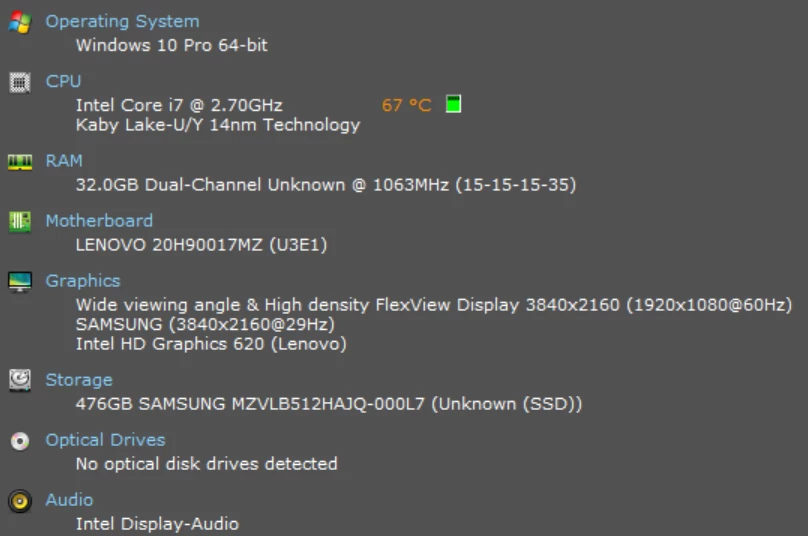
My machine data:

My browsers all auto-update to newest current versions; I use Chrome, Opera, Edge and Firefox.


Brett13
  • Community Manager
  • April 21, 2022

Hey @peter11 and @domingo12 this seems like a bug so I'll create a ticket on your behalf so our Customer Care team can dig into this with you.

You'll receive an email shortly stating your ticket has been created.

Cheers!