

Hi,
We often add links to images so that people can click to view them in a new tab.
Using the legacy editor:
- Add image to article
- Click the image to highlight it
- Click the Add link icon from the toolbar
- Add the link - at this point, the “Paste URL” field and the “Open in new tab” option are available.
- Click Add link
The link is added, and the image becomes clickable (edit, preview, and publish mode).
With the new editor, we have found that the following actions cause the image to be completely replaced by the link.
Using the new editor:
- Add image to article
- Click the image to highlight it
- Click the Add link icon from the toolbar
-
Add the link - at this point, the “Paste URL” and “Text on link” fields, as well as the “Open in new tab” option, are available.
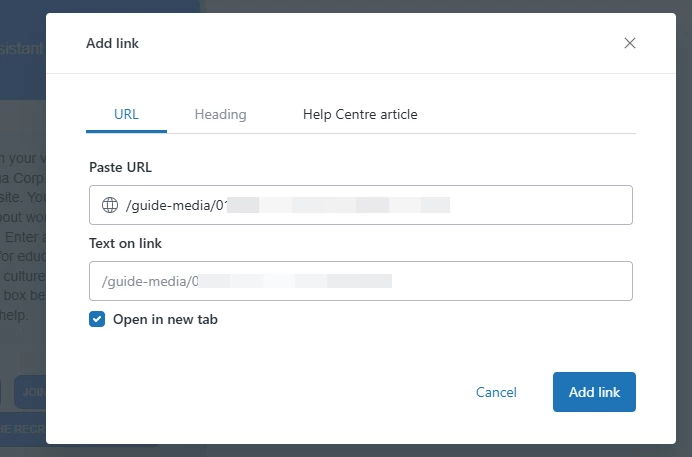
- Click Add link
The image is replaced with the link on the article (in edit, preview, and publish mode)
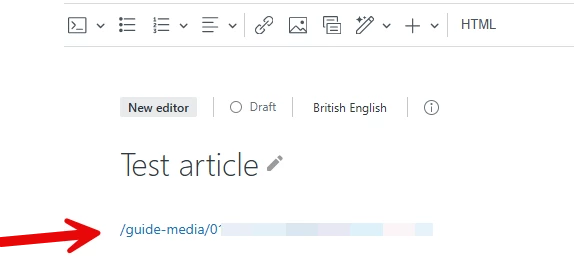
For the new editor, we've been working around this by either:
- Editing the HTML to manually insert the HTML attributes to make it clickable
- Reverting to the legacy editor (work needs to be saved before this action is taken otherwise, you lose all your edits) to then complete the actions noted above.
Can the new editor please be updated to enable adding links to images without replacing the image itself?
Thank you
