Add-on Zendesk for JIRA is not responding. | Community
Skip to main content

Add-on Zendesk for JIRA is not responding.

  • July 15, 2016
  • 6 replies
  • 0 views

Hi,

I'm trying to set up an integration between a test zendesk and test jira instance (own server). In JIRA when I'm installing Zendesk for JIRA (using standard http 8080 port in JIRA) it goes ok - I can configure this plug-in. However when I'm switching JIRA to https (port 443, self signed cert), when I'm trying to configure this plug-in it fails, actually it hangs with a communicate "Add-on Zendesk for JIRA is not responding." no more info in logs is available. Do you know this issue? How I can get rid of this?

Thanks and Regards,
Arnold
 

This topic has been closed for replies.

6 replies

  • July 15, 2016

Hi Arnold

Did you whitelist Zendesk IPs on your JIRA server?

Thanks


  • Author
  • July 18, 2016

Hi Maxime,

Thanks for your tip, so I should add all these IP numbers:
https://support.zendesk.com/hc/en-us/articles/203660846-Zendesk-Public-IP-addresses

using the JIRA Security tab? Could you kindly explain, in the pattern "174.137.46.0/24", what exactly means the "24" number is it a port number? My server opens only 443 port for the outside traffic.

Thanks and Regards,
Arnold

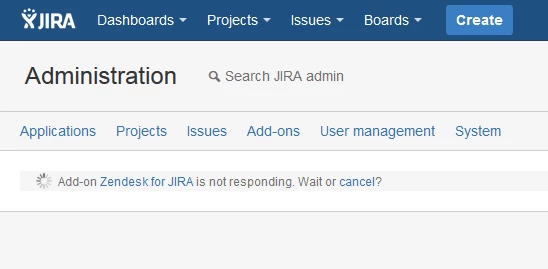
In addition, here is the stage where configuration of this plugin just hangs, no message on the page or in the logs what is the problem:

UPDATE 2:

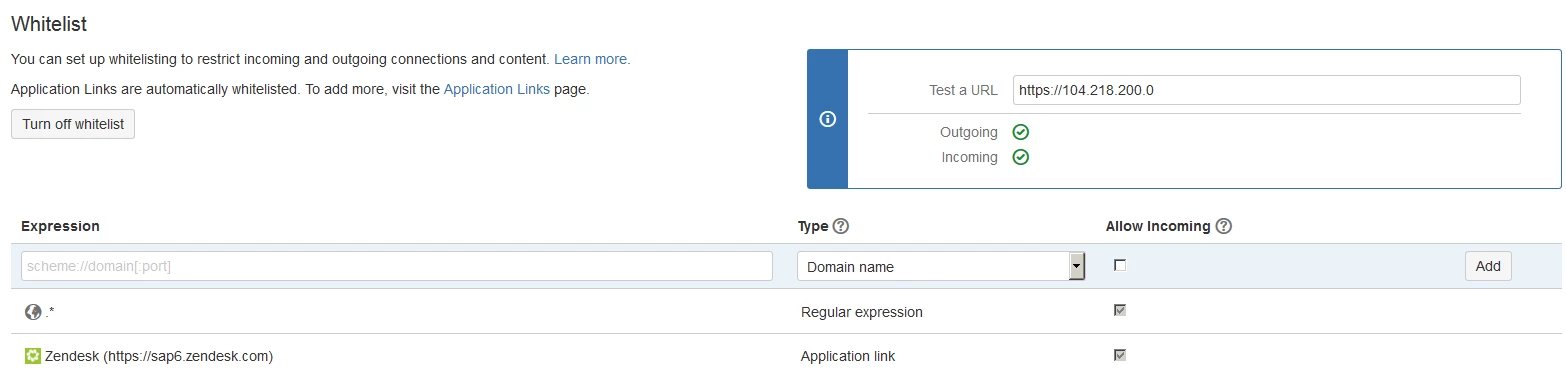
Now, I've added temporary a regular expression to allow all IPs (see te image below) but the result is still the same


  • July 19, 2016

Hi Arnold, 

Thanks for your time with regards to your configuration question. To help you further we require more specific info, so we will be in touch via a ticket. 

Thanks


  • January 6, 2017

so how exactly this issue is resolved??? i have the exact same issue. I added wildcard domain to Jira whitelist but issue remains.


  • April 3, 2017

Hello, I'm also receiving the same issue. Was anybody able to resolve this?


  • June 12, 2018

Potential Solution

Make sure the JIRA Base URL matches the URL you are accessing a JIRA issue from, including the port and/or https:// prefix. This can be updated in JIRA Administration > System > General Configuration > Base URL 

Note that if you want to access it with HTTPS then the Base URL must have HTTPS defined in it (eg https://jira.domain.com versus jira.domain.com ) and I believe the same would probably apply to ports.

----

Explanation

For us this message would appear if the domain used to access JIRA differed from what was configured as our JIRA Base URL. For example:

  • Base URL defined as: jira2.domain.com
  • But accessing a JIRA issue from: jira.domain.com

This was introduced after a JIRA upgrade where we wanted to test the new JIRA while still keeping the old one online, thus the JIRA Base URL had the number 2 in it so we knew which instance was which.