
How do I provide feedback? | Community
Skip to main content

How do I provide feedback?

  • August 14, 2025
  • 4 replies
  • 0 views

Alina12

As a participant in the EAP, we kindly ask for your active engagement and feedback. This may include participating in surveys, providing feedback on your experience, and reporting any issues you encounter. Your insights and suggestions will be invaluable in helping us refine our products and ensure they meet the needs of all our customers. 


Ways to engage:

  1. Comment on any existing community topic around partial end user separation EAP
  2. Create a new community topic
  3. Email tim.mclean@zendesk.com and alina.wright@zendesk.com with your feedback.


If you have any questions or need further clarification, please don't hesitate to reach out. We greatly value your input and look forward to your participation in our Early Access Program.
4 replies

Alina12
  • Author
  • September 29, 2025

We have a identified a new limitation that was not previously documented in the FAQ:

Side Conversations are not included in the scope of the EAP and will expose end user information of end users outside of the agents brand.

The following list the is the full scope of limitations:

Product Limitations


As an early access feature, there are some limitations to our partial end user separation EAP that you should be aware of when utilizing this feature:


  • Adding Followers / CC: An agent will not be allowed to CC or add followers outside of their department to a ticket. 
  • Agents can add an existing end user to their department if they know the User’s email address: Agents can gain access to a User record if they know the email address.
  • Does not prevent creation of already created end user records: As an agent creating a new end user that exists in another department, I am not notified that the end user exists and the department I am in gets added to the end user in the other department. The end user now has two department associations.
  • Shared end users across departments: when an end user interacts with multiple departments, the end user is shared between those departments. Agents who have access to one or more of those departments will have access 
  • All Support channels supported for end user separation. Guide and Explore are not included. Acquired product like WFM, Ultimate, Klaus are not included.
  • Only admins have access to end users who don’t have any department relationships
  • Side Conversations are not included in the scope of the EAP and will expose end user information of end users outside of the agents brand.

Alina12
  • Author
  • October 23, 2025

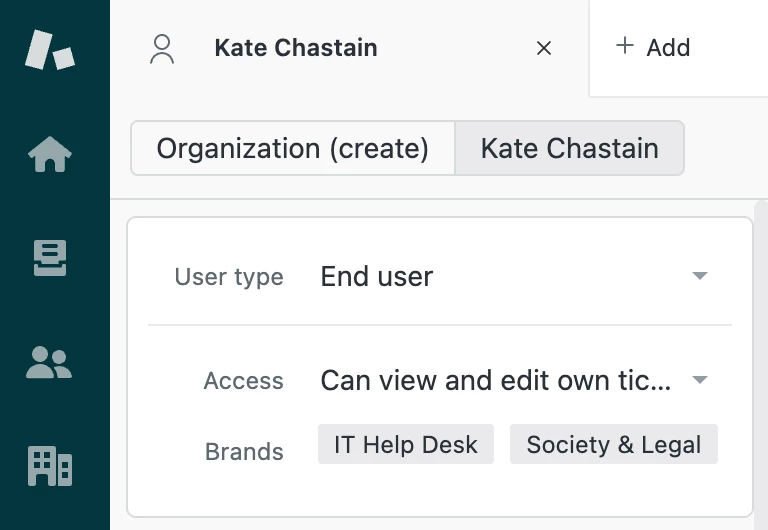
Announcing BRANDS visibility on the end user profile! You can now easily understand which brands the end user is associated with by viewing the end user. This tells you directly which of your agents are able to view this end user based on their brand membership.


  • November 7, 2025

Hi,

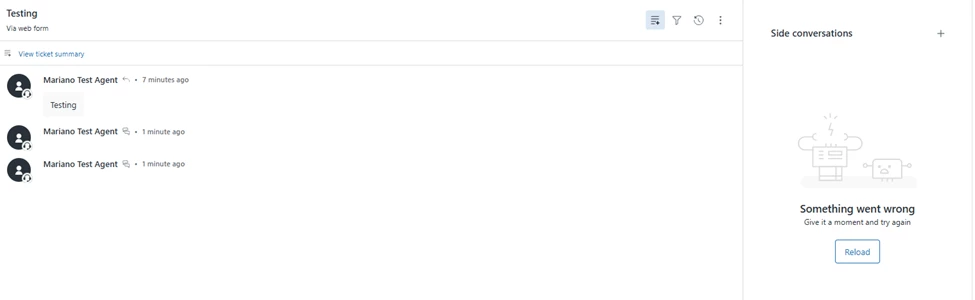
We've encountered a bug using side conversations. When an agent creates a side conversation with a recipient whose email address does not yet exist in Zendesk, the system creates a new user without assigning a brand.  This causes the agent to lose access to the side conversation.


See teste below where 2 side conversations were started but are no longer visible to the agent. Admins can still see the side conversations. 
 

We fixed the issue by adding the customer as a “New Customer” to the brand. However it would be good to be able to add new an end user to new brands directly from their profile (similar to how agents can be added to new groups directly on support).


  • November 11, 2025

Would it be possible to also have the functionality to assign organizations to brands?