Trigger when requestor (customer) updates a ticket with new response? | Community
Skip to main content

Trigger when requestor (customer) updates a ticket with new response?

  • August 4, 2023
  • 4 replies
  • 0 views

Nicholas14

I thought this one would be super obvious, but I can't seem to find an appropriate trigger from the drop down.

Use case: whenever an existing ticket is updated with a new message from the requester (not from any of the agents) it triggers a Slack message into a channel to notify an agent that they should check the new response in Zendesk. 

What I've tried so far:

Assignee | is | [agent's name]
Ticket status | Changed to | Open
Updated via | is | Web form
Updated via | is | Email

But this does not work. Also, it doesn't matter if the customer updates the ticket via email or any other method, I just want the update itself to be the trigger.

Any ideas?

4 replies

Mike16
  • August 4, 2023

@nicholas14,

Instead of using the "Ticket Status" and "Updated Via" options, try using the "Ticket" option, as this allows for the "is updated" parameters. So your Conditions would look like:

Assignee | is | {agent's name}

Ticket | is | Updated

You may also want to add the "Current User is not Agent" option, to ensure that only your customers/end-users are the only ones triggering this rule...unless you want other Agents' updates to trigger this policy, then you would want it to say "Current User is not Assignee".

I hope this helps.

~Konstantin


Nicholas14
  • Author
  • August 4, 2023

That looks like it's worked. Thanks a lot!


Hannah12
  • April 24, 2025

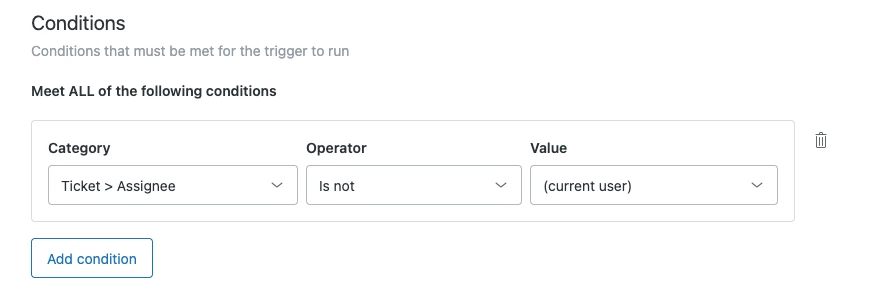
Hello! I see that 1268748606509  mentioned a trigger option for Current User > Is Not > Assignee, but I don't see this as an option. If this used to be an option, why did this get removed? If not, is there an open feature request that I can upvote and add my comment to?


Rj22
  • July 12, 2025

Hi @hannah12 <Hannah Lucid>,
 

I believe the correct condition should be “Ticket Assignee” | “is not” | “Current User.”


For a complete list of trigger conditions, you can check this helpful article: Ticket trigger conditions and actions reference

I hope this is helpful.