Time to next SLA breach | Community
Skip to main content

Time to next SLA breach

  • March 29, 2022
  • 11 replies
  • 0 views

Hi there, I'm pretty new to Zendesk Explore but I'm getting confident.

My goal is to calculate the time to the next SLA metric target breach, so that you can act before time has already run off. The focus is on First Reply Time, Agent Work Time and Requester Wait Time.

Provided that I was not able to find a pre-calculated field within the SLAs dataset, which is the way you, community, would suggest? Could Zendesk APIs be of help?

Thanks

11 replies

Jacob20
  • March 30, 2022

Hi Alberto,

You may want to consider adding the "next SLA breach" column to your agents' views and have them sorted by this as well. This should let the SLAs you've set dictate the order tickets should be handled, and let agents see the timer in views and on tickets working.

There is a brief guide on this here:
https://support.zendesk.com/hc/en-us/articles/4408885799834-Adding-the-SLA-breach-countdown-to-your-views

Hope that helps you out.


  • March 30, 2022
Hi Alberto, good question! Jacob has it pretty spot on. Explore does not show "real time" data except for live widgets. At most, its data would be syncing once every hour. So having a "time until next SLA breach" is not possible with Explore. Instead, an alternative would be including the next SLA breach column in the view that your agents look into. 
 
Cheers! 

Jacob20
  • March 30, 2022

Hi Alberto, sorry for not being clear, I was speaking about your stated goal of having agents aware of upcoming targets before they breach. 

I don't believe Explore real-time dashboards would be able to warn agents, at best it could display the tickets that have already been breached. 


CJ99
  • October 20, 2022

Is there anyway to achieve this anyways? Being off by an hour is not a concern for me. Let's assume I have 500 tickets and 200 of them have breached SLA already. I want a report that shows me "most breached" to "least breached". Can I do that? 


Dave12
  • October 21, 2022
Hey CJ -
 
Views would be the way to do this, as Jacob mentioned -- there's not a way to do this in Explore.

  • Author
  • October 21, 2022

Hi there and thanks to anyone who contributed. I apologize for being extremely late to reply; I somehow forgot about it.

My goal is to provide the user of one of the custom Explore dashboards I developed with the time to the next SLA breach, ticket by ticket, at the time of when the data were extracted (which is considered sufficiently accurate). As a consequence, I think I cannot act on Zendesk Views.

From what you all have written, I deduce this is simply not feasible. Am I right? 


  • October 27, 2022

Big +1 to the @cj99 point. You have to be able to report on 'Next SLA Breach', even if it's not live but a snapshot of how it looked a couple of hours ago! 


Jacob20
  • November 1, 2022

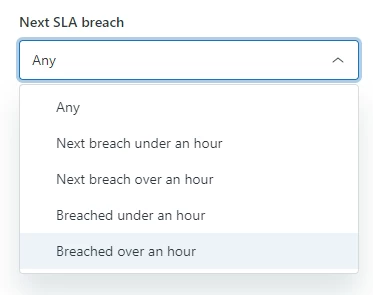
While not the reporting you're looking for, a new release adds more filtering options on views, among them Next SLA breach.


CJ99
  • November 2, 2022

That unfortunately brings in no clarity and does not add any value for me, at least. That filter is still "all metrics for all policies", that's not helpful if you want to look at a specific policy and a set of tickets to see what has breached first reply versus next reply. 


Michael227

So our organization is using Geckoboards to achieve this. I had to create it there and they are able to calculate time until next SLA breach. This data should be available in the Explore suite by default. We shouldn't need to pay an outside vendor to dashboard this information. Build a way for Explore to do this please.


Mathias18
  • December 19, 2025

To be honest I don't understand why the Request Time Wait is just not in sync with the tickets every hour like most of the fields.
It is way too confusing this only gets synced with a status change.