Text line on Ticket Forms? | Community
Skip to main content

Text line on Ticket Forms?

  • February 19, 2016
  • 41 replies
  • 0 views

Show first post

41 replies

Brett13
  • Community Manager
  • August 29, 2019

@Mikaël Janssens as mentioned above, this would require some custom code on your end to set this up. Perhaps you can provide some additional information on the workflow you're trying to set up to give other users a better understanding of what you're trying to accomplish?

Additionally, while I'm not able to assist with custom code from my end, we do have some documentation that may help point you in the right direction: 

Cheers!


  • August 30, 2019

Hi


I really don't know what I need to extra to explain my question about adding text, text lines etc. when using Conditional Fields... I think the questions here are pretty clear. 

The topic started with a question about adding static info that belongs to a custom Ticket Field. That works fine, but in the case of a Conditional Field, that static info is always visible, even if the Conditional Ticket Field is invisible in the form (because the condition was not set). 

We would then expect that Zendesk can offer help to achieve this, which tag or whatever to use. 


Thanks


  • October 10, 2019

Hey all,


Just adding an FYI here, but came across the comments in this article which can help to lead to a solution to hide additional text/text lines on forms: https://support.zendesk.com/hc/en-us/articles/115002860148-Disabling-the-subject-and-description-fields-on-the-new-request-form-in-Help-Center-


Essentially, if you simply wrap your text/line in an if statement attached to a change function, you can control when it shows, something like this (based on Socorro's examples on that article):

$("#request_custom_fields_yourcustomfieldidhere").change(function() {   // Script will run if this field is changed
if ($("#request_custom_fields_yourcustomfieldidhere").val() == "valueofcustomfield") {
$('.request_custom_fields_xxxxxxxxx').before( "<p>Header</p><hr>" ); // Your text/line etc.
}
});


This would mean you may need at add some conditional logic in here, similar to when you set up your conditional fields, but hopefully this helps some people with little javascript experience (like me!) customize their forms a bit more.


Brett13
  • Community Manager
  • October 10, 2019

This is awesome. Thanks for taking the time to share this with everyone Scott!


  • March 25, 2020

Now the question is how do we do this in the API v2 templating, since it seems all the previous customizations will not work. I made a terrible mistake and deleted my v1 Copenhagen theme and now none of the customizations I was using work...


  • March 31, 2020

@Dave Foster Could you explain a little further what exactly are you trying to achieve?


  • March 31, 2020

It turns out that all the jquery customizations will in fact work with the updated Templating API v2. After reading a little more into it, I found information to import a jquery library here.

Thanks for following up!


Nicole17
  • March 31, 2020

Glad to hear you got it figured out, Dave!


  • April 16, 2020

Hello,

Is there a way to accomplish this within the agent screen?

Use case: We have different payment programs for our customers depending on specific criteria. We have these broken down in a tree style with yes or no drop downs and there is a chance the customer may not be eligible for that particular program.

Is there a way to display a message to an agent that would say 'Customer not eligible, please select a different program'?


Gail12
  • April 23, 2020

Hi Matthew,

This is a case where you'd want the decision tree to only offer that program as an option if the customer is eligible, there's not a way to have the text prompt the agent in the way you describe.

You might want to have agents work off a macro that has notes on the eligibility to call this out to them (like a checklist on a internal note), or have an internal knowledge base article that highlights the eligibility restrictions as an alternative.


  • February 17, 2021

I actually have the exact same question as Justin. There are some request categories (living in a dropdown) that we'd like to A) display a text message with no entry field associate with it B) ideally hide the form submission button so that if the user makes that selection, they actually cannot submit a request (for example, we want to direct them to another support page instead).


  • March 17, 2021

Hey Alex, this would be possible with a whole lot of custom JS code in your Help Center theme. I'd encourage you to get your developers involved to look into doing that. Alternatively, you could engage with our professional services team who could build that out for you.


François12

Hi, thanks for the help that was done. I tried what was mentionned before but in my case it do not work. If I write the line to display the sentence, it works but selecting the value "Non" do not work as displaying the sentence.

Did someone managed to do this?

$("#request_custom_fields_13723326467347").change(function() {
  if ($("#request_custom_fields_13723326467347").val() == "Non") {
    $('#request_custom_fields_13723326467347').after("Afin d'obtenir un appareil, vous devez avoir un contrat de plus de 10% dans la même école.");
  }
});

As an explanation, I'm trying to display some text when someone select a value in a custom field from a form.


Remi16
  • April 10, 2023

Good day François Bellavance,


Thank you for your post, hope you are doing well today!

I can confirm the following code works in my HC : 

$("#request_custom_fields_1500001044062").change(function() {
  if ($("#request_custom_fields_1500001044062").val() == "valeur_numero_1") {
    $('#request_custom_fields_1500001044062').after("Afin d'obtenir un appareil, vous devez avoir un contrat de plus de 10% dans la même école.");
  }
});

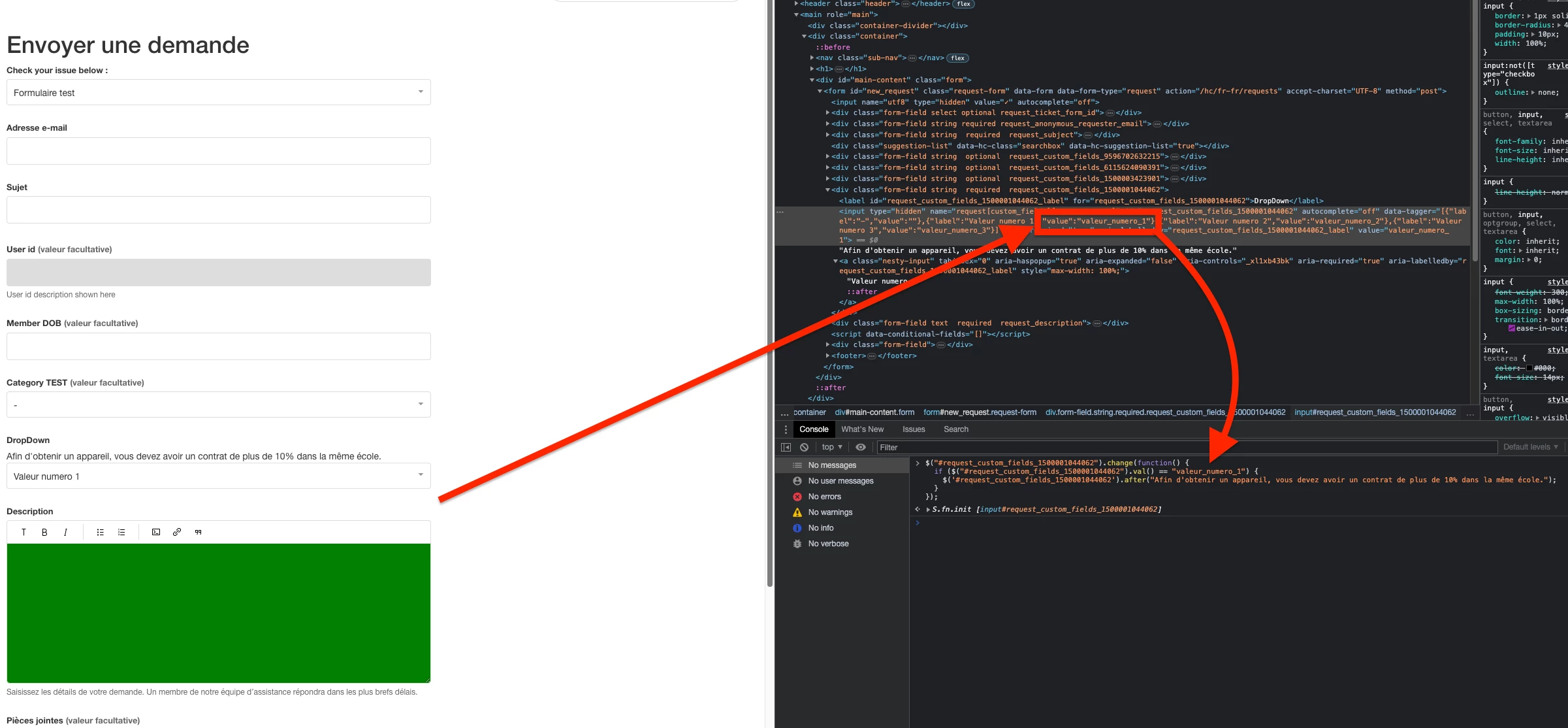
Just remember, you need to use the "value" attribute tied to your option from your Drop-Down, example from my HC here : Recording can be viewed here.

And screenshot here :

You need to use the related "value" attribute for this option when building your IF condition. 

Hope this clarifies it! Have a lovely rest of your day.

Best regards,


  • June 9, 2023

I used Scott's code to add text when a drop down is selected. It works, however; if the end user selects the option that the text shows up on, and then decides to select the other option in the drop down, the text still remains. Has anyone figured out a good if/then statement to hide the text when another option is selected? 

Below is Scott's Code: 


$("#request_custom_fields_yourcustomfieldidhere").change(function() {   // Script will run if this field is changed
if ($("#request_custom_fields_yourcustomfieldidhere").val() == "valueofcustomfield") {
$('.request_custom_fields_xxxxxxxxx').before( "<p>Header</p><hr>" ); // Your text/line etc.
}
});

Larissa11
  • September 28, 2023

@ed84 We had the same need, I just placed the code directly in "new_request_page.hbs" like:


    <script>
          $('.request_custom_fields_10597936620572').before("{{dc 'ticketfeld_dispute_wichtig_beschreibung'}}");
      </script>

In js the dynamic content was not valid. 


It works perfectly.