Text line on Ticket Forms? | Community
Skip to main content

Text line on Ticket Forms?

  • February 19, 2016
  • 41 replies
  • 0 views

Hi,

We are using ticket forms with conditional fields, and were wanted to be able to add a line of text to specific forms, kind of like a header. Any thoughts on how to accomplish this, or if it is possible? 

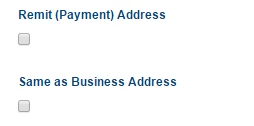
For example, instead of Remit (Payment) Address being a check box field, is there a way to just have it show up as text, or hide the check box? 
Thanks! 

41 replies

ModeratorWes

@Robin - Hi, is this within the agent screen or is this on the Request Form.


  • Author
  • February 19, 2016

@Wes,

This is on the Request Form in the Help Center. 


ModeratorWes

@Robin - Copy the below code on the JS tab right below the $(.document.ready) function.

//Add text before a custom field
$('.request_custom_fields_24303156').before( "<p>Header</p><hr>" );

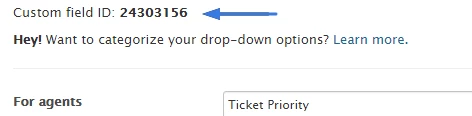
Replace the 24303156 with the number of your custom field.  You can locate this when viewing the custom field


  • Author
  • February 19, 2016

Thank you Wes!! That was exactly what I was looking for. 


ModeratorWes

@Robin - Glad to hear everything work.  Best of luck.


  • March 21, 2016

Is there any way to have the Text header part of the conditional field?  The field that this "header" is set to be before is part of a conditional field (using Zendesks app), so even when that field is not displayed yet because its requirement has not been selected, the "text field" is still showing.


  • April 21, 2017

@Wes - Can you help out with this one? Or if you know any kind of a work around?


ModeratorWes

@Kristos - To make sure I can fully test this can you give me a screenshot or exactly what you are trying to accomplish.  Thanks in advance.


  • June 8, 2017

@wes have the same problem.  Trying to display HR between sections on a submission form.  

The user choses how many items they have an issue with, then conditional fields displays a set of fields for each.  I.e., Choose number 1-10; then Display Fixture 1, Fixture 1 Issue, Fixture 2, Fixture 2 Issue, etc depending on the selection in number of fixtures.  

I'd like an HR between these sections, but ONLY when the fields are shown.  


ModeratorWes

@Brendan - Can you show me a screenshot?


  • June 8, 2017

Actually, no.... we hadn't built it all yet bc of the complexity.  Just got off the call with the client and we changed direction and are doing one item per ticket now.  

Now have a different question:

A ticket is submitted including fields for Store Name, Phone Number, and Address.  When the requester submits, we will ask if they have another item to submit, and if so we'd like to take them to a new submission but copy over the Store Name, number, and address fields to be prepopulated.  I know we can probably do this with js, but is there a different way to do in Zendesk?  


  • October 20, 2017

Hey guys,

Is it possible to insert a clickable hyperlink in that text we are adding in the ticket form via:

//Add text before a custom field 
$('.request_custom_fields_24303156').before( "<p>Header</p><hr>" );

Many thanks !


  • November 2, 2017

Hi Bertrand!

I'm not sure I understand your question...can you go into a little more detail about what you're trying to accomplish here? What do you want the end result to be/look like?


Trapta
  • November 3, 2017

Hi @Bertrand Bazin,

Yes, you can add a clickable hyperlink in that text. Use the below code and let us know how it goes for you -

$('.request_custom_fields_24303156').before( "<p>Clickable <a href="URL">link</a></p><hr>" );

Replace URL with the URL of your link.

Thanks


  • November 3, 2017

Fantastic thks guys !!!


Trapta
  • November 3, 2017

@Bertrand Enjoy!

Thanks


  • March 8, 2018

Is there a way to make this display based on the form ID instead of a custom field? 


  • May 24, 2018

Is there a way to use this with dynamic content?  We have text listed before a custom field (thanks Wes) but we also support french and german players so we need this text to be able to display in those languages also based on the user of course.


  • May 31, 2018

Hey Ed!

I'm going to check with the Community Moderators to see if this is possible. Sit tight!


Justin62
  • October 5, 2018

Is it possible to add conditional text based off which drop-down option a user selects in a custom field? For example, a drop down has three options. Select Option A and be shown a message.


  • October 17, 2018

I actually have the exact same question as Justin. There are some request categories (living in a dropdown) that we'd like to A) display a text message with no entry field associate with it B) ideally hide the form submission button so that if the user makes that selection, they actually cannot submit a request (for example, we want to direct them to another support page instead).


Jenni12
  • October 22, 2018

Hey Justin and Kevin,

This is a great question, and while possible, it would require custom coding within your Help Center. I'm going to leave this in the hands of some of our great community moderators in case they have further guidance on the code that would be necessary for this!


  • July 8, 2019

@Justin or Kevin - did anyone figure out a way to do this? We're interested in something very similar. Thanks!


  • July 16, 2019

Hey all,

Did anyone figure out a way to show/hide these kinds of headers based on conditional fields? Similar to what Matthew, Kristos and Brendan were attempting earlier.


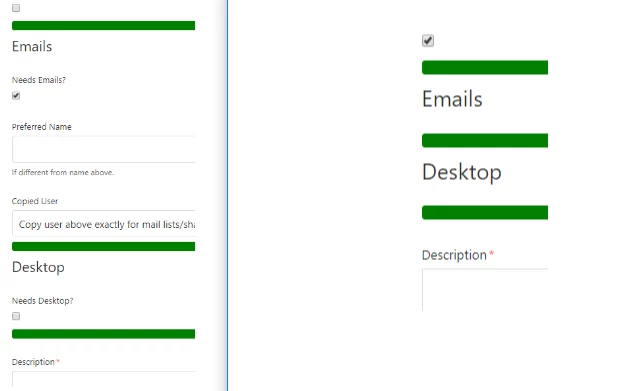
Currently I have a pretty lengthy form and I am just trying to give it a bit of visual breakup between sections with some horizontal lines/headers, however if I set these to appear before a field using the method Wes suggested (thanks by the way!) and then that field gets hidden, the headers remain which ends up being pretty messy. 


Attaching an example screenshot - On the left, there are sections for Emails and Desktops, which will each potentially expand to up to a couple dozen fields. But then on the right you can see that when all those fields are hidden (not relevant), the headers still show which isn't ideal.


Any tips would be appreciated - I am sure there's a bunch of ways to accomplish this and I'm currently reading up on what other queries I might be able to use here, I am just very inexperienced with html/js and could use all the help I can get.


Thanks!

-SP


*bump* Also want to use this hint but with conditional fields. 


Thanks