How to copy values between fields using triggers | Community
Skip to main content

How to copy values between fields using triggers

  • March 22, 2022
  • 8 replies
  • 0 views

Paul26

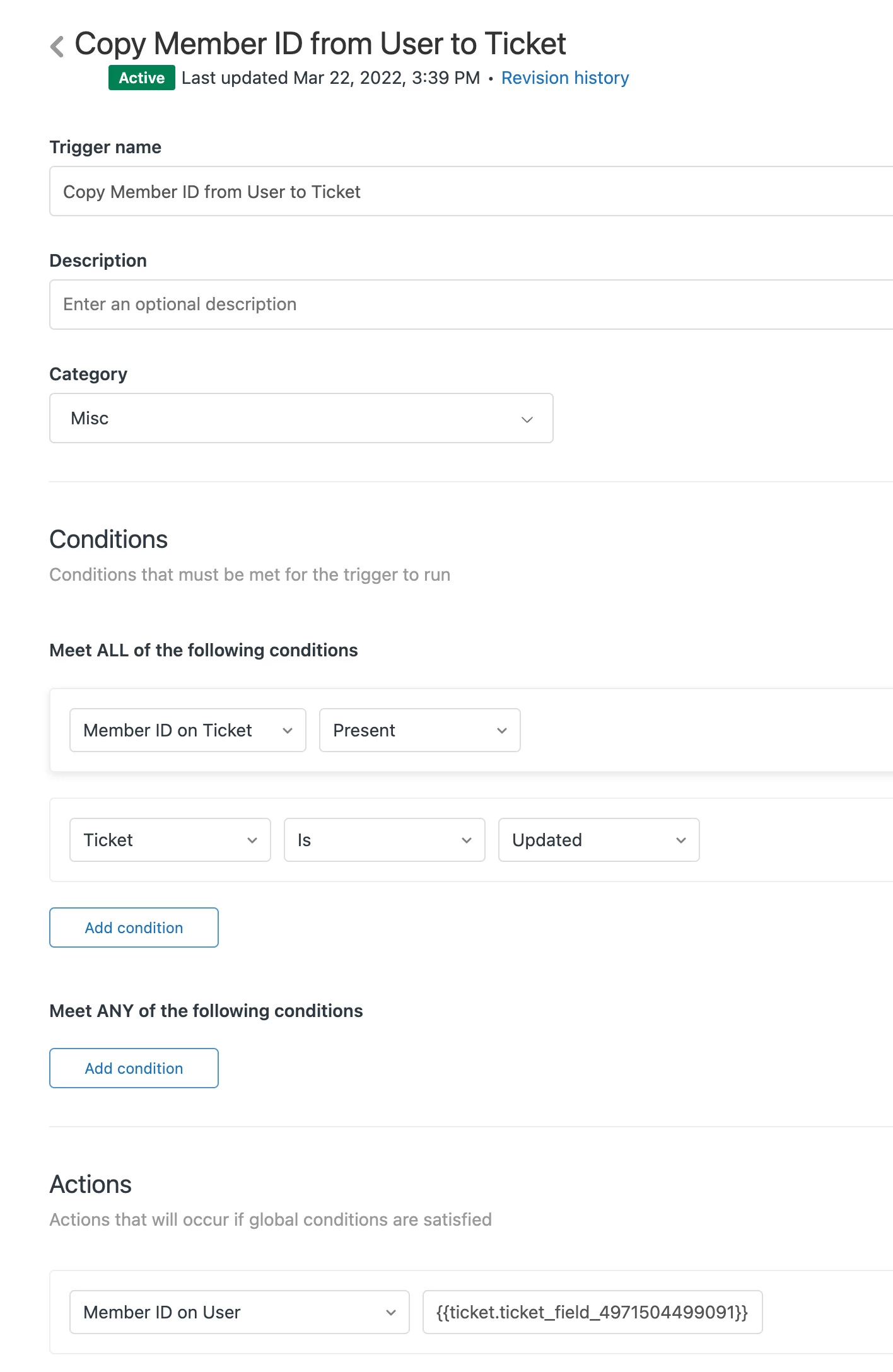
I'm currently trying to create a trigger to copy a custom text field on a ticket into a custom user field. When I use the following placeholder as the value to set user field to on the action, it doesn't treat the placeholder as a variable, and instead literally copies this text into the user field:

{{ticket.ticket_field_4971504499091}}

See below for a screenshot of what I'm trying to do:
8 replies

Dave12
  • March 23, 2022
Hi Paul, 
 
Unfortunately, placeholders aren't useable as the values when creating triggers. Your use case might be something our product team would be interested in hearing about – would you mind creating a post in our Feedback - Ticketing System (Support) topic, using this template

Amie11
  • March 23, 2022

hey @paul26,

You could look to create a webhook that can update data inside of a ticket field. Check out this article we have on how to do this here:

How to copy ticket data into a custom field using a webhook

Let us know how you go. :)


Paul26
  • Author
  • March 23, 2022

Thanks @amie11 ! This looks like it could be just the thing I need. I just need to see I I can use the same approach to copy a ticket custom text value to a user custom field. Gonna give that a try.


Amie11
  • July 13, 2022

Hey @paul26

Wondering if you managed to get it to work and what the JSON looked like that you used? I'm looking to push data from a custom user profile field into a custom ticket field upon ticket creation. Can't quite seem to get it working but I figure if you did, I could reverse engineer what you did for my needs. :)

Best,

Amie


Yanni
  • September 9, 2022

Hi @Amie Brennan

Thank you for sharing the sample webhook. While your example is from string + ticket number for the value of a custom field. Is it possible to get the initial value from a certain text field instead?

Ex.
get the value of field #1 "4413122487577" and paste it to field #2 "4413122501657"

I'm using this one, and it gives me a parse error.

JSON Body:
{

"ticket": {

"custom_fields": [{"id": 4413122487577, "value":"id": 4413122501657}]

}

}


Another question:
Similar to your example, have you tried creating a webhook to get the ticket ID from a follow-up ticket?


The final goal is to create a webhook that will get the follow-up ticket ID and automatically set it as an incident / link to the problem ticket


Sorry for having so many questions :( but thank you in advance :)

Respectfully,
Yanni


  • November 30, 2023

Hi @amie11 - I was wondering if there is a way you can copy a tag to a specific custom ticket field? In my case - I have tags that are created automatically from the chats and I want certain type of tags (i.e. those which start with 2020) to be copied into a custom field called ID. Do you know how I can set that via webhook?


Mike53
  • December 5, 2023
Hi Efrat!

Hope you're doing well! Would you need to copy all tags or just specific tags? AFAIK there isn't a way to copy a specific tag only (starting with 2020) unless a dev adds a condition for it via JSON.

  • December 6, 2023

Hi @mike53, Can you elaborate more where and how to add that condition via JSON?
( In my case every ticket has one tag which starts with 2020 - I would like that tag value to be copied into a custom field in the ticket form)