How to auto populate the Priority | Community
Skip to main content

How to auto populate the Priority

  • July 23, 2021
  • 26 replies
  • 0 views

Dear All, 

As you know, there is dropdown list for Priority. We hope able to base on some condition to auto populate some value for Priority field. May I check with you how can we do it?

Rgds

Tan Bing

This topic has been closed for replies.

26 replies

  • July 23, 2021

You can set your priority based on a condition  by adding it as an action to your trigger or automation:

Does this help?


  • July 23, 2021

Adding to what Edwin said, you can definitely achieve this with triggers and automations!

Here’s an article which shows an example of creating a trigger that automatically sets the priority of tickets to normal: https://support.zendesk.com/hc/en-us/articles/360000618767-Can-I-automatically-set-priority-on-tickets-for-my-SLA-targets-

You can also check out this user tip which highlights how to automatically set the priority for certain tickets based on keywords: https://support.zendesk.com/hc/en-us/community/posts/115007817067-Trigger-recipe-Set-priority-based-on-keywords-in-incoming-tickets

Hope that helps give you a few ideas!


  • Author
  • July 23, 2021

HI Edwin Schukking/Chandra Robrock,

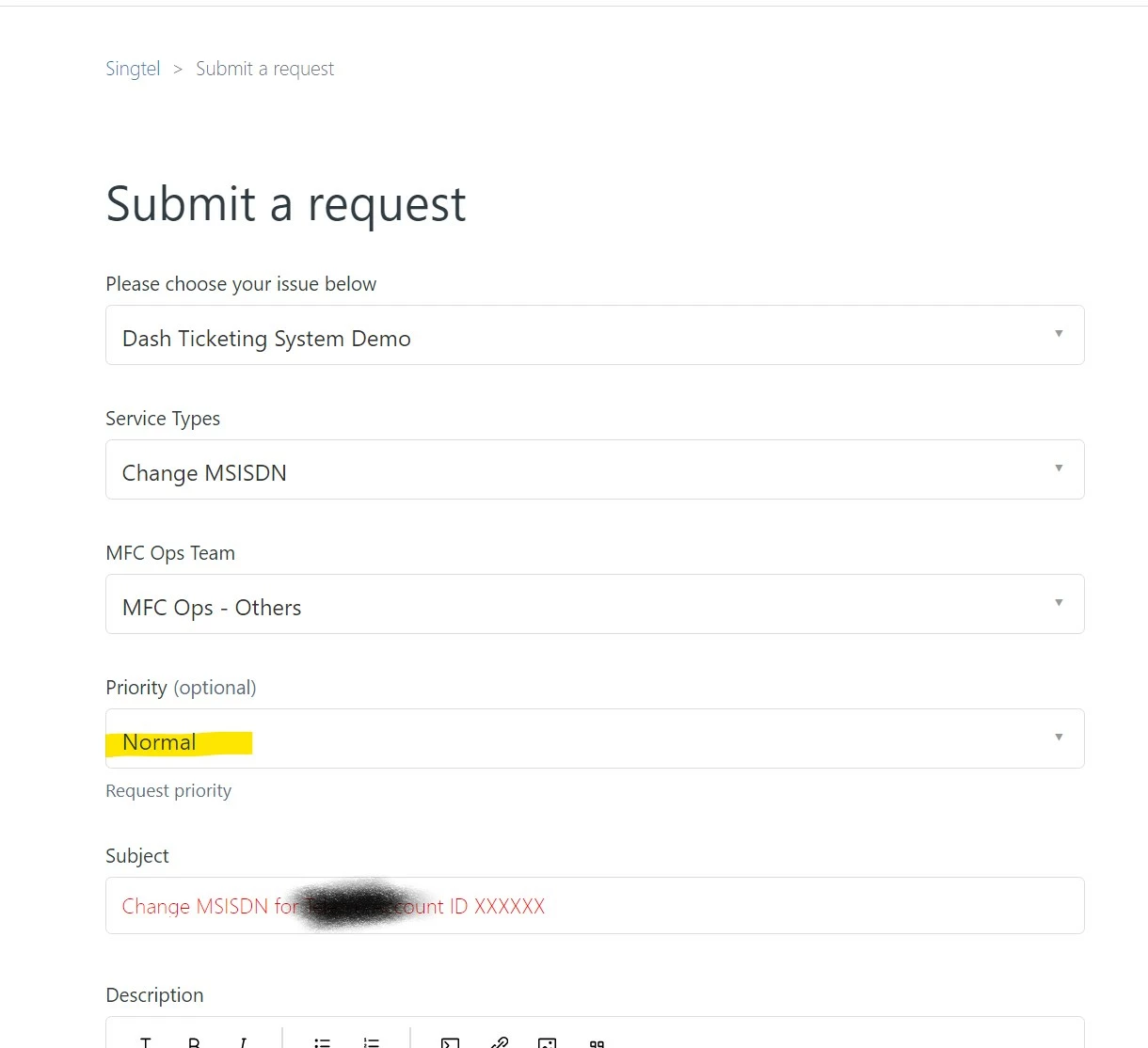
Tks for you advice. But seems the trigger/automations only take in place after the ticket is created. I hope can assign a value during the ticket creation. Something like below attachment. Once the requester select one value from "MFC Ops Team" dropdown list, the "Normal" to be auto assign to "Priority". Not sure how to do it? Tks for your help first.


  • July 23, 2021

Would you like the end-user to be able to change themselves the value in your Priority field? Because then you could think of the below: 

  1. Setup a trigger when a ticket is received and has no value for Priority, to set it to Normal
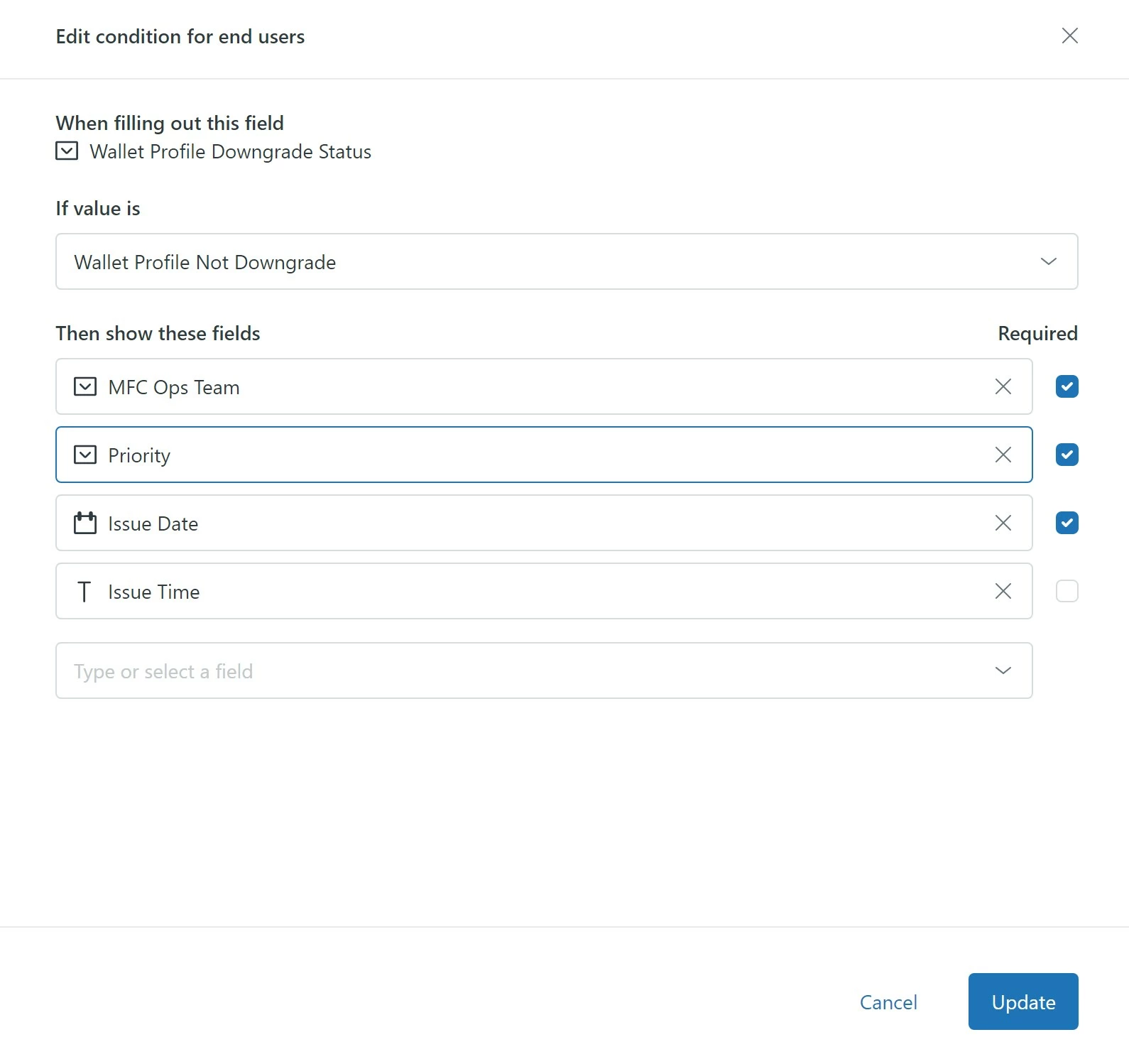
  2. Setup your form using conditional fields [https://support.zendesk.com/hc/en-us/articles/360022293573-Creating-conditional-ticket-fields-in-Zendesk-Support-Professional-Add-on-and-Enterprise-]
  3. Create a condition for your form that will only show the Priority ticket field when your ticket field MFC Ops Team is set to MPC Ops - Others

On the other hand, if your idea is to assign the value of Priority depending on the value of MFC Ops Team and not allow the end-user to change it themselves, I would remove the Priority field from your form and use triggers upon ticket creation to set the Priority of the ticket.

Should you have other triggers in place depending on the value in Priority, then you would only need to make sure, your triggers are in the right order.


  • Author
  • July 23, 2021

Hi Edwin,

We try to assign a default value but will allow end-user to change it.

Yes, I am using condition field but seems it only allow me show "Priority" instead of assign a value (such as Normal) to it. If any way we can do it? Should we do it by add in some coding in script.js?


  • July 23, 2021

@TAN BING Unfortunately, you wouldn't be able to select a specific value to be auto-populated for the end user using Conditional Fields. That feature would allow you to specify when you would or would not want to display the Priority field for the end user though.

Zendesk does offer a way you to create pre-filled ticket forms which you can learn more about here. The caveat would be that you these fields would only be pre-filled for users that access the form via that unique link versus those that navigate to your generic ticket form, so it might not be as robust as what you're ultimately looking for. Additionally, this feature requires that the theme you are using is the Templating API version 2. 

Otherwise, it looks like you might be able to achieve this with some Javascript (see Zendesk's Help Center JavaScript Cookbook) but Javascript isn't really my area of expertise to know for certain that will work for your specific use case. Hopefully it helps point you in the right direction though. 

In the meantime, I've gone ahead and moved this post over to the Guide Q&A section in case any other community members might have some ideas or have already implemented something similar on their end. :) 


Trapta
  • July 24, 2021

Hi @TAN BING,

In your case, I think doing it via coding will be better. That will solve the purpose of automatically assigning the value as well as letting the end-user choose it from the dropdown.

Thanks


  • Author
  • July 25, 2021

Hi Trapta,

Tks for your info. If any example hoe to change the priority by script? I tried "$('#request_priority').val('Normal');" in script.js but unsuccessful. 


Trapta
  • July 26, 2021

Hi @TAN BING,

Try the below code by replacing the id with your custom field ID.

document.getElementById('CUSTOM_FIELD_ID').nextSibling.innerText = 'Val_1';

Let me know how it goes for you.

Thanks


  • Author
  • July 28, 2021

HI Trapta, 

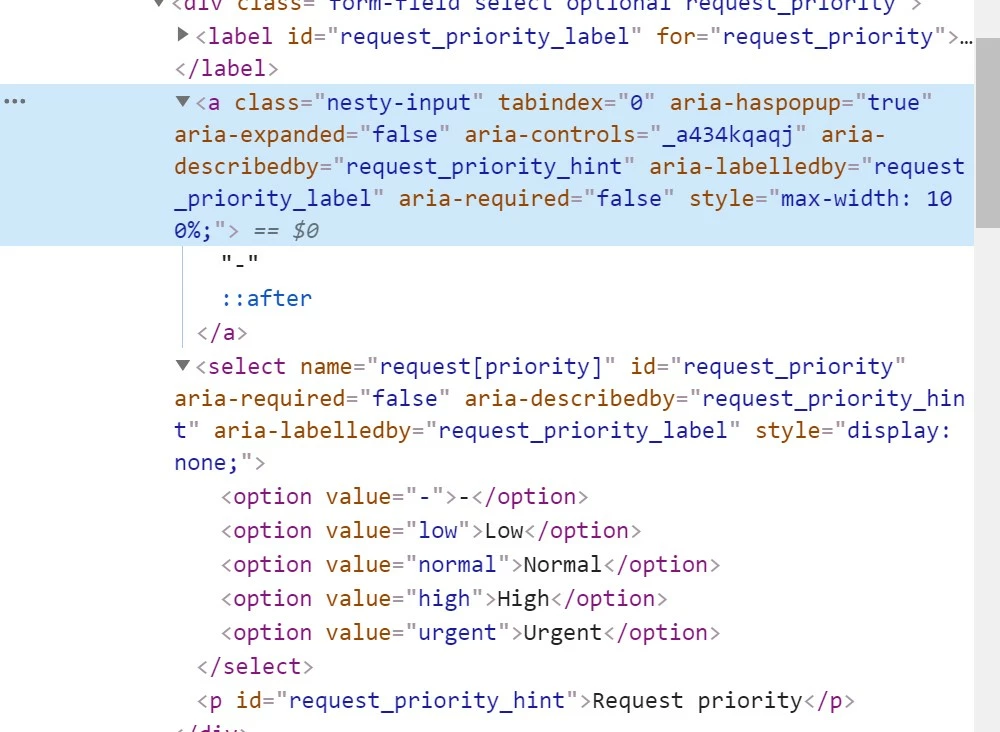
Seems there is no ID for priority field as below. And i tried both 2 below commands don't work. Would you please advise.

document.getElementById('#request_priority').nextSibling.innerText = 'normal';

document.getElementById('#request_priority').nextSibling.innerText = 'Normal';


  • Author
  • July 28, 2021

I tried below don't work as well.

document.getElementByClass('#nesty-input').nextSibling.innerText = 'normal';


Trapta
  • July 28, 2021

@TAN BING,

It should be 

document.getElementById('#request_priority_label').nextSibling.innerText = 'normal';

instead of 

document.getElementById('#request_priority').nextSibling.innerText = 'normal';

Let me know if this works for you.

Thanks


  • Author
  • July 28, 2021

HI Trapta, 

I tried below but noluck as well.

document.getElementById('#request_priority_label').nextSibling.innerText = 'normal';

Trapta
  • July 29, 2021

@TAN BING, is it possible for you to share the URL of your HC so that I can take a look? You can also create a ticket here if you can't share the URL publicly so that I can take a look and provide the solution accordingly.

Thanks


  • Author
  • July 29, 2021

HI Trapta, 

Tks. I have submit a ticket in https://moderatortrapta.zendesk.com/ with #21. You may check. Let me know

Rgds

Tan Bing


Trapta
  • July 29, 2021

@TAN BING got it.

Thanks


  • Author
  • July 31, 2021

Dear All,

It still not work. Not sure if anyone can help? Tks first for your help.

Rang


Trapta
  • July 31, 2021

Hi Tan,
I replied to you over the ticket you have created. Have you tried that?

Thanks


  • Author
  • July 31, 2021

HI Trapta,

Nice to hear you. Yes, I tried already but noluck. I removed all unnecessary code as below but still not able to auto fill in "Normal" in Priority field. Would you please help.


// add JQuery to Prepopulate the fields (subject & description ) of custom ticket forms
$(document).ready(function(){
var ticketForm = location.search.split('ticket_form_id=')[1];
if(ticketForm == 900001605023) {
//alert("Enter End-user Interface 2");

// Query ID
$("#request_custom_fields_900010029806").change(function () {
var category_1 = $('#request_custom_fields_900010029806').val();

if (category_1 == "query-_id"){
document.getElementById('#request_priority_label').nextSibling.innerText = 'normal';
}
});
}
});


  • Author
  • July 31, 2021

Hi Trapta,

Any good news for it?

Rgds

Tan Bing


Trapta
  • August 1, 2021

Hi @TAN BING,

Yes, I have updated you over the ticket as well as sharing the code here too.

Replace

document.getElementById('#request_priority_label').nextSibling.innerText = 'normal';

with

$('#request_priority_label').next('.nesty-input').text('Normal');

Let us know how it goes for you.

Thanks


  • Author
  • August 1, 2021

Hi Trapta,

Tks very much first. Yes, able to show it before click "Submit". After submissions, it become "-". I have update details in the ticket. Would you please help.

Rgds

Tan Bing


  • Author
  • August 4, 2021

Hi Trapta,

Any good news for it?

Rgds

Tan Bing


  • Author
  • August 10, 2021

Dear All,

It still stuck here. If anyone has a good idea how to auto populate the Priority?

Rgds

Tan Bing


  • August 11, 2021

You have to set the value and the text independently.   Something like

$('option[value="normal"]').prop("selected", true).trigger('change');
$('.request_priority a.nesty-input').text("Normal");