Email forwarding trigger assignment send via agent | Community
Skip to main content

Email forwarding trigger assignment send via agent

  • October 29, 2021
  • 9 replies
  • 0 views

I have "Email Forwarding" enabled. I want the email to then be automatically assigned to the agent who forwarded the email to the support address. Is that possible?

9 replies

Heather13
  • October 29, 2021

Hi @william18,

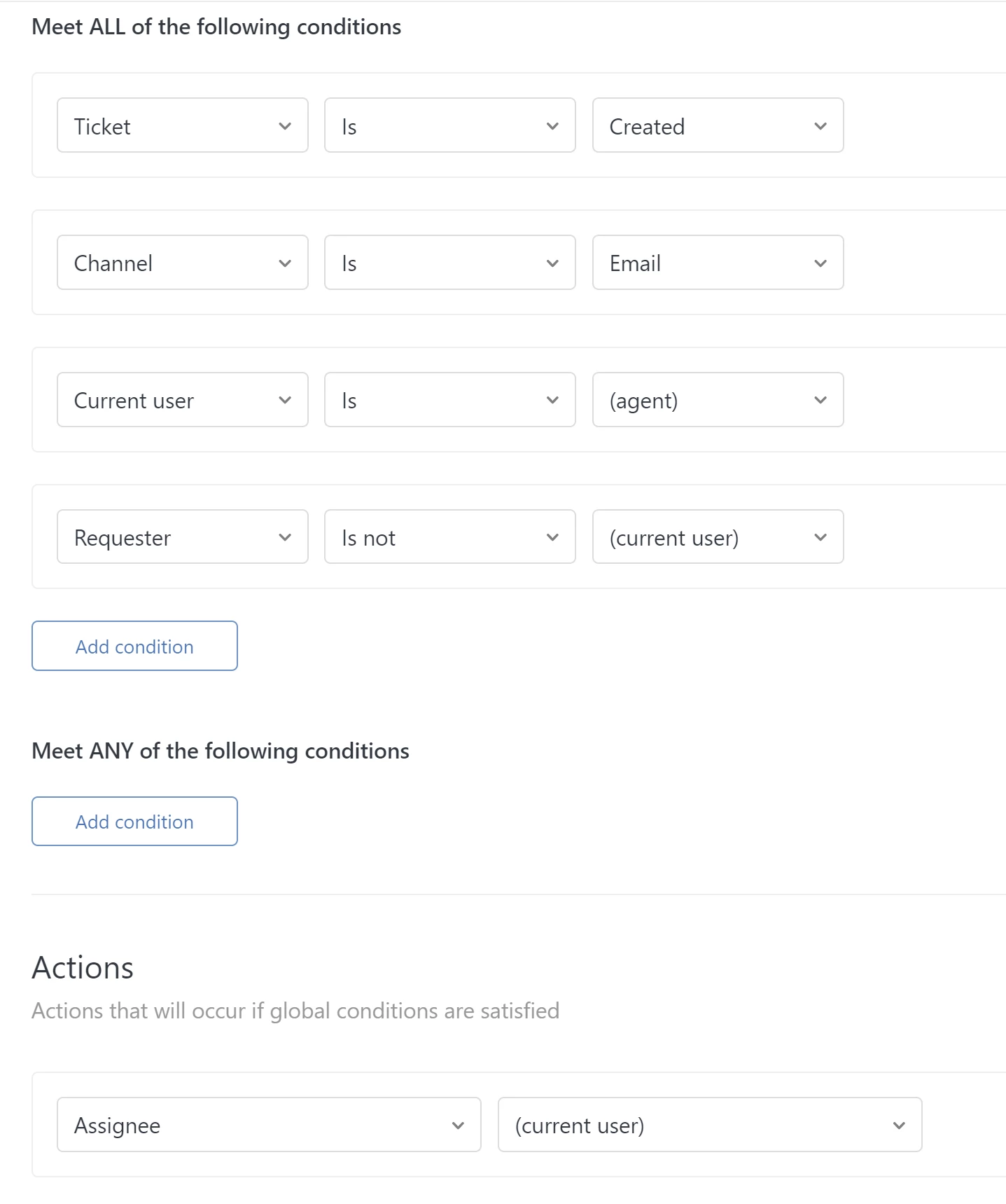
I think this might work -- I strongly suggest super duper testing on this with multiple roles and scenarios.  Let us know if it helps!


Lou11
  • October 29, 2021

I like that formula. We use email forwarding quite a bit, and it looks like it does treat the "emailer" as the current user.


  • Author
  • November 2, 2021

Super! Many thanks @heather13. I have set this up and will keep an eye on it to see it works as intended


  • December 16, 2021

Any update on if this works? I think Zendesk does this automatically except for unrestricted agents. I need a way to do this for unrestricted agents as well.


  • December 27, 2021
Hi Justin!
 
When a non-restricted agent creates a ticket using agent forwarding, the ticket comes in as unassigned. While when a restricted agent creates a ticket using agent forwarding, the ticket will initially be assigned to their default group.

The trigger condition "Current User is (agent)" will not work on this workflow as the agent will not appear as the current user on the ticket. As a workaround, agents can use the Mail API command #assignee to set themselves as the ticket assignee of the forwarded email. Kindly check this article to learn more: Using the Mail API to update ticket properties from your inbox
 
Hope this helps!

Luke42
  • April 12, 2022

I remember there was a way to forward emails from my inbox and as long as I included 'assign to + agent's_email' (or some variation of that) in the email body, then it would open a ticket on Zendesk and automatically assign to the agent. 

e.g. if I wanted to assign to myself I would just need to add 'assign to luke@company.com'

I can't remember the exact text format though. Does anyone know if this is still an option? 


Heather13
  • April 13, 2022

Hi @luke42

An agent forwarding in an email to create a ticket can include

#assignee self@myemail.com

in the first line of the body of the email. Try it out!


Luke42
  • April 13, 2022

Hi Heather,

I just tested that but it doesn't seem to be working. Here are my steps:

1. the support email comes into my gmail

2. I forward to our support address including the #assignee self@myemail.com in the first line of the body of the email.

3. it creates a ticket in Zendesk but it's unassigned and the requester is me. Ideally I can open the ticket assigned to me and have the senders from the original email show as the requesters on the ticket. 

Are there some triggers I need to set up? Thanks a ton!


Heather13
  • April 27, 2022

Hi @luke42,

That' interesting! Is the Gmail you're forwarding from your primary email address as a full agent (not a light agent)? 

Can you check your forwarding settings? That should set the requester as the original sender (though not foolproof) https://support.zendesk.com/hc/en-us/articles/4408836514202-Passing-an-email-to-your-support-address#:~:text=a%20public%20comment.-,Enabling%20the%20forwarding%20option%20for%20agents%20in%20Zendesk%20Support,ticket%20creation%2C%20not%20ticket%20updates.