CSAT Survey in the requests | Community
Skip to main content

CSAT Survey in the requests

  • January 12, 2022
  • 10 replies
  • 0 views

Support23

Hi everyone!

I'm very happy that there is such an amazing community. I have a question about the CSAT survey in the requests themselves. Has anyone created them? Is it possible to make a CSAT survey in the requests with a default CSAT? I mean that I want to make a feature that we will work in this way:

An agent solves the ticket, then in several minutes CSAT survey will be sent in the same ticket with the phrase like 'thank you for contacting us, rate our support and blah-blah-blah using two options:
1 - helped 
0 - didn't help

I guess that it might be more productive than a separate letter in several hours. If I miss the same topic (but i've looked for them), please share them. Thank you in advance! 

10 replies

Brett13
  • Community Manager
  • January 12, 2022

Hey Alex,

Thanks so much for your kind words regarding the Zendesk community :) 

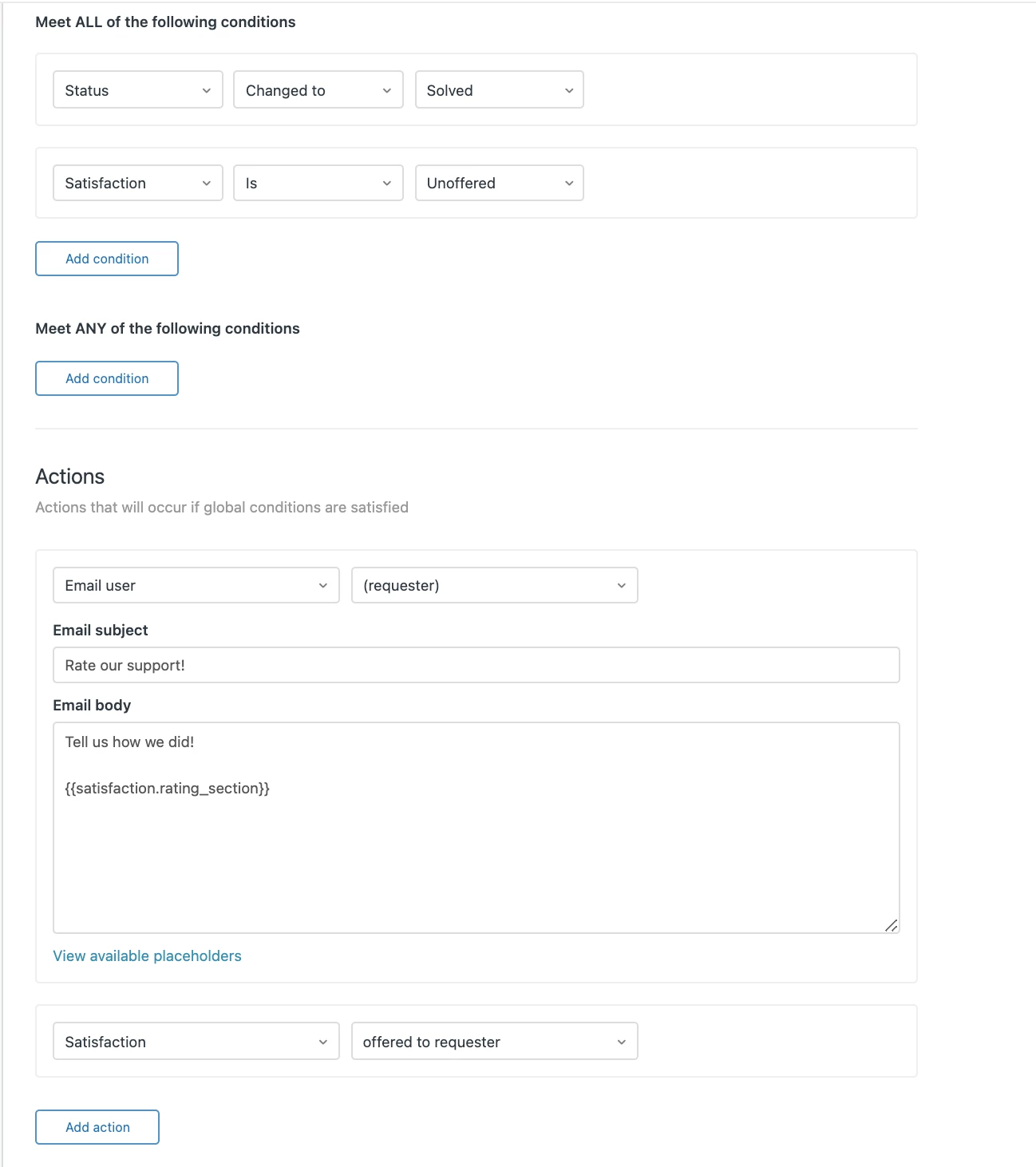
Just to confirm, are you looking to just have the CSAT survey sent immediately after an agent solves the ticket? If so, I'd recommend using a trigger instead of an automation to set this up. I've attached a screenshot of what this trigger could look like.

Let me know if that's not the solution you're looking for!


Support23
  • Author
  • January 12, 2022

Hey Brett,

Thank you so much for the information!

It looks like what I need but will this trigger create a new message in the request? It looks like It will send an email. Or am I wrong? 


Brett13
  • Community Manager
  • January 12, 2022
 
 
Hey Alex,
 
This trigger will only send an email notification to the requestor of the ticket. It shouldn't add any text to the ticket itself. 
 
Hope this clears up any confusion!

Support23
  • Author
  • January 12, 2022

Thank you, Brett!

But is it possible to make a CSAT survey in the ticket itself?


Brett13
  • Community Manager
  • January 12, 2022
Hey Alex,
 
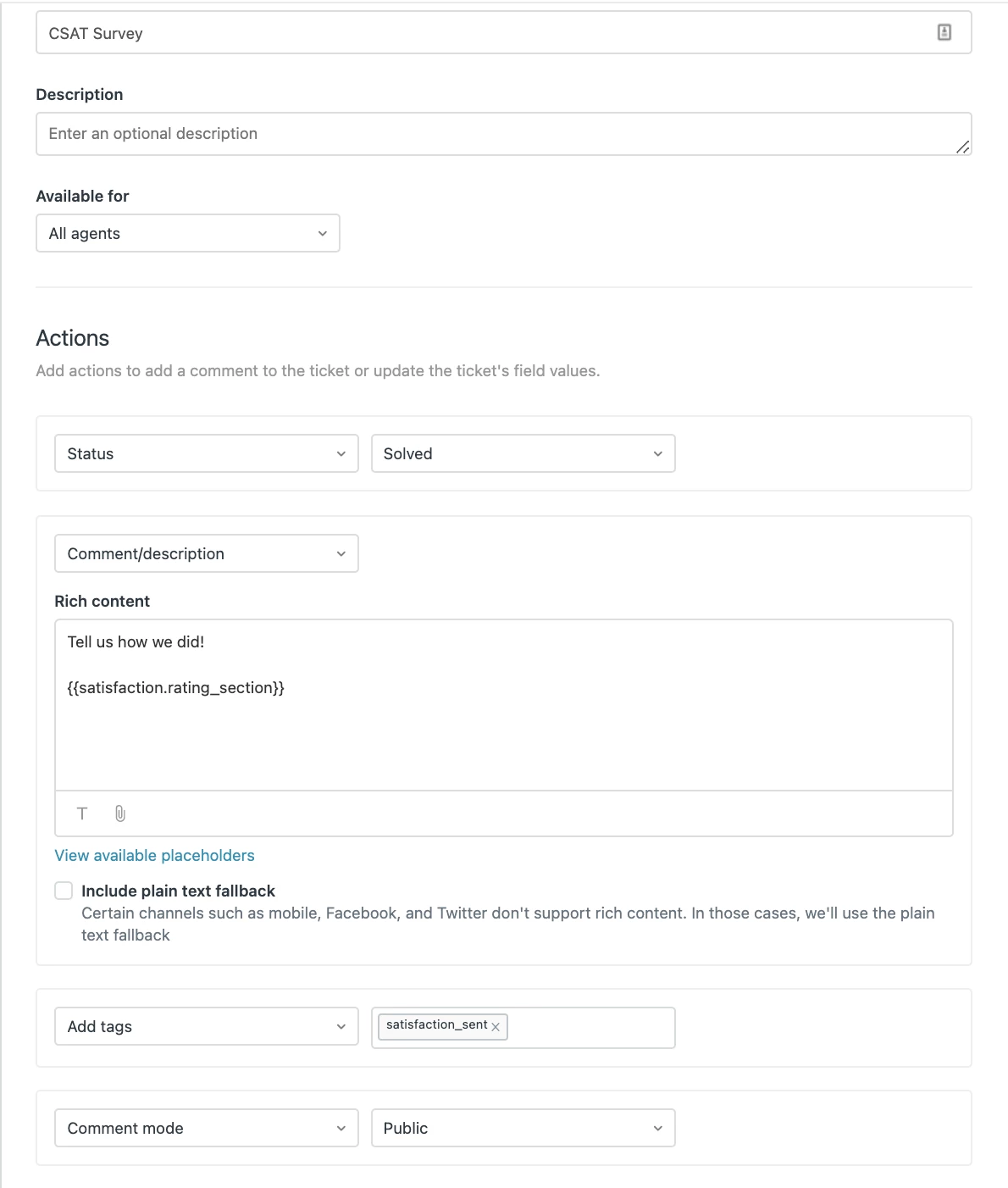
If you'd like the CSAT survey to be sent directly within the ticket, you'd most likely need to instead set up a macro that the agent fires once they solve the ticket.

They would just need to include that placeholder I shared in the screenshot above within the macro and that should get you the results you're looking for.

Support23
  • Author
  • January 12, 2022

Hey Brett,

Oh, sounds great! So, I need to create a macro and then use the trigger you've mentioned above. Is it right?


Brett13
  • Community Manager
  • January 12, 2022

Hey Alex,

If you use the macro then the trigger won't be necessary since you're already sending the survey through the macro. 

Here's an example of what that macro could look like:


Support23
  • Author
  • January 12, 2022

Hey Brett,

Okay, I got it. Looks quite amazing. And is it possible to make some kind of automation like this macro will be sent in two minutes when the ticket is solved?


Brett13
  • Community Manager
  • January 12, 2022
Hey Alex,

There's no way to automate this if you're looking for the satisfaction survey to show up in the conversation history of the ticket. The only way to automate this is through a trigger but then it wouldn't display within the ticket itself.


Support23
  • Author
  • January 12, 2022

I got it, Brett. I'm unhappy that it's not possible to send this macro, for example, in two minutes after solving the ticket. We'll think of backend solutions.