Can we hide custom user fields? | Community
Skip to main content

Can we hide custom user fields?

  • November 1, 2018
  • 3 replies
  • 0 views

Just wondering how we hide custom user fields from agents and end users.  We are using some that are just clutter and informational for the admins...

Any ideas?

This topic has been closed for replies.

3 replies

  • November 2, 2018

If you mean in terms of tickets, I believe there is an option when setting up or modifying a ticket field that sets the permissions. 

Permissions:
  • Agent only
  • Editable for end-users [Field can be edited by the end-user when submitting a request.]
  • Read-only for end-users
 

  • November 2, 2018

Hi Andrew,

Yes - you can natively hide fields from end-users, but not the inverse, agents will see all fields. 

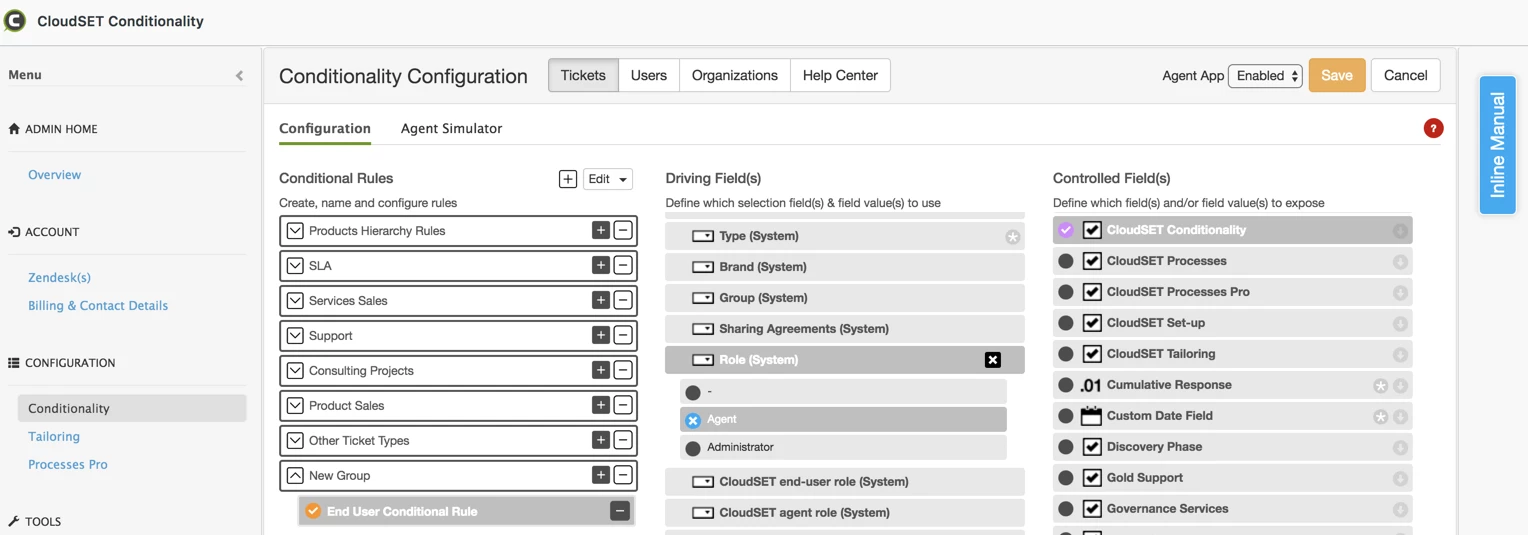
You'd need Zendesk Forms (Enterprise or Productivity Pack) to configure the agent field visibility. Otherwise, you'd need something like our CloudSET Conditionality App - a commercial app from the Zendesk Marketplace.

In the following case, a conditional rule is shown that, will in effect, hide from agents, a field.

If you want to hide fields for all i.e. you have some control fields. You can hide from end-users easier enough, but not agents. You can either use CloudSET Conditionality as above or use our CloudSET Tailoring App, which will more straightforwardly hide custom fields globally.

Hope this helps

Graham (CloudSET)


Alina12
  • October 14, 2025

We have launched an early access program for custom user field permissions where you will be able to hide user fields from agents based on their custom role. Check it out here!