Auto assign tickets on first reply | Community
Skip to main content

Auto assign tickets on first reply

  • November 16, 2017
  • 13 replies
  • 0 views

Hello,


I tried to set up a trigger that would auto-assign tickets to the agent who first responds with a public comment, as described once in a Zendesk post (it may have been this one but I swear I looked at something more recent).

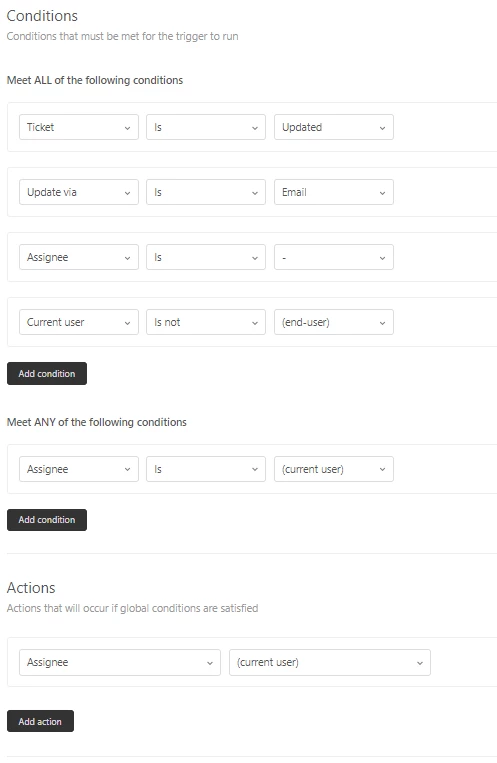
It's not working. When looking at the ticket 'Events' the trigger is not firing at all.  Here is how I have it set up
 

This topic has been closed for replies.

13 replies

  • November 16, 2017

Hi Cyrup,


were you testing the trigger by replying via e-mail or Zendesk Support?

Does "Update Via E-mail" mandatory?


thanks.


  • Author
  • November 19, 2017

'Update via email' is mandatory (see the image I posted), underneath must meet ALL the follow conditions.


To test the trigger I was replying via Zendesk Support. I have been tracking agent first-responses on tickets and it has not be firing anyway,

Thank you


Nicole17
  • December 22, 2017

Hey Cyrup - 

This is one of the default triggers for Professional and Enterprise plans. You just need to activate it. Here are the details: Auto-assign to first email responding agent

Let us know if that helps you out, or if you have additional questions. 


  • May 22, 2018

Hi 


this is not working for me. 

I have it set up as it was when inactive. 

I simply activated as suggested but deosnt auto-assign to agent when they reply via the support portal 


any idea?


Hi

This is not working for us either. We have only activated the trigger but it does not auto-assign the case. We have tried with several tickets. Any suggestions?


  • May 24, 2018

I have also moved the trigger at the very top but still no luck.

Cant find other suggestions on other sites. Can you help zendesk?


Diogo13
  • May 29, 2018

Hi guys


The trigger of the OP is not correct, as it has Assignee is current users under any conditions. The trigger should work if configured as the article below


https://support.zendesk.com/hc/en-us/articles/203662176-About-the-Support-default-triggers#topic_ksf_3js_5t


  • May 29, 2018

Thanks Diogo. 


However, that is exactly how I have got it set up. It just doesnt fire when I leave a public note on a unassigned ticket.


Any other thoughts? Struggling to get this working and is very important for us to be able to auto assign tickets


  • May 29, 2018

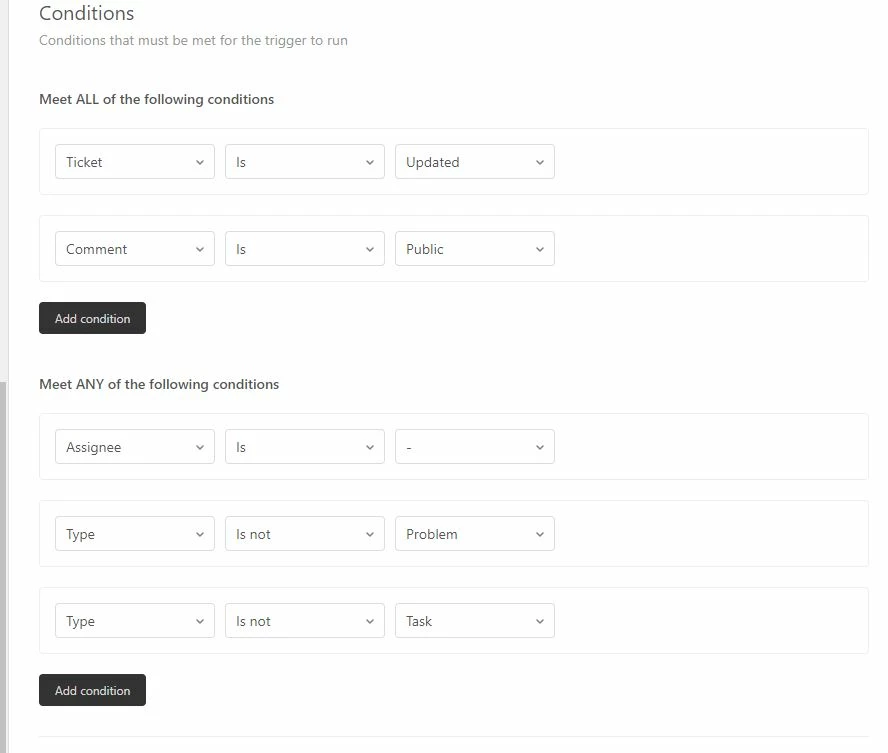
ok I found the solution. remove the Update via | Is | Email: and add  Privacy is Ticket has public comments. 


Thanks Massimo, this works for us. Update via e-mail was the sinner.


  • May 29, 2018

Thanks for sharing what you figured our, Massimo!


  • Author
  • May 30, 2018

Hi all! I have attached an image of how we currently have it set up and it is working. I am not sure if this follows the default one. Sorry for not updating my thread when we had it worked out.


Actions: Assignee = current user. 


  • June 1, 2018

Thanks for letting us know, Cyrup!