
Why are my icons not showing on my homepage? | Community
Skip to main content

Why are my icons not showing on my homepage?

  • May 25, 2023
  • 3 replies
  • 0 views

I am modifying the Copenhagen theme. I want to add icons to the categories on the homepage but they are not showing up. I have uploaded my images as assets - they are all uploaded correctly as png's.

This is the relevant code:
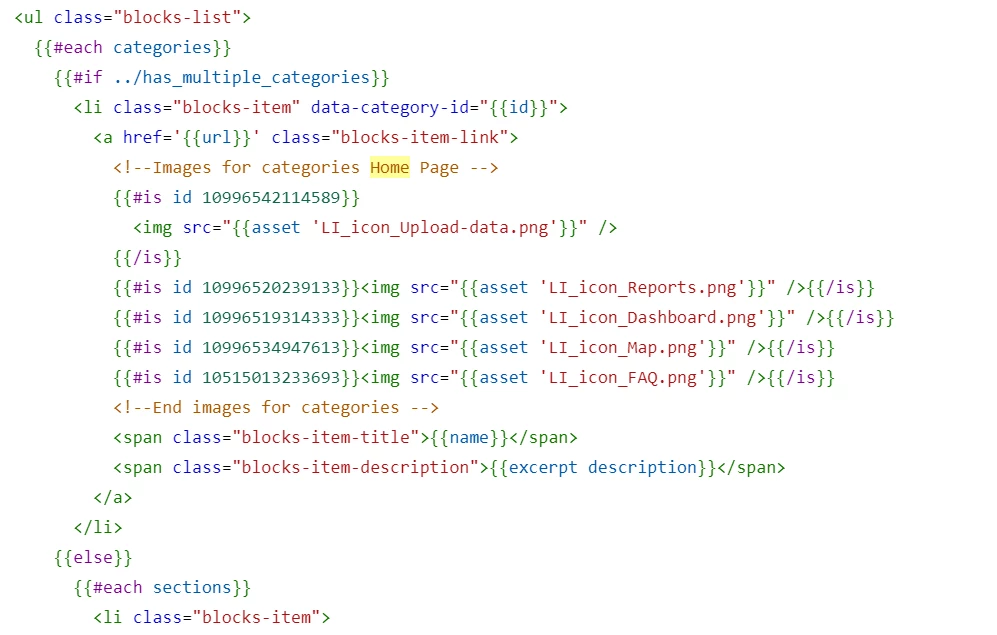
When I inspect the elements using my browser developer tool I don't see this code there at all, and there are no images showing with the categories. I've tried identing the image on a different line and having it in line and neither work. Any ideas?

3 replies

  • May 25, 2023

Check the image paths: Double-check the paths specified in the src attribute of the <img> tag. Ensure that the paths are correct and match the location where you uploaded the images as assets. It's important to use the correct relative or absolute paths to access the images.


  • Author
  • May 25, 2023

Problem solved - the issue was that I'd put the images in the #if ../has-multiple-categories bit but not in the #else bit - not really sure what that all means but when I put it in the #else bit it worked :) thanks @finnegan


  • September 6, 2023

Ensure that the asset URLs for your category icons are correctly defined. You mentioned that you've uploaded the images as PNGs. Check that the asset URLs are pointing to the correct files in your theme's asset directory.