Voting on articles | Community
Skip to main content

Voting on articles

  • December 30, 2016
  • 11 replies
  • 0 views

Hi, 

I was wondering how I can add the vote buttons to my articles. 

I attached an example which is also from a Zendesk article. 

Max

This topic has been closed for replies.

11 replies

  • January 2, 2017

Hi Max,

Wondering if you are using default Copenhagen theme? It gives an option for voting.

Further, you can add this code in your article template:

  {{#with article}}
    <div class="article-vote">
      <span class="article-vote-question">
        {{t 'was_this_article_helpful'}}
      </span>
      <div class="article-vote-controls">
        {{vote 'up' class='article-vote-up' selected_class='article-voted' role='button'}}
        {{vote 'down' class='article-vote-down' selected_class='article-voted' role='button'}}
      </div>
      <small class="article-vote-count">
        {{vote 'label' class='article-vote-label'}}
      </small>
    </div>
  {{/with}}
 
Try and let us know if we can offer further any help.
 

  • Author
  • January 2, 2017

Hi Diziana,

Thanks a lot for your reply! Your code worked. Is there a way to allow voting only for articles in one specific category? 

Max


  • May 26, 2018

Hi, Diziana,

I would like to ask you where exactly on the article I can put this code. I tried but I could not put it on the article


  • May 31, 2018

Hi Мели!

You don't put the code in the article itself. You'll need to add it to the CSS in your Guide Admin dashboard. You can find details on this here.


  • October 31, 2018

Is there a way to add a 3rd voting option? We are wanting to have 3 and I am falling short on my coding. 


  • November 6, 2018

Hi Nita!

It should be possible...can you post your code so I get some Mods to come take a look at it with you?


  • November 7, 2018

Thanks, Jessie. I am new to this stuff so here's what I had for just the 2 buttons on my article.hbs and I wasn't sure what to call the middle button so here's what I had so far. It is not pretty! TIA!

<div class="comment__voting-and-actions">

{{#unless official}}

<div class="vote vote--comment">
{{vote 'up' class='fa fa-smile-o' role='button'}}
<div class="vote-sum">
{{vote 'sum'}}
</div>
<div class="vote vote--comment">
{{vote 'neutral' class='fa fa-meh-o' role='button'}}
<div class="vote-sum">
</div>
{{vote 'sum'}}
</div>
<div class="vote vote--comment">
{{vote 'down' class='fa fa-frown-o' role='button'}}
<div class="vote-sum">
</div></div>
{{/unless}}
<div class="comment__actions">
{{actions}}
</div>
</div>
</div>
</li>
{{/each}}
</ul>


  • November 14, 2018

Thanks Nita! I've pinged our Community Moderators to see if anyone is able to take a look at this for you. Hopefully someone will be able to help!


Dan32
  • November 26, 2018

Hey Nita,

To get a voting option beyond the initial two is actually more complex than it seems initially. You'll need to have the vote counts tracked somewhere, which means you need to have your new vote button trigger a call to a server that records that article's vote tally. This is possible, but it is definitely beyond the scope of what could be covered in a Help Centre post. 

If you, or someone on your team has development skills here's a very rough idea of how this could work.

1. Article page script that loads when the page is loaded. This script will send your Article's ID to the vote-server to find out if there are votes on this article to display. 

2. User clicks vote button. This sends a message to your new vote-server and includes the article ID and the vote type selected. You'll probably want to consider what you do with the button so the user can't vote multiple times.

3. (Bonus) Article updates with the new vote count live. Easier implementation would just show the new score on refresh.

Hope that gets you started on the right path!


  • December 13, 2019

@Diziana


Hey Diziana,


I tried posting this directly into our theme CSS file and it did not work. Did I do something wrong?


  • December 16, 2019

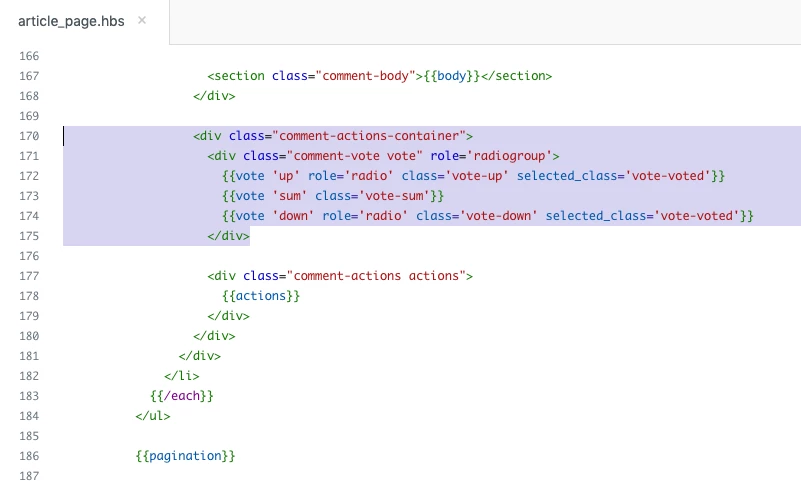
390476627494 are you using the Copenhagen theme in your Zendesk instance? If so, you would actually add the code to the article_page.hbs helper file to display vote counts, not to the CSS itself (the CSS is going to be where you do a majority of the styling for your Help Center). Below is a screenshot with the code that is in this page. In this example, it is towards the bottom of the code, before the article comments box and pagination of comments we are displaying.