

Hi guys! This question confuses me so I'll try to be specific.
Our Guide theme has a top banner (you can see it at https://support.aha.io/hc/en-us). It lets the user do a few things like submit a new request or check out system status.
In an article, any time I use a header (h1, h2, etc.) I can also use it as an anchor link using [Link] > Heading.
The problem is that if I click an anchor link that links to that header, the page jumps to that header — but disregards that top banner. So the result is that the anchor link jumps too far — the end user doesn't see the header.
Does that make sense? So the end user will see something like this, where the header is under that banner:
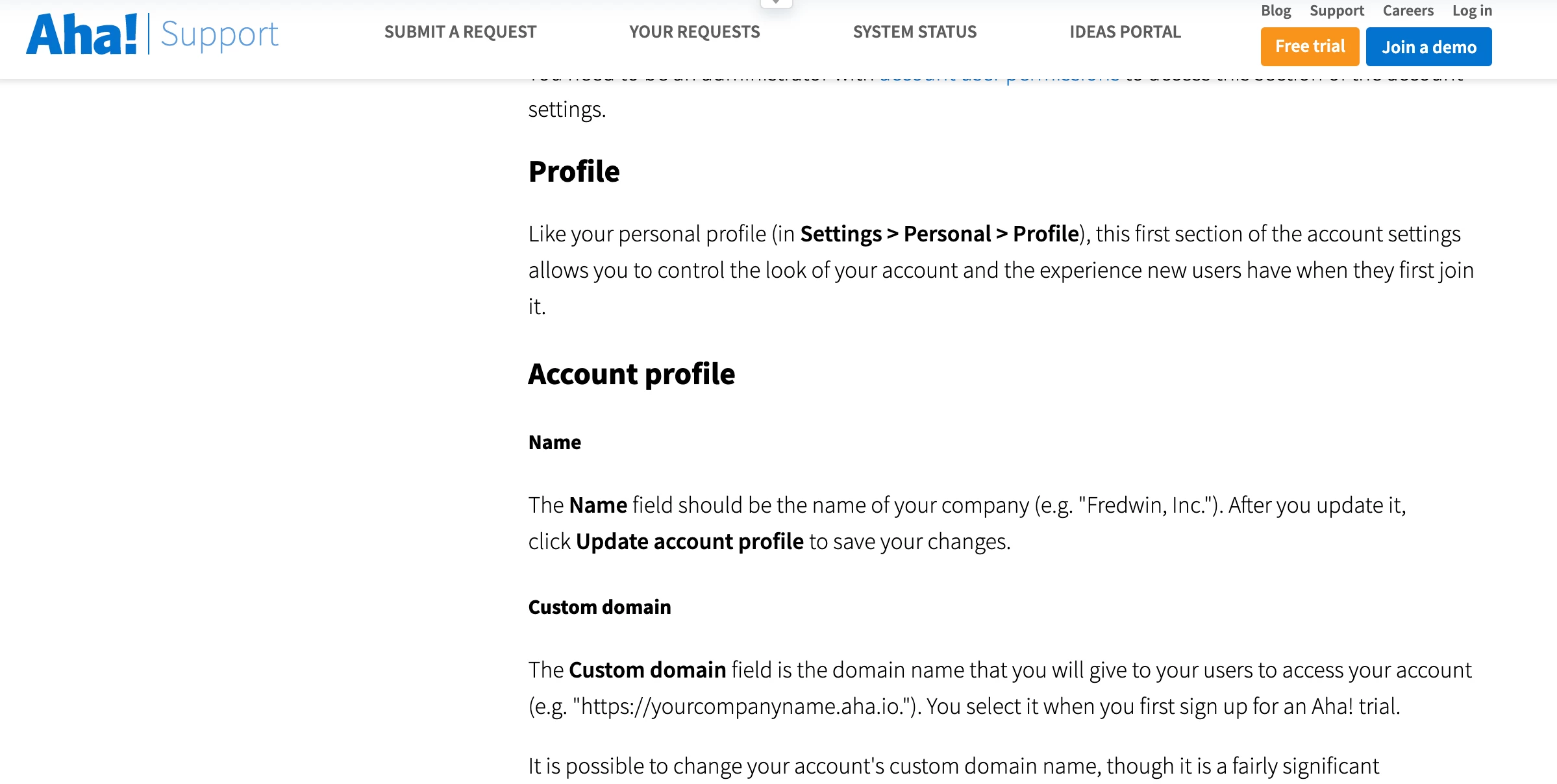
Is there a way to make it so that the article does not scroll under the top banner? So that clicking on an anchor link gets the reader right to that header, not to an inch below it?
Thanks!


Hi Erik,
Great question!
I'm going to get this post added to our monthly Community Roundup to help get more eyes on your question.
Cheers :)