Table of information as a section | Community
Skip to main content

Table of information as a section

  • April 6, 2021
  • 5 replies
  • 0 views

Can I add a table of information that the end user can see under a category? that a section will be the information?

5 replies

Ifra
  • April 6, 2021

Something like this?

On the category template, all sections are showing as table info..


  • Author
  • April 6, 2021

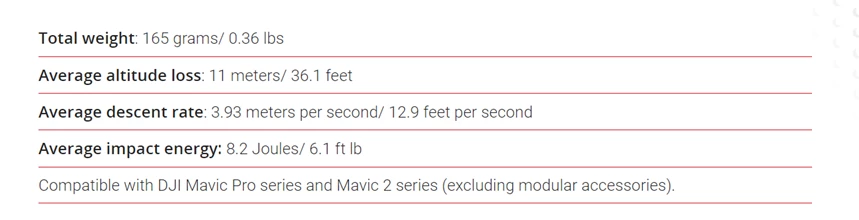
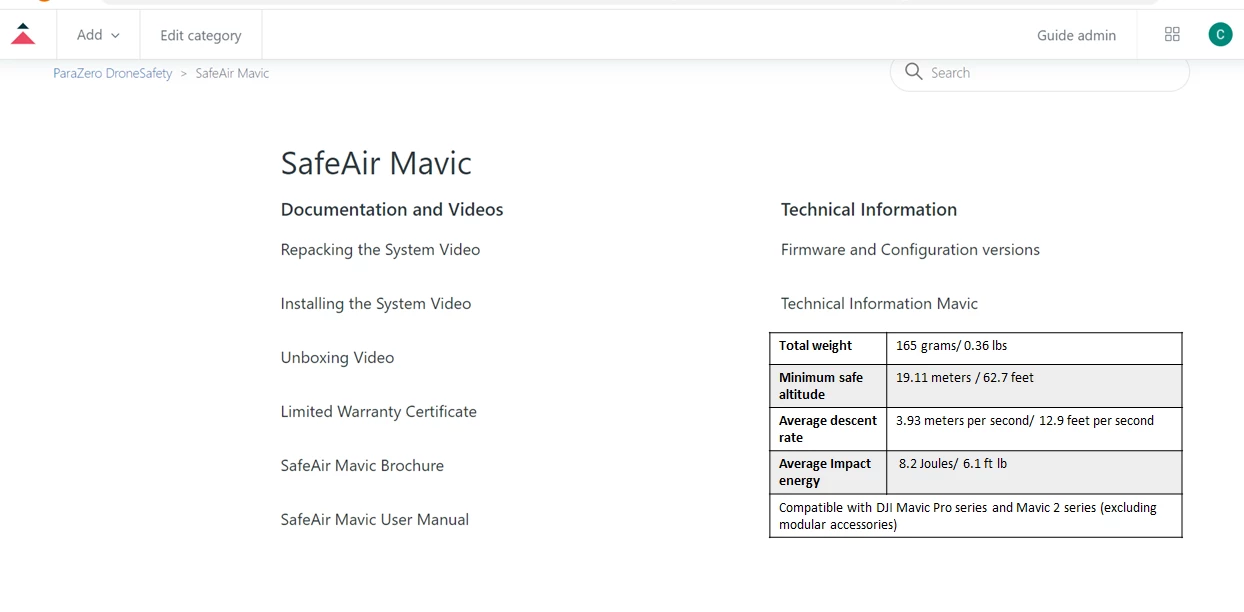
no. I want to enter a table like this:

that the end user will see under category and nor under article. (so he see it after one click and not three)
Thanks a lot


Ifra
  • April 10, 2021

You mean you want to show the data of the articles on a category template but have to style to show this nice.

Add {{body}} under the article code on the category page:


 {{#if articles}}
<ul class="article-list ">
{{#each articles}}
<li class="items {{#if promoted}} article-promoted{{/if}}">
{{#if promoted}}
<svg xmlns="http://www.w3.org/2000/svg" width="12" height="12" focusable="false" viewBox="0 0 12 12"
class="icon-star" title="{{t 'promoted'}}">
<path fill="currentColor"
d="M2.88 11.73c-.19 0-.39-.06-.55-.18a.938.938 0 01-.37-1.01l.8-3L.35 5.57a.938.938 0 01-.3-1.03c.12-.37.45-.63.85-.65L4 3.73 5.12.83c.14-.37.49-.61.88-.61s.74.24.88.6L8 3.73l3.11.17a.946.946 0 01.55 1.68L9.24 7.53l.8 3a.95.95 0 01-1.43 1.04L6 9.88l-2.61 1.69c-.16.1-.34.16-.51.16z" />
</svg>
{{/if}}
<a href="{{url}}" class="article-link" title="">{{title}}</a>

{{body}} // Add body to show article data on category page

</li>
{{/each}}

</ul>
{{#if more_articles}}
<a href="{{url}}" class="see-all-articles">
{{t 'show_all_articles' count=article_count}}
</a>
{{/if}}
{{else}}
<a href="{{url}}">{{t 'empty'}}
<i class="section-empty"></i>
</a>
{{/if}}  


Thanks


  • Author
  • April 13, 2021

Thank you very much!

But in this way it shows all the articles in the category. 

I want only this data to be shown like here (not the FAQ answers..):


  • April 13, 2021

Hi. You could set conditions for this category showing only your table without any information from the articles. In the example below not the standard template for the category but should be fine. Have a look text in bold. I hope it could be useful for you. 


<header class="page-header">
<h1 style="text-align: center; padding-left: 0px;padding-right: 150px;">{{category.name}}
<div>
<img src="https://image.freepik.com/free-icon/thick-right-arrow_318-8433.jpg" width="80" height="80" align="center">
</div>
</h1>
{{#if category.description}}
<p class="page-header-description">{{category.description}}</p>
{{/if}}
</header>


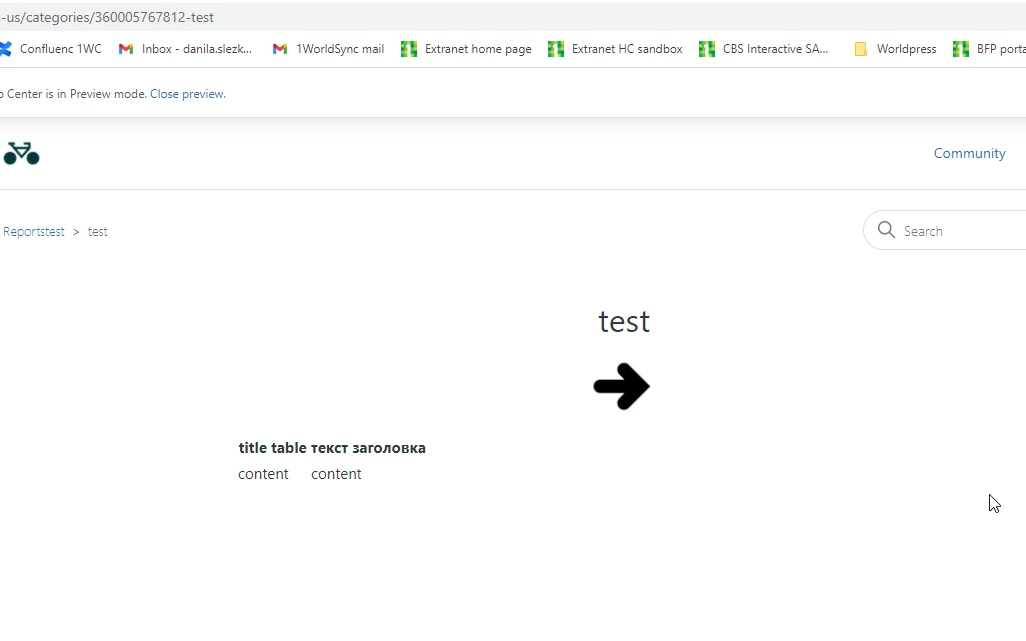
{{#is category.id 360005767812}} {{! your category where you want to display your table.
id you could find in the URL -}}

<table>
<tr><th>title table</th><th>текст заголовка</th></tr> {{! your table, HTML code -}}
<tr><td>content</td><td>content</td></tr>
</table>
{{/is}}

{{#isnt category.id 360005767812}} {{! you set a condition so that the basic settings are not performed for a certain category -}}
<div id="main-content" class="section-tree">
{{#each sections}}
<section class="section">
<h2 class="section-tree-title">
<a href="{{url}}">{{name}}</a>
</h2>
{{#if articles}}
<ul class="article-list">
{{#each articles}}
<li class="article-list-item{{#if promoted}} article-promoted{{/if}}">
{{#if promoted}}
<svg xmlns="http://www.w3.org/2000/svg" width="12" height="12" focusable="false" viewBox="0 0 12 12" class="icon-star" title="{{t 'promoted'}}">
<path fill="currentColor" d="M2.88 11.73c-.19 0-.39-.06-.55-.18a.938.938 0 01-.37-1.01l.8-3L.35 5.57a.938.938 0 01-.3-1.03c.12-.37.45-.63.85-.65L4 3.73 5.12.83c.14-.37.49-.61.88-.61s.74.24.88.6L8 3.73l3.11.17a.946.946 0 01.55 1.68L9.24 7.53l.8 3a.95.95 0 01-1.43 1.04L6 9.88l-2.61 1.69c-.16.1-.34.16-.51.16z"/>
</svg>
{{/if}}
<a href="{{url}}" class="article-list-link">{{title}}</a>
{{#if internal}}
<svg xmlns="http://www.w3.org/2000/svg" width="16" height="16" focusable="false" viewBox="0 0 16 16" class="icon-lock" title="{{t 'internal'}}">
<rect width="12" height="9" x="2" y="7" fill="currentColor" rx="1" ry="1"/>
<path fill="none" stroke="currentColor" d="M4.5 7.5V4a3.5 3.5 0 017 0v3.5"/>
</svg>
{{/if}}
</li>
{{/each}}
</ul>
{{#if more_articles}}
<a href="{{url}}" class="see-all-articles">
{{t 'show_all_articles' count=article_count}}
</a>
{{/if}}
{{/if}}
</section>
{{else}}
<i class="category-empty">
<a href="{{category.url}}">{{t 'empty'}}</a>
</i>
{{/each}}
</div>
</div>
{{/isnt}} {{! end-}}
</div>
</div>

Result: table in the chosen category (in the #is)

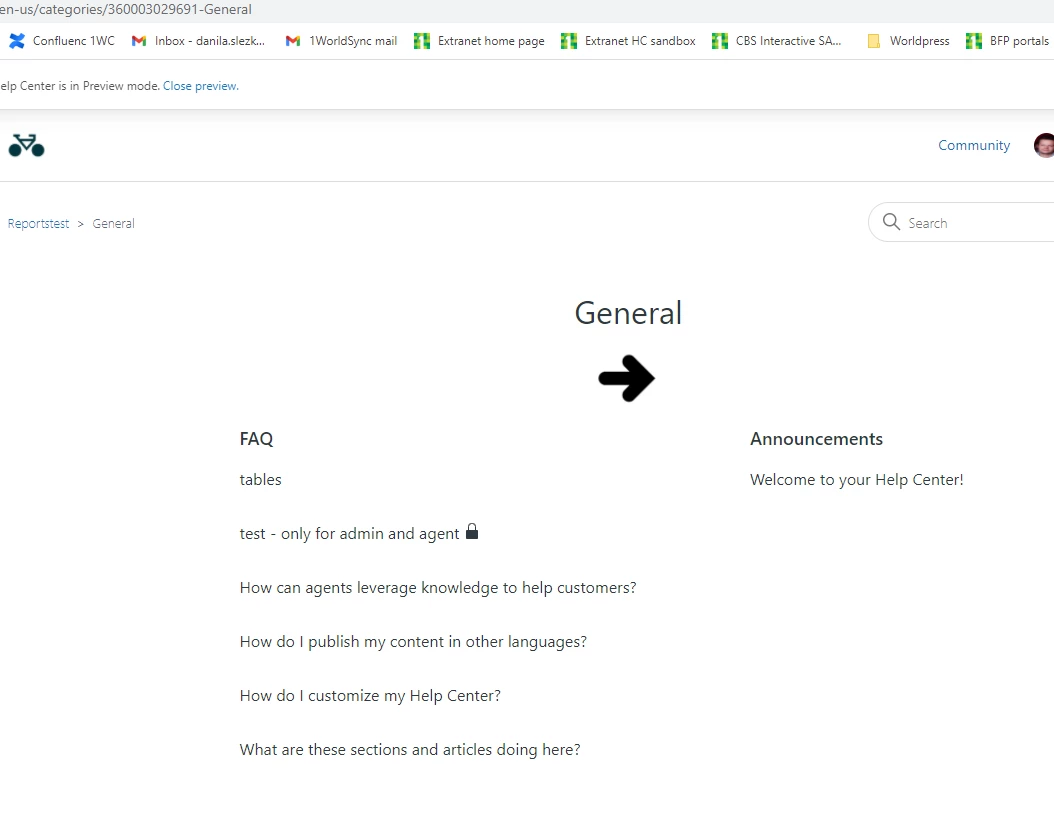
The same template for the category - but in another category in work. We can see that table didn't display.