Table of contents? | Community
Skip to main content

Table of contents?

  • December 21, 2021
  • 15 replies
  • 0 views

Hi all, 

maybe I'm missing something too obvious...

I'm trying to get an automatic table of contents on longer articles - like offered by e.g. mediawiki. 
This means: Whenever I have more than 5 headings in the article, I would like to show a table of contents on top of the article. 

Currently we use the HTML and manually add a table of contents to the HTML source code. This is not the most efficient way to handle this. The usage of content blocks will anyway stop this as there will be no full HTML export any more. 

Any ideas how to get this? Or is this an enhancement request? 

15 replies

Dan32
  • December 21, 2021

Hey @kai13

In the past, I had explored using http://gregfranko.com/jquery.tocify.js/ to build a ToC, but we backed off the solution in our current theme. If you try it and manage to get it to work, make sure you let the Community know!


Pulkit12
  • December 21, 2021

Hi Kai Schmitte

You can use this plugin (https://github.com/ndabas/toc)  to generate the Dynamic TOC on your article.

Please, let me know if you found any issue to setup this 

Thank You 

Pulkit


Ifra
  • December 21, 2021

@Kai Schmitte, follow the below steps to add the TOC for your articles.


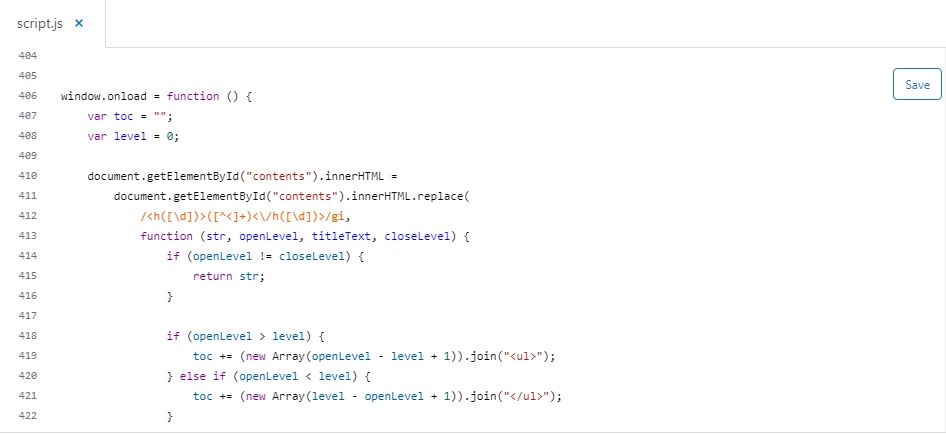
Step 1: Copy the below script code and paste it at the bottom into your script.js file.

window.onload = function () {
var toc = "";
var level = 0;

document.getElementById("contents").innerHTML =
document.getElementById("contents").innerHTML.replace(
/<h([\d])>([^<]+)<\/h([\d])>/gi,
function (str, openLevel, titleText, closeLevel) {
if (openLevel != closeLevel) {
return str;
}

if (openLevel > level) {
toc += (new Array(openLevel - level + 1)).join("<ul>");
} else if (openLevel < level) {
toc += (new Array(level - openLevel + 1)).join("</ul>");
}

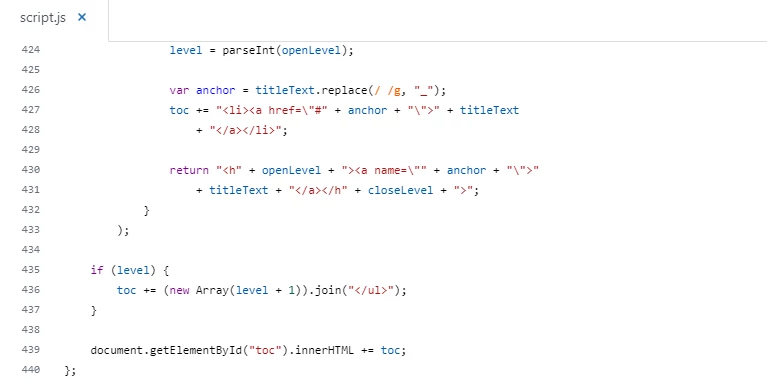
level = parseInt(openLevel);

var anchor = titleText.replace(/ /g, "_");
toc += "<li><a href=\"#" + anchor + "\">" + titleText
+ "</a></li>";

return "<h" + openLevel + "><a name=\"" + anchor + "\">"
+ titleText + "</a></h" + closeLevel + ">";
}
);

if (level) {
toc += (new Array(level + 1)).join("</ul>");
}

document.getElementById("toc").innerHTML += toc;
};


Screenshot for the same:


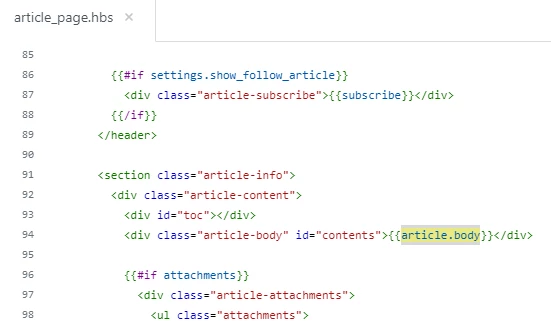
Step 2: Add the id into the article body on article_page.hbs file.

<div class="article-body" id="contents">{{article.body}}</div>

Here I added id="contents" only


Screenshot for the same:


If any confusion, do let me know :)

Thanks


Stephen23
  • December 21, 2021

Hi, perfect timing to see this discussion as I'm looking for ToC info.

The above seems to relate to adding a ToC to a single article. However, we'd prefer to add it in one place so that all articles in a brand can use it.

We used to have a brand that contained a ToC. I recall my manager (no longer with my company) working inside a screen with black background and characters of different colors.

Can someone point us in the right direction to implement a ToC at the brand level?

Thanks,

Stephen


  • Author
  • December 22, 2021

Hi all, 
thanks so much for the quick help!
As this is no configuration topic I forwarded it to our development team. 

Thanks, 
Happy Holidays!

Kai


Stephen23
  • December 22, 2021

Thanks, Kai. Is there a ticket# for the forwarded issue? Happy Holidays.


  • Author
  • December 23, 2021

@stephen23: Thanks! This will be a ticket in our internal organization first, not a ticket with Zendesk directly - my assumption is, that our internal ZD development team can solve this. 

Happy Holidays and Happy New Year!


Stephen23
  • December 23, 2021

How will I be informed about this ticket? Is there an ETA? Thanks and Happy Holidays.


tiktok
  • December 27, 2021

Hey all,

 Thank you so much for your great contribution in the post. You might check the below post for more confirmation and good results:

https://support.zendesk.com/hc/en-us/articles/4408842914714-Help-center-CSS-cookbook-tiktokdownloaders

Keep visiting for more information.

 Thanks


Rae13
  • December 27, 2021

The above seems to relate to adding a ToC to a single article. However, we'd prefer to add it in one place so that all articles in a brand can use it.

@stephen23 The solution @ifra provided is not for a single article but an edit to the article template which does allow you to apply the change brand-wide to all articles. This is done under customizing the theme and does require a bit of coding knowledge. Your previous manager likely edited these files in a local code editor. Loads more info on this process can be found here.

I did however notice thanks to your screencap @ifra one small step was left off I needed to modify my article_page.hbs file to also include the line:

<div id="toc"></div>

Before the line modified in step 2 (<div class="article-body" id="contents">{{article.body}}</div>)

Thanks for the helpful solution when we switched to the new theme our previous TOC did not function as it had previously and this got me close, now working on styling the list this script outputs.!


Stephen23
  • December 27, 2021

Rae - 

Thank you so much. That screen (at a quick glance) looks familiar per what I recall my manager doing. I'll have to take a deeper look after the holidays. Except to ask - what language is the above code written in?

Happy New Year.


Rae13
  • January 4, 2022

@stephen23

Happy new year to you as well. Glad I could help the theme templates are primarily just HTML with a little Curlybraces explained here in the article I linked. https://support.zendesk.com/hc/en-us/articles/4408839332250-Customizing-your-help-center-theme#topic_h5c_k4w_n3.

I'm a front-end web developer so I edit my theme files locally and use Github to version the theme but that may be overly involved for this single addition. If you follow @ifra instructions you can do it all in your browser.


Stephen23
  • January 4, 2022

Thank you for the above. But, our priorities have changes in the new year, so for now I've been told to back-burner this. Apologies for taking this much of your time.


Thank you for your code!
I'm looking for possibility to hide TOC if article has no headings or just one. How can I set this up? 


Ifra
  • February 8, 2022

@Jakub Kręcisz, you can do this, just follow the steps in this article:

https://support.zendesk.com/hc/en-us/community/posts/4408867942298-Tip-How-to-make-a-Table-Of-Contents-TOC-For-Article-Template


Here, the TOC would be shown when your article has headings else not.


Thanks