
"See all [x] articles" button class issue | Community
Skip to main content

"See all [x] articles" button class issue

  • July 27, 2021
  • 5 replies
  • 0 views

I hope someone can help me to resolve the issue. On Category page we have issue with "see all articles" button. It's configured to show only 3 articles on page, so everything above 3 is under "Show all"

Now, the problem is with button CSS.
This is what we have in category_page.hbs code:

{{#if more_articles}}
<a style="margin-bottom: 20px;" href="{{url}}" class="btn btn--primary see-all-articles">
{{t 'show_all_articles' count=article_count}}
</a>
{{/if}}

When you open category page, this is what you get:
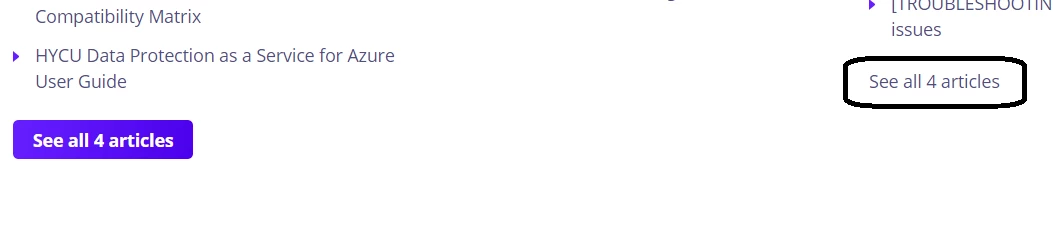
One button is purple and another is not. Using "Inspect" option on browser, purple button has class="btn btn--primary see-all-articles"

While the another has class="see-all-articles"

Does anyone knows why this is happening and how to resolve it?

Thanks!

This topic has been closed for replies.

5 replies

Ifra
  • July 27, 2021

Hi, 

If you share the category_page.hbs file code here so I would be able to figure out. Because I tried the same and don't get any issue, I have same classes in both buttons. You can share the public URL of your theme here.

See the below screenshots:


Do you have subsections code on category page? 


Or

Another way is, go to the stylesheet and find the purple button code.

remove the extra classes just leave the class  'see-all-articles'.

When you have done, test well the button on other pages.

If any bug, let me know.

Thanks


Pulkit12
  • July 28, 2021

Hi Nikola Pejak

Please add the below code at the bottom of your style.css file
.see-all-articles {
background: transparent !important;
color:#000000;
}

Let me know if it solves your issue

Thanks
Pulkit


  • Author
  • July 29, 2021

Hi Ifra Saqlain
Thank you on your comment. We don't use subsections as we have only professional licenses.

Here is the code of category_page.hbs

<div class="container category-page">
<div class="container-inner">
<div class="row clearfix">
<div class="column column--sm-8">
{{breadcrumbs}}
</div>
</div>

<div class="page-header page-header--center" id="main-content">
<h1>{{category.name}}</h1>
{{#if category.description}}
<p class="page-description">{{category.description}}</p>
{{/if}}
</div>

{{#if sections}}
<div class="row section-tree clearfix" >
{{#each sections}}
<section class="column column--sm-6 column--md-4 section">
<h3 class="section__title">
<a class="section__title-link" href="{{url}}">{{name}}</a>
</h3>
<ul class="article-list">
{{#each sections}}
<li
class="article-list-item ">
<a class="article-list-item__link" href="{{url}}">{{name}}</a>
</li>
{{/each}}
{{#each articles}}
<li class="article-list-item {{#if promoted}}article-list-item--is-promoted{{/if}}" >
{{#if promoted}}
<span class="fas fa-star" title="{{t 'promoted'}}"></span>
{{/if}}
<a class="article-list-item__link" href="{{url}}">{{title}}</a>
</li>
{{/each}}
</ul>
{{#if more_articles}}
<a style="margin-bottom: 20px;" href="{{url}}" class="btn btn--primary see-all-articles">
{{t 'show_all_articles' count=article_count}}
</a>
{{/if}}
</section>
{{/each}}
</div>
{{else}}
<div class="column column--xs-12">
<p>
<i><a href="{{category.url}}">{{t 'empty'}}</a></i>
</p>
</div>
{{/if}}
</div>
</div>


Here you can see example without purple buttons:

https://support.hycu.com/hc/en-us/categories/360002422599-HYCU-Data-Protection-as-a-Service-for-Azure

Here are purple buttons - which is what we want!

https://support.hycu.com/hc/en-us/categories/115000458185-HYCU-Data-Protection-for-Enterprise-Clouds

And third example, we don't see "see all articles" button even if "product documentation" section has more then 3 articles

https://support.hycu.com/hc/en-us/categories/360000503559-HYCU-Data-Protection-as-a-Service-for-Google-Cloud


Ifra
  • July 29, 2021

Hi, copy the below code and paste at your stylesheet at the end/bottom;

.section-tree .see-all-articles{
padding: 6px calc(12px + 12px / 2);
text-align: center;
cursor: pointer;
border: 0;
background: linear-gradient(104deg, rgba(102, 31, 255, 1), #4a00eb );
color: #fff;
border-color: rgba(102, 31, 255, 1);
border-radius: 5px;
display: inline-block;
font-size: 16px;
font-weight: 700;
line-height: 1.5;
user-select: none;
transition: all 0.3s ease;
touch-action: manipulation;
text-decoration: none;
}

.section-tree .see-all-articles:hover, .section-tree .see-all-articles:focus,.section-tree .see-all-articles:active {
background: linear-gradient( 104deg, #4a00eb, #4200d2 );
border-color: #4700e1;
}


Screenshot for the same:


I tested by adding in your CSS file at the bottom and the result is:


Test well if any issue let me know.

Thanks


Ifra
  • July 29, 2021

The third one is,

And third example, we don't see "see all articles" button even if "product documentation" section has more then 3 articles

https://support.hycu.com/hc/en-us/categories/360000503559-HYCU-Data-Protection-as-a-Service-for-Google-Cloud


It's because Zendesk provide this button after 6 articles on the category page and you have only 5 articles. Create more than 6 article and test if any issue at that moment let me know.

Another way is, you can remove the condition from the button.

{{#if more_articles}}


{{/if}}


Here  I have removed the condition from  the button now you can test if it's working for your requirement.