Need help with a custom button | Community
Skip to main content

Need help with a custom button

  • September 23, 2022
  • 3 replies
  • 3 views

Ray13

Hello, I am using the Copenhagen theme and would like some help with an issue I can't seem to solve. 

I have attached a screenshot to help others understand what I would like done. I'm trying to get the created "submit a request" button to look and function exactly like the "knowledge library" one. Ideally the KL button will by cut in half and the request button will be sized up to the same height and width. How can I make that happen?

3 replies

Ray13
  • Author
  • September 23, 2022

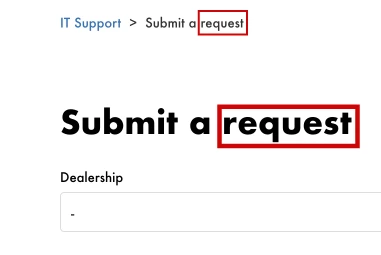
Another issue I am having is how to change the following text boxed in red from "request" to "ticket"?

This is on the new request page.


Ifra
  • September 27, 2022

Hey Ray Renteria, answer of your query:

Another issue I am having is how to change the following text boxed in red from "request" to "ticket"?


Add code to your script.js file at the bottom.

$(document).ready(function() {
  if (window.location.href.indexOf("/requests/new") > -1) {
   $('.breadcrumbs li:contains(request)').text("Submit a ticket");
    $('h1:contains(request)').text("Submit a ticket");
  }
});


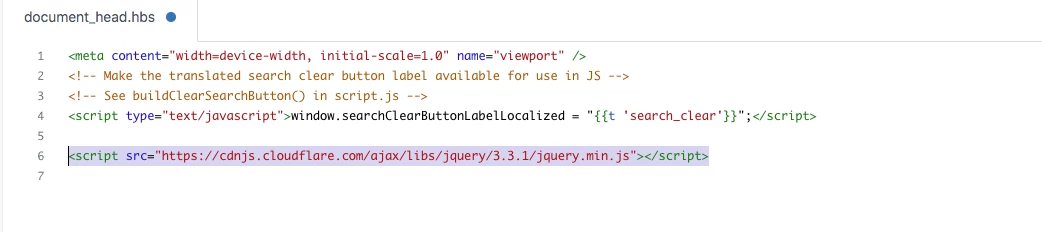
Add jquery CDN to your document_head.hbs file.

<script src="https://cdnjs.cloudflare.com/ajax/libs/jquery/3.3.1/jquery.min.js"></script>

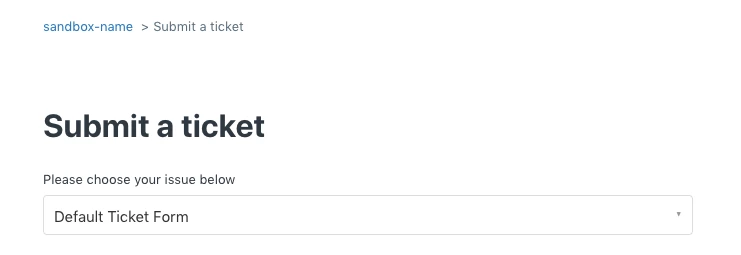
Screenshot for the same:


Output:


Thanks

Team


Ifra
  • September 27, 2022

Share your HC URL here to solve your first query.