need help making the first column of the Help Center table to be sticky | Community
Skip to main content

need help making the first column of the Help Center table to be sticky

  • June 27, 2021
  • 1 reply
  • 0 views

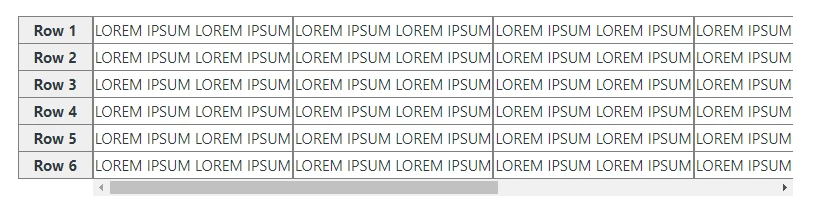
I was working on my website  Minecraft, and I have changed the formatting of my tables for the Help Center - but now I need help making the first column of the table to be sticky as I scroll left and right with the mouse. 

Any ideas? 

How can i fix this?

All googled ideas don't seem to work in Zendesk... something weird with the section that the article is in....

Thanks

This topic has been closed for replies.

1 reply

Ifra
  • June 27, 2021

Hi, try this


1). Add the HTML of the table in the article source or wherever you want to show the table.

<div class="sticky-table-wrapper">
<div class="sticky">
<table>
<tbody>
<tr>
<th class="headcol">1</th>
<td class="long">LOREM IPSUM LOREM IPSUM</td>
</tr>
<tr>
<th class="headcol">2</th>
<td class="long">LOREM IPSUM LOREM IPSUM</td>
</tr>
<tr>
<th class="headcol">3</th>
<td class="long">LOREM IPSUM LOREM IPSUM</td>
</tr>
<tr>
<th class="headcol">4</th>
<td class="long">LOREM IPSUM LOREM IPSUM</td>
</tr>
<tr>
<th class="headcol">5</th>
<td class="long">LOREM IPSUM LOREM IPSUM</td>
</tr>
<tr>
<th class="headcol">6</th>
<td class="long">LOREM IPSUM LOREM IPSUM</td>
</tr>
</tbody>
</table>
</div>
</div>


2). Add the CSS at the stylesheet.

table {
border-collapse: separate;
border-spacing: 0;
border-top: 1px solid grey;
}

td, th {
margin: 0;
border: 1px solid grey;
white-space: nowrap;
border-top-width: 0px;
}
.sticky-table-wrapper{
position:relative;

}
div.sticky {
max-width: 100%;
overflow-x: scroll;
margin-left: 5em;
overflow-y: visible;
padding: 0;
}
@media(min-width:768px){
div.sticky {
width: 700px;
}
}
.headcol {
background: #eee;
position: absolute;
width: 5em;
left: 0;
top: auto;
border-top-width: 1px;
/*only relevant for first row*/
margin-top: -1px;
/*compensate for top border*/
}

.headcol:before {
content: 'Row ';
}


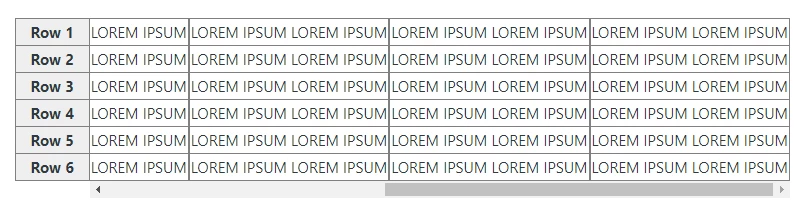
3). Output is -


Now you have an idea of source, you can embed the code in your table as per your requirement.


Thanks