Moving recently viewed and related article section to side-by-side columns on the home page. | Community
Skip to main content

Moving recently viewed and related article section to side-by-side columns on the home page.

  • June 5, 2024
  • 3 replies
  • 0 views

Ral

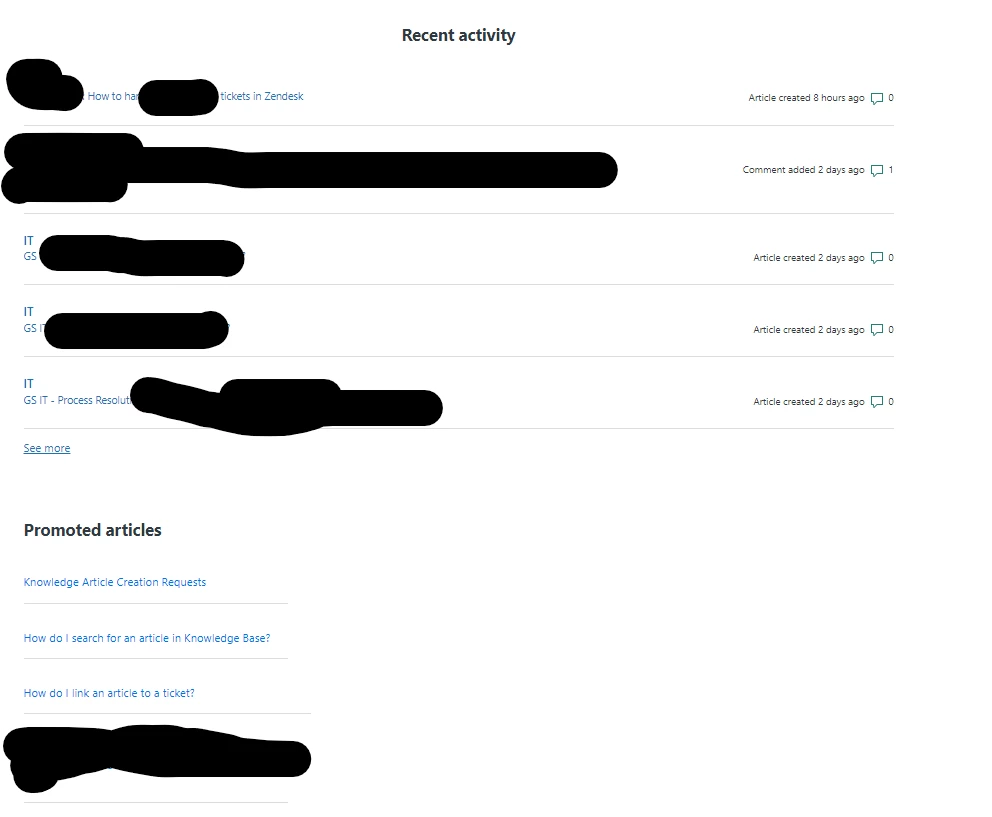
Is it possible to move the recently viewed and related article section to side-by-side columns on the home page and show only the links? I am trying to make our home page simpler and less space-consuming.

 

3 replies

Pulkit12
  • June 7, 2024

Hi  Ral Risos,
 

First, you need to wrap the recently viewed and related article section inside a parent “div” and give that parent div a class I am assuming the following class “related-home-wrapper”, then add the following CSS at the bottom of the style.css file to make the recently viewed and related article section side by side.


.related-home-wrapper {

  display: flex;

  justified-content: space-between;

 flex-wrap: wrap;

}


.recent-activity-item-link,

.recent-activity-item-meta {

   display: none;

}


If it's not possible to resolve the issue, please share the URL of your help center homepage so I can provide a more tailored solution.


Thank You 

Pulkit

Team Diziana


Ral
  • Author
  • June 13, 2024

Hello, I wasn't able to edit it out like I wanted it to be. This is the current setup since we have the knowledge base live, and we cannot turn it off for our employees at the moment. What I'm trying to do is to put them side by side.


<h1 class="visibility-hidden">{{ help_center.name }}</h1>

<section id="main-content" class="section hero">
 <div class="hero-inner">
   <h2 class="visibility-hidden">{{ t 'search' }}</h2>
   <svg xmlns="http://www.w3.org/2000/svg" width="12" height="12" focusable="false" viewBox="0 0 12 12" class="search-icon" aria-hidden="true">
     <circle cx="4.5" cy="4.5" r="4" fill="none" stroke="currentColor"/>
     <path stroke="currentColor" stroke-linecap="round" d="M11 11L7.5 7.5"/>
   </svg>
   {{search submit=false instant=settings.instant_search class='search search-full'}}
 </div>
</section>

<div class="container">
  <section class="section home-section activity">
   {{#if settings.show_recent_activity}}
     {{recent_activity}}
   {{/if}}
 </section>
 <section class="section top-articles">
   <div class="row">
     <div class="column">
       {{#if promoted_articles}}
         <section class="articles">
           <h2>{{t 'promoted_articles'}}</h2>
           <ul class="article-list promoted-articles">
             {{#each promoted_articles}}
               <li class="promoted-articles-item">
                 <a href="{{url}}">
                   {{title}}
                 </a>
               </li>
             {{/each}}
           </ul>
         </section>
       {{/if}}
     </div>
   </div>
 </section>

 <section class="section knowledge-base">
   <h2 class="visibility-hidden">{{ t 'categories' }}</h2>
   <section class="categories blocks">
     <ul class="blocks-list">
       {{#each categories}}
         {{#if ../has_multiple_categories}}
           <li class="blocks-item">
             <a href='{{url}}' class="blocks-item-link">
               <span class="blocks-item-title">{{name}}</span>
               <span class="blocks-item-description">{{excerpt description}}</span>
             </a>
           </li>
         {{else}}
           {{#each sections}}
             <li class="blocks-item">
               <a href='{{url}}' class="blocks-item-link">
                 <span class="blocks-item-title">
                   {{name}}
                 </span>
                 <span class="blocks-item-description">{{excerpt description}}</span>
               </a>
             </li>
           {{/each}}
         {{/if}}
       {{/each}}
     </ul>
     {{pagination}}
   </section>
 </section>

  {{#if help_center.community_enabled}}
   <section class="section home-section community">
     <h2>{{t 'community'}}</h2>
     {{#link 'community' class='community-link'}}
       {{t ''}}Join the best place for all Thrashers to connect, share knowledge, and get inspired!
     {{/link}}

     <div class="community-image"></div>
   </section>
 {{/if}}

     
</div>


Ral
  • Author
  • July 10, 2024

Hello @pulkit12 ,
 

I posted my code here for you to look over.  In this post, we're trying to achieve this (without the container boxes).