
Move the CC field in Help Center | Community
Skip to main content

Move the CC field in Help Center

  • July 14, 2021
  • 10 replies
  • 0 views

Lefteris

Hello all,

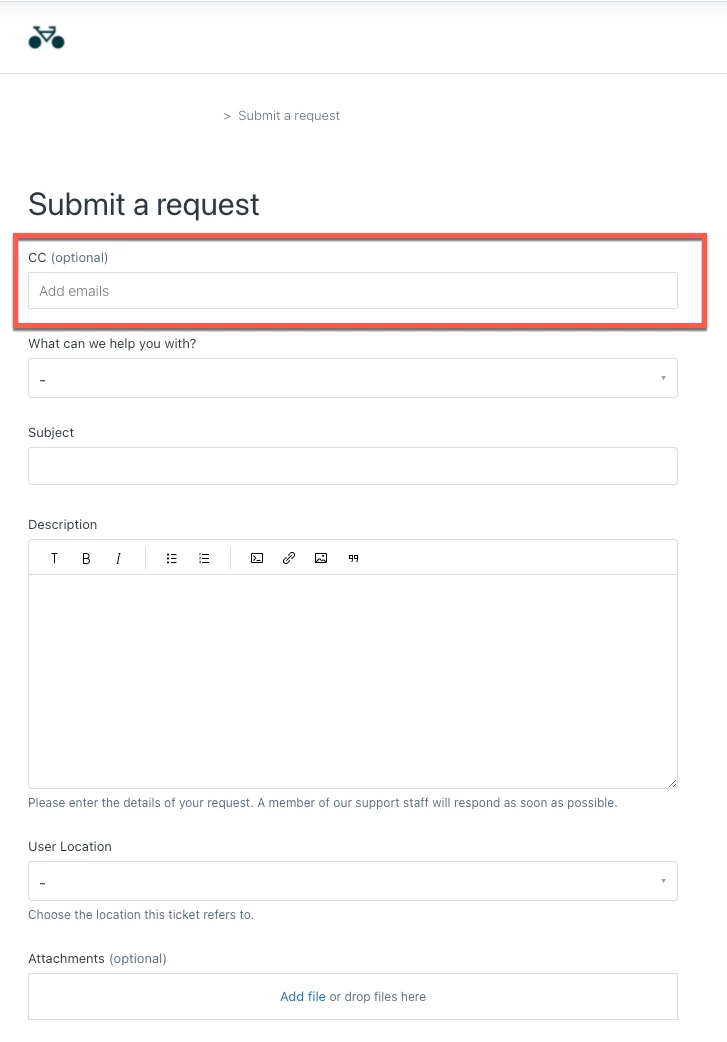
Is there a simple way to move the default CC field in a Zendesk ticket form to another location (e.g. at the bottom of the form beneath all the other ticket fields)? Right now and since we enabled the CC field, it's sitting at the top of each form and I can't see it as a separate ticket field in Support so that I may move it in my ticket form.
10 replies

Trapta
  • July 14, 2021

Hi @Lefteris Apostolakis

Try putting the below code at the bottom of your style.css file

#new_request {
display: flex;
width: 100%;
flex-direction: column;
}

.form-field ~ .form-field {order: 0;}

/* Replace FIELDID with your custom ID (ex: if your field id is 'request_custom_fields_1500007306061_label' then, replace FIELDID with 1500007306061 ) */
.form footer,
.form-field.request_custom_fields_FIELDID {
order: 1;
}

Thanks


Lefteris
  • Author
  • July 14, 2021

Thanks for the comment @Trapta. The issue is that this default Zendesk CC field does not appear in the list of ticket fields in Support, therefore I don't know its id. Do you perhaps know of a way to find the id of this field?


Trapta
  • July 14, 2021

@Lefteris Apostolakis

You can always do inspect the element to get the id of the element. Take a look at this link to know how to do so: https://www.browserstack.com/guide/inspect-element-in-chrome

Thanks


Lefteris
  • Author
  • August 12, 2021

Thanks so much for the tip Trapta. I managed to implement this into out Zendesk portal and it worked like a charm. Thanks a lot again!


Mikael16
  • October 13, 2021

Hi,

tried to follow the instructions above, but there is no field id visible for the CC-field.


@lefteris , are you willing to share how you did it ?


Regards

Mikael


  • November 2, 2021

Hey @mikael16, not sure if you found the answer yet, hopefully the following helps.

I figured that the field's name is `request_cc_emails` 

I used the following CSS, which work pretty good:

/** Everything else after subject and cc and before footer **/
.form-field ~ .form-field {order: 5;}

/** Form Footer at the very bottom **/
form footer {
order:10;
}

/** Set Subject as the first field **/
div.form-field.request_subject {
order: 1;
margin-bottom:5px;
}

/** Set CC as the second field **/
div.form-field.request_cc_emails {
order: 2;
}

raphael12
  • December 14, 2022

@amit20 Thank you!!


Mikael16
  • February 2, 2023

OK, thank you for the feedback. I will test it


  • October 3, 2023

Hello,

Any update on this topic because it seems like @amit20 solution doesn't work for me.

Thanks !


  • January 16, 2025

@lefteris What did you do to make it work? Could you post the code please?