Move recently viewed and related article sections | Community
Skip to main content

Move recently viewed and related article sections

  • August 16, 2017
  • 11 replies
  • 0 views

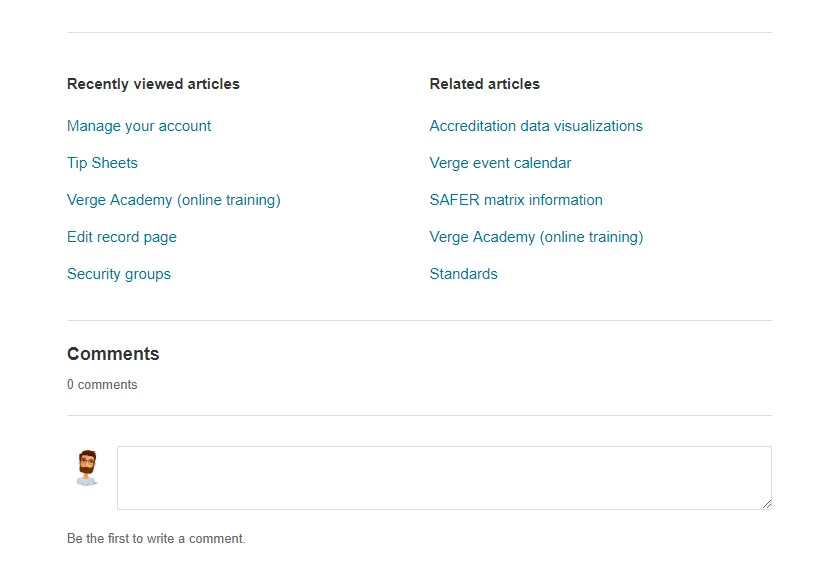
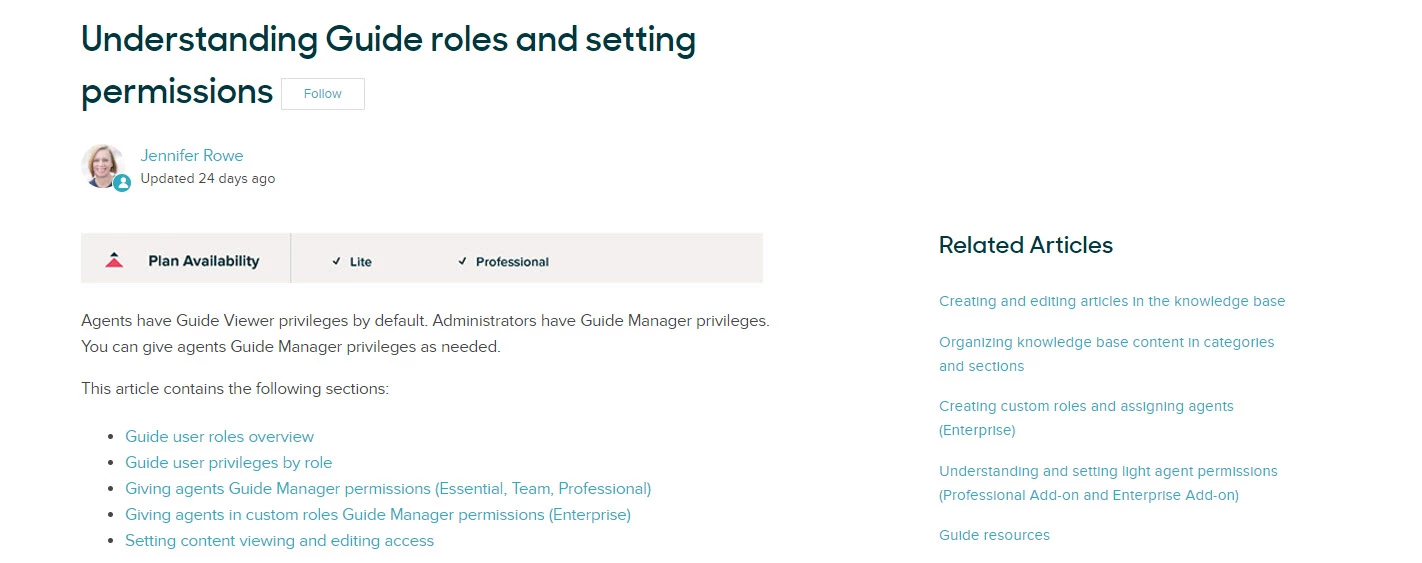
Is it possible to move the recently viewed and related article section to the right hand side of the page? Similar to how Zendesk has their articles formatted?  Thanks!

Current location
Desired location
This topic has been closed for replies.

11 replies

Vladan
  • August 16, 2017

Hi Mike! Yes, it's possible. If you are using Copenhagen theme, remove the whole code from the article page, and paste this code on the same place:

<div class="container-divider"></div>
<div class="container">
<nav class="sub-nav">
{{breadcrumbs}}
{{search scoped=true submit=false}}
</nav>

<div class="article-container" id="article-container">
<section class="article-sidebar">
<section class="section-articles collapsible-sidebar">
<h3 class="collapsible-sidebar-title sidenav-title">{{t 'articles_in_section'}}</h3>
<ul>
{{#each section.articles}}
<li>
<a href="{{url}}" class="sidenav-item {{#is id ../article.id}}current-article{{/is}}">{{title}}</a>
</li>
{{/each}}
</ul>
{{#if section.more_articles}}
<a href="{{section.url}}" class="article-sidebar-item">{{t 'see_more'}}</a>
{{/if}}
</section>
</section>

<article class="article">
<header class="article-header">
<h1 title="{{article.title}}" class="article-title">
{{article.title}}
{{#if article.internal}}
<span class="icon-lock" title="{{t 'internal'}}"></span>
{{/if}}
</h1>

<div class="article-author">
<div class="avatar article-avatar">
{{#if article.author.agent}}
<span class="icon-agent"></span>
{{/if}}
<img src="{{article.author.avatar_url}}" alt="Avatar" class="user-avatar"/>
</div>
<div class="article-meta">
{{#link 'user_profile' id=article.author.id}}
{{article.author.name}}
{{/link}}

<ul class="meta-group">
{{#is article.created_at article.updated_at}}
<li class="meta-data">{{date article.created_at timeago=true}}</li>
{{else}}
<li class="meta-data">{{date article.updated_at timeago=true}}</li>
<li class="meta-data">{{t 'updated'}}</li>
{{/is}}
</ul>
</div>
</div>
{{subscribe}}
</header>

<section class="article-info">
<div class="article-content">
<div class="article-body">{{article.body}}</div>

<div class="article-attachments">
<ul class="attachments">
{{#each attachments}}
<li class="attachment-item">
<a href="{{url}}" target="_blank">{{name}}</a>
<div class="attachment-meta meta-group">
<span class="attachment-meta-item meta-data">{{size}}</span>
<a href="{{url}}" target="_blank" class="attachment-meta-item meta-data">Download</a>
</div>
</li>
{{/each}}
</ul>
</div>
</div>
</section>

<footer>
<div class="article-footer">
<div class="article-share">{{share}}</div>
{{#if comments}}
<a href="#article-comments" class="article-comment-count">
<span class="icon-comments"></span>
{{article.comment_count}}
</a>
{{/if}}
</div>
{{#with article}}
<div class="article-votes">
<span class="article-votes-question">{{t 'was_this_article_helpful'}}</span>
<div class="article-votes-controls" role='radiogroup'>
{{vote 'up' role='radio' class='button article-vote article-vote-up'}}
{{vote 'down' role='radio' class='button article-vote article-vote-down'}}
</div>
<small class="article-votes-count">
{{vote 'label' class='article-vote-label'}}
</small>
</div>
{{/with}}

<div class="article-more-questions">
{{request_callout}}
</div>
<div class="article-return-to-top">
<a href="#article-container">{{t 'return_to_top'}}<span class="icon-arrow-up"></span></a>
</div>
</footer>


<div class="article-comments" id="article-comments">
<section class="comments">
<header class="comment-overview">
<h3 class="comment-heading">
{{t 'comments'}}
</h3>
<p class="comment-callout">{{t 'comments_count' count=article.comment_count}}</p>
{{#if comments}}
<div class="dropdown comment-sorter">
<a class="dropdown-toggle">{{t 'sort_by'}}</a>
<span class="dropdown-menu" role="menu">
{{#each comment_sorters}}
<a aria-selected="{{selected}}" href="{{url}}" role="menuitem">{{name}}</a>
{{/each}}
</span>
</div>
{{/if}}
</header>

<ul id="comments" class="comment-list">
{{#each comments}}
<li id="{{anchor}}" class="comment">
<div class="comment-wrapper">
<div class="comment-info">
<div class="comment-author">
<div class="avatar comment-avatar">
{{#if author.agent}}
<span class="icon-agent"></span>
{{/if}}
<img src="{{author.avatar_url}}" alt="Avatar" class="user-avatar"/>
</div>
<div class="comment-meta">
<span title="{{author.name}}">
{{#link 'user_profile' id=author.id}}
{{author.name}}
{{/link}}
</span>

<ul class="meta-group">
{{#if editor}}
<li class="meta-data">{{date edited_at timeago=true}}</li>
<li class="meta-data">{{t 'edited'}}</li>
{{else}}
<li class="meta-data">{{date created_at timeago=true}}</li>
{{/if}}
</ul>
</div>
<div class="comment-labels">
{{#with ticket}}
<a href="{{url}}" target="_zendesk_lotus" class="status-label escalation-badge">
{{t 'request'}}{{id}}
</a>
{{/with}}
{{#if pending}}
<span class="comment-pending status-label status-label-pending">{{t 'pending_approval'}}</span>
{{/if}}
</div>
</div>

<section class="comment-body">{{body}}</section>
</div>

<div class="comment-actions-container">
<div class="comment-vote vote" role='radiogroup'>
{{vote 'up' role='radio' class='vote-up' selected_class='vote-voted'}}
{{vote 'sum' class='vote-sum'}}
{{vote 'down' role='radio' class='vote-down' selected_class='vote-voted'}}
</div>
<div class="comment-actions actions">
{{actions}}
</div>
</div>
</div>
</li>
{{/each}}
</ul>

{{pagination}}

{{#form 'comment' class='comment-form'}}
<div class="avatar comment-avatar">
{{user_avatar class='user-avatar'}}
</div>
<div class="comment-container">
{{wysiwyg 'body'}}
<div class="comment-form-controls">
{{input type='submit'}}
</div>
</div>
{{/form}}

<p class="comment-callout">{{comment_callout}}</p>
</section>
</div>
</article>
<section class="article-relatives">
{{recent_articles}}
{{related_articles}}
</section>
</div>
</div>

and add the following code at the end of you CSS file:

section.article-relatives {
flex-direction: column;
}

.article-relatives > * {
flex: 0;
}

That should works (if you are on Copenhagen theme)! Let us know! :)


Vladan
  • August 16, 2017

Very glad to head that! Thanks for the feedback and enjoy your updated article page! ;)


  • August 16, 2017

Fantastic, Vlad! You're amazing. :D


  • August 23, 2017

This is AWESOME! How would I swap the Recently Viewed and Related Articles so that Related Articles appears on top?


Trapta
  • August 23, 2017

@Thressa Nichols,

By simply reversing the order of related_articles and recent_articles components.

<section class="article-relatives">
{{related_articles}}
{{recent_articles}}
</section>


Team Diziana


Nicole17
  • August 23, 2017

Welcome to the Zendesk Community, Thressa! 

Thanks for the answer, Trapta!


  • August 29, 2018

Hey Vlad, is there a way to implement this for a TOC? I see you on TOC articles as well, but not implemented well. 


Vladan
  • September 11, 2018

Hey Robert, I"m sorry for delayed response. 
TOC is a quite custom thing and it depends from case to case. 
Have you already implemented TOC successfully or...?
Also, probably will be the easiest way if you could share a link to your current help center.


  • November 22, 2018

Thank you for this information!!!

Super grateful!!


  • May 21, 2019

This is great! Is there a way to get the font changed for this content?


Vladan
  • May 29, 2019

Hey Cody, sorry for the slow reply, what do you mean by changing the font? If you mean on stuff like Font family, color, weight, size, etc.. all of these can be easily changed with a little CSS snippet.
