Icon before article title | Community
Skip to main content

Icon before article title

  • February 26, 2020
  • 30 replies
  • 0 views

Show first post

30 replies

Ifra
  • June 22, 2023

Hey Ashley Boose,

Remove previous line of code and use this code snippet:

var divs= document.getElementsByClassName('article-label');
 for (var i = 0, len = divs.length; i < len; ++i) {
   if(divs[i].innerHTML.indexOf("gate_access") !== -1) {
    divs[i].innerHTML = '<svg xmlns="http://www.w3.org/2000/svg" width="16" height="16" focusable="false" viewBox="0 0 16 16" class="icon-lock" ><rect width="12" height="9" x="2" y="7" fill="currentColor" rx="1" ry="1"/><path fill="none" stroke="currentColor" d="M4.5 7.5V4a3.5 3.5 0 017 0v3.5"/></svg>';
    } else {
       divs[i].style.display = "none";
    }
}

Ashley18
  • June 26, 2023

Ifra, you're amazing! That worked perfectly. I appreciate you taking the time to help me with this so much--you have no idea. Thank you, thank you!


Ifra
  • June 27, 2023

Glad to hear that it worked for you!


Marsy11
  • July 24, 2023

Hello, I am trying to add icons to sections before the title name.  Do you happen to have any suggestions on coding for this?  I tried a few variations that are not working for me.


Ifra
  • July 25, 2023

Hi Marsy

There is easy and simple way,

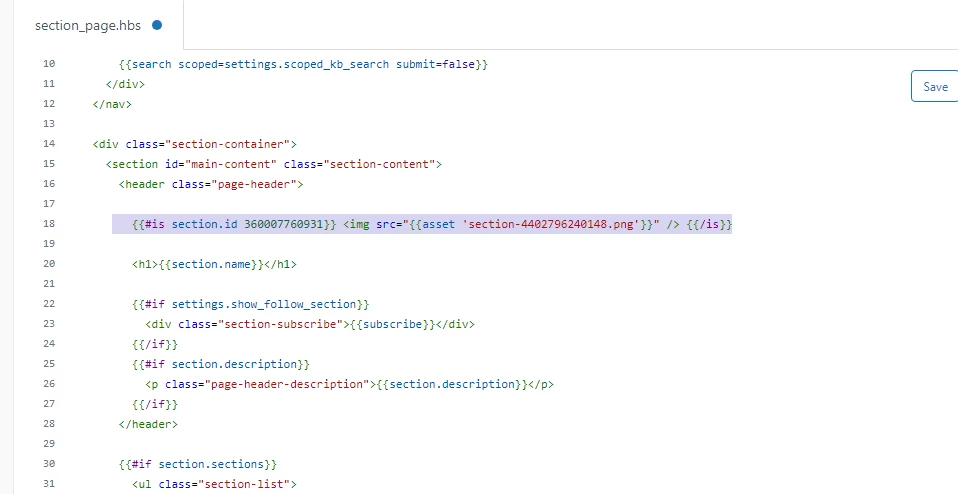
Go to the section_page.hbs file.

Check the section id.

Add icon on section page like below:

For font image

{{#is section.id 123456789}} <img src="{{asset 'updatebutton50x21.png'}} "/>{{/is}}


Screenshot for the same:


For font icon

{{#is section.id 123456789}} <i class="fas-fa-pencil"></i> {{/is}}


123456789 -- Section ID
updatebutton50x21.png -- Image name
<i class="fas-fa-pencil"></i> -- Icon name


If any confusion let me know :)

Thanks