How to change the title? | Community
Skip to main content

How to change the title?

  • June 2, 2016
  • 12 replies
  • 0 views

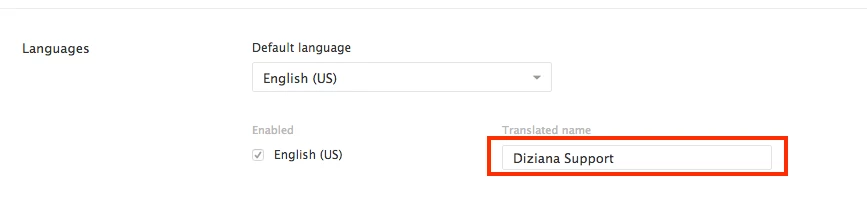
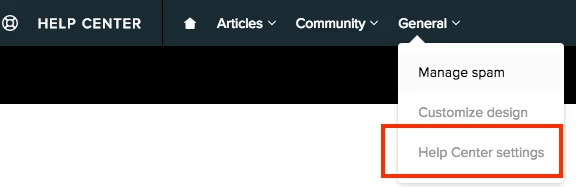
I set up our company name in the Zendesk name when I started the trial version. I subsequently purchase the lowest level agent. Now our Help Center is titled with the right logo but then it has our company name instead of Success Center. I already changed the name in Admin-Account-Branding but this is not where it's being pulled from because the title still hasn't changed. What am I missing?

This topic has been closed for replies.

12 replies

  • June 3, 2016

Hi Anneliese,

I think you can the change the name from the help center settings. 


I think that might work.

Let me know if you face any problem.


Cheers,

Diziana


  • Author
  • June 3, 2016

Brilliant! Thank you Diziana. That fixed it.


  • June 7, 2016

Thanks, Diziana! Another brilliant answer. :)


  • November 23, 2017

We want to have different title and breadcrumbs, but they seem to be connected. How can we fix that or is there a workaround?


Trapta
  • November 23, 2017

Hi @Karsten, yes they are connected but you can change by using the code provided below. Simply copy and paste the code at the bottom of your JS code -

$(document).ready(function(){
$('ol.breadcrumbs > li').first().children().text('TEXT');
});

Replace 'TEXT' with the title you want to show in breadcrumbs.

Let me know if you face any issue.

Thanks


  • November 27, 2017

Hi @Trapta! It almost did the trick. Only issue is that it removes the hyperlink. Do you have a solution for that? 

I've added the following code:

// replace first breadcrumb in each language
$(document).ready(function(){
var currentLanguage = $('html').attr('lang').toLowerCase();
if(currentLanguage === "en-us") { $('ol.breadcrumbs > li').first().text('Support'); }
if(currentLanguage === "cs") { $('ol.breadcrumbs > li').first().text('Podpora'); }
if(currentLanguage === "da") { $('ol.breadcrumbs > li').first().text('Support'); }
if(currentLanguage === "de") { $('ol.breadcrumbs > li').first().text('Hilfe'); }
if(currentLanguage === "es") { $('ol.breadcrumbs > li').first().text('Asistencia'); }
if(currentLanguage === "fr") { $('ol.breadcrumbs > li').first().text('Aide'); }
if(currentLanguage === "it") { $('ol.breadcrumbs > li').first().text('Assistenza'); }
if(currentLanguage === "nl") { $('ol.breadcrumbs > li').first().text('Ondersteuning'); }
if(currentLanguage === "no") { $('ol.breadcrumbs > li').first().text('Support'); }
if(currentLanguage === "pl") { $('ol.breadcrumbs > li').first().text('Pomoc'); }
if(currentLanguage === "pt") { $('ol.breadcrumbs > li').first().text('Suporte'); }
if(currentLanguage === "pt-br") { $('ol.breadcrumbs > li').first().text('Suporte'); }
if(currentLanguage === "fi") { $('ol.breadcrumbs > li').first().text('Tuki'); }
if(currentLanguage === "sv") { $('ol.breadcrumbs > li').first().text('Support'); }
});

Trapta
  • November 29, 2017

@Karsten,

  I have updated the code please give it a shot and let me know how it goes for you.

Thanks


  • November 29, 2017

@Trapta,

It seems that your previous comment has disappeared.


Trapta
  • November 29, 2017

@Karsten, it is pending approval :(

Update the code from 

$('ol.breadcrumbs > li').first().text('TEXT');

to

$('ol.breadcrumbs > li').first().children().text('TEXT');

It will work for you.

Thanks


  • November 29, 2017

@Trapta,

Perfect! Worked :) Thank you very much.


Trapta
  • November 29, 2017

@Karsten, Glad it worked for you :)

A piece of advice for you, if you have dynamic content you can use dynamic content instead of repeating text in your code.

Only change you have to make is, add the code in footer template under the <script></script> tag and add DC in the code. Something like this -

<script>
$('ol.breadcrumbs > li').first().children().text(DC);
</script>

Replace DC with your dynamic content placeholder.

Now, you do not have to repeat text instead, add variants to your DC.

Thanks

Team Diziana


  • November 29, 2017

@Trapta,

Very nice to know. I was actually under the impression that dynamic content didn't work in the javascript file.

I will try that out. Thanks :)